 wapday Download Latest Pro Soccer Games
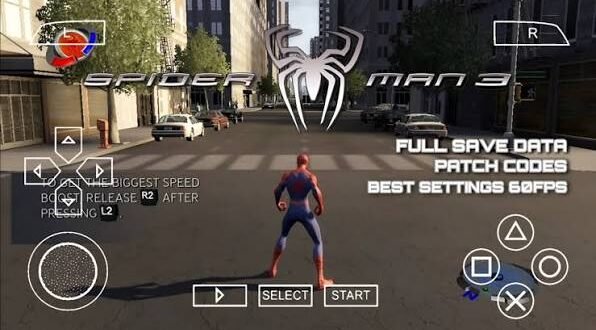
Want to swing through New York on your Android phone using Spider-Man 3 PPSSPP ISO PS2? This search term causes plenty of confusion because Spider-Man 3 appeared on multiple platforms, while PPSSPP specifically emulates PSP games.
The good news? You can still enjoy Spider-Man games through PPSSPP if you use a compatible PSP version. The important part involves knowing which version you’re actually looking for instead of downloading a random file with “PS2” and “PPSSPP” thrown into the same title.
I’ve always liked superhero games that let you move around freely rather than simply following a hallway from one fight to another. Spider-Man 3 has that classic web-swinging appeal, but the platform you choose can change the entire experience.
What Is Spider-Man 3?
Spider-Man 3 takes inspiration from the 2007 movie starring Tobey Maguire and puts Peter Parker into a larger action-adventure experience.
The game combines:
– Web-swinging
– Hand-to-hand combat
– Open-world exploration
– Story missions
– Side activities
– Character upgrades
– Superhero abilities
– Vehicle and street encounters
The game also features several villains connected to the movie and Spider-Man universe.
Remember that movie era? Before every superhero game tried to become a giant live-service project with seventeen currencies and a battle pass for Peter Parker’s shoelaces? Yeah, Spider-Man 3 comes from a much simpler gaming period.
Did Spider-Man 3 Have a PSP Version?
Yes, but it differs from the PS2 version
Spider-Man 3 received versions for several platforms, including PlayStation 2 and PlayStation Portable.
That distinction matters because the PSP version doesn’t simply represent the PS2 game in a smaller package.
Developers adapted the game for PSP hardware, so the graphics, world design, missions, and overall presentation can differ from the home-console versions.
If you search for Spider-Man 3 PSP ISO, you’re looking for the PSP version that PPSSPP can emulate.
If you search for Spider-Man 3 PS2 ISO, you’re looking for the PlayStation 2 version.
PPSSPP cannot directly run a PS2 ISO.
That’s probably the most important thing to understand before you start downloading files.
Spider-Man 3 PPSSPP vs PS2 Version
The PS2 and PSP versions share the same general Spider-Man 3 concept, but they don’t deliver identical experiences.
PS2 version
The PS2 version benefits from the console’s hardware and uses a larger presentation.
You can expect:
– Larger environments
– More detailed visuals
– Console-style controls
– Different mission presentation
– More substantial world detail
The PS2 version makes sense if you want the original home-console experience.
PSP version
The PSP version focuses on portability.
It offers:
– Portable gameplay
– Smaller environments
– PSP-specific controls
– Simplified graphics
– Shorter gameplay sessions
– Compatibility with PPSSPP
If you want to play Spider-Man 3 on Android through PPSSPP, the PSP version makes far more sense.
Can PPSSPP Run Spider-Man 3 PS2 ISO?
No.
PPSSPP stands for PlayStation Portable emulator, and it focuses on PSP games.
A PS2 ISO belongs to a different platform with different hardware architecture.
So if someone tells you to load a PS2 Spider-Man 3 ISO directly into PPSSPP, don’t expect magic.
You need a PSP-compatible game image for PPSSPP.
The basic difference
Format| Original platform| PPSSPP compatibility
PSP ISO| PlayStation Portable| Yes
PSP CSO| PlayStation Portable| Yes
PS2 ISO| PlayStation 2| No
PS2 disc image| PlayStation 2| No
This distinction saves you a lot of frustration.
Spider-Man 3 PSP Features
The PSP edition gives you a portable version of the Spider-Man 3 experience.
Web-swinging
What would Spider-Man be without web-swinging?
The ability to move around the city gives the game much of its charm.
Even on PSP, swinging around the environment can make simple travel feel more enjoyable than simply selecting a mission from a menu.
[10/4/2026 2:28 PM] Content store 4: Ever played a superhero game where walking from one mission to another felt like a punishment? Spider-Man 3 tries to avoid that problem.
Combat
Combat focuses on Spider-Man’s agility and physical abilities.
You can attack enemies, dodge attacks, use combinations, and rely on Spider-Man’s movement abilities during fights.
The combat doesn’t match the complexity of modern Spider-Man titles, but it still captures the basic superhero fantasy.
Story missions
The game follows a movie-inspired storyline while adding gameplay scenarios around Peter Parker.
You encounter enemies, complete missions, and explore different parts of the game world.
The PSP version makes some compromises because the hardware can’t provide everything the PS2 version offers.
Spider-Man 3 PPSSPP Graphics
If you expect PlayStation 5-quality graphics from a PSP emulator, we need to have a quick reality check.
Spider-Man 3 originally targeted PSP hardware from a completely different era.
However, PPSSPP can improve the visual presentation through emulator settings.
Depending on your phone, you can experiment with:
– Rendering resolution
– Texture filtering
– Texture scaling
– Anisotropic filtering
– Frame skipping
– Vulkan or OpenGL
– Performance settings
A modern Android phone can sometimes make older PSP games look much sharper than they did on the original handheld.
That doesn’t magically turn Spider-Man 3 into a modern Spider-Man Remastered game, but it can make the experience considerably cleaner.
Recommended PPSSPP Settings
Your ideal settings depend on your Android phone.
For mid-range Android phones
Try:
– Rendering resolution: 2x PSP
– Backend: Vulkan where supported
– Texture filtering: Auto
– Frameskip: Off initially
– Anisotropic filtering: Moderate
– Fast memory: Enabled if stable
– Post-processing: Optional
If the game struggles, reduce the rendering resolution before changing everything else.
For powerful phones
A modern high-end phone can experiment with higher rendering resolutions.
You can try:
– 3x or 4x rendering
– Vulkan
– Higher texture filtering
– Texture scaling
– Additional visual enhancements
But don’t chase graphics settings blindly.
If your phone already produces smooth gameplay, why create problems just to make a menu icon slightly sharper?
Spider-Man 3 PPSSPP Performance
Performance depends on your phone’s processor, GPU, RAM, emulator version, and configuration.
A modern Android device can generally handle many PSP games comfortably, but demanding titles can still behave differently from one device to another.
If you experience lag
Try these fixes:
1. Lower the rendering resolution.
2. Switch between Vulkan and OpenGL.
3. Disable expensive visual enhancements.
4. Turn off texture scaling.
5. Close background applications.
6. Keep your phone cool.
7. Test different PPSSPP versions.
Don’t assume every performance problem comes from the ISO. Your emulator settings can make a huge difference.
How Much Storage Does Spider-Man 3 Need?
The PSP version uses significantly less storage than many modern Android games.
However, the exact file size depends on the version and compression format.
You may encounter:
– ISO
– CSO
– Compressed archives
CSO files can reduce storage requirements, although compression can sometimes affect loading performance.
You should also leave additional free space for temporary extraction files and emulator data.
If your phone has very little free storage, deleting unused videos and applications can help before setting up a large game.
Spider-Man 3 ISO vs CSO
Both formats can represent PSP game data.
ISO
An ISO generally stores the disc image without the same level of compression.
Advantages include:
– Straightforward compatibility
– Easy organization
– Reliable performance
CSO
CSO compresses PSP game data.
Advantages include:
– Smaller storage footprint
– Easier file storage
– More room for other games
The best choice depends on your storage and device performance.
[10/4/2026 2:28 PM] Content store 4: If you have plenty of storage, I prefer keeping a clean ISO because it keeps things simple.
Spider-Man 3 PPSSPP Android Requirements
PPSSPP itself doesn’t require an extremely powerful phone, but individual games can vary.
For a smoother experience, look for:
– Android 64-bit support
– At least 3–4 GB RAM
– A reasonably modern processor
– A capable GPU
– Several GB of free storage
– Updated Android software
A stronger chipset gives you more room for higher rendering resolutions and visual enhancements.
Older phones can still run some PSP games, but you may need lower settings.
Spider-Man 3 PSP vs Modern Spider-Man Games
Let’s compare the old PSP experience with modern Spider-Man games.
Feature| Spider-Man 3 PSP| Modern Spider-Man
Platform| PSP / PPSSPP| PS4, PS5, PC
Graphics| Retro PSP visuals| High-end 3D
Open world| Limited| Huge
Web-swinging| Basic| Highly advanced
Combat| Simple| Deep and fluid
Storage| Relatively small| Very large
Hardware demand| Low| High
Portability| Excellent with PPSSPP| Depends on platform
Modern Spider-Man games win easily in graphics, animation, combat, and world detail.
But the PSP version has one massive advantage: simplicity.
You can pick it up, play a few missions, swing around for a while, and put your phone away.
Sometimes that’s exactly what you want.
Common Spider-Man 3 PPSSPP Problems
Black screen
A black screen can result from graphics settings, compatibility issues, or a problematic game dump.
Try changing the graphics backend and restoring default emulator settings.
Slow gameplay
Lower your rendering resolution and disable demanding enhancements.
You can also try Vulkan if your device supports it.
Audio problems
Audio issues can sometimes relate to emulator settings or device compatibility.
Testing another audio configuration may help.
Controls feel awkward
PPSSPP lets you customize the on-screen controls.
Move buttons around until you find a comfortable layout.
A Bluetooth controller can also improve the experience if your phone supports one.
Is Spider-Man 3 PPSSPP Worth Playing?
Absolutely, if you enjoy retro superhero games.
Don’t expect the technical quality of Marvel’s Spider-Man on PS5. That comparison would be hilariously unfair.
Instead, look at Spider-Man 3 PSP as a portable superhero game from the PSP era.
It offers nostalgia, straightforward gameplay, Spider-Man’s familiar abilities, and the convenience of running a PSP game through PPSSPP on compatible Android hardware.
For fans of older games, that’s enough reason to give it a look.
What About Spider-Man 3 PPSSPP ISO Downloads?
If you’re searching for Spider-Man 3 PPSSPP ISO download, remember that the game remains copyrighted.
The safest approach involves using a legally obtained copy of the PSP game and creating a compatible backup for personal use where local law permits.
Avoid suspicious websites offering modified executables, password-protected archives, “cracked” versions, or strange installers.
A PSP game shouldn’t require you to install some mysterious Windows program called DefinitelyNotAVirus.exe. 🙂
Final Thoughts
The keyword Spider-Man 3 PPSSPP ISO PS2 combines two different versions of the game, so understanding the platforms matters.
The PS2 version works with PS2 hardware or compatible PS2 emulation, while PPSSPP focuses on the PSP version. If your goal involves playing Spider-Man 3 through PPSSPP on Android, look for the legitimate PSP version rather than trying to load a PS2 ISO.
The PSP edition can’t compete with modern Spider-Man games in graphics or gameplay depth, but it offers something different: portable superhero nostalgia.
With sensible PPSSPP settings, a compatible Android phone can provide smooth gameplay and sharper visuals than the original PSP display.
So, if you’re ready to swing back into the older Spider-Man era, start with the correct PSP version, configure PPSSPP properly, and keep your expectations realistic. The web-swinging may look old-school, but Peter Parker still knows how to make an entrance.


One comment
Pingback: Tekken 7 PPSSPP ISO Highly Compressed 351 MB - wapday