wapday Download Latest Pro Soccer Games
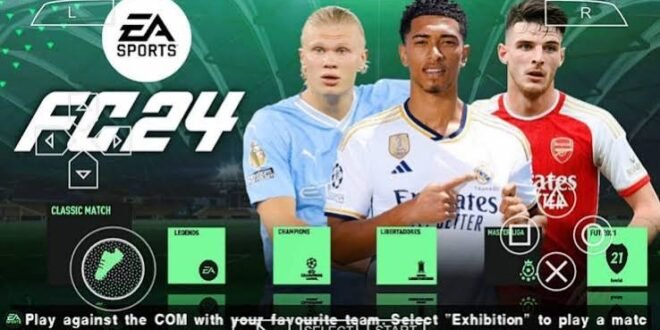
Looking for EA Sports FC 24 PPSSPP ISO for mobile and wondering what the game actually offers? If you enjoy classic PSP football games but want modern teams, updated kits, newer player faces, and a more current football atmosphere, an FC 24-style PPSSPP modification might catch your attention.
There’s one important detail before we get started: EA Sports FC 24 never received an official PSP version. The “FC 24 PPSSPP ISO” versions you find online generally refer to unofficial fan-made modifications built around older PSP football games.
That doesn’t automatically make them uninteresting. In fact, the appeal comes from combining a familiar PSP football engine with modern fan-made updates.
So, what exactly can you expect from an EA Sports FC 24 PPSSPP mobile modification? Let’s break down the gameplay, graphics, updated squads, game modes, performance, camera options, and the things you should know before trying one.
What Is EA Sports FC 24 PPSSPP?
EA Sports FC 24 PPSSPP usually describes an unofficial football modification designed to run through the PPSSPP emulator.
Instead of representing a brand-new PSP game developed by EA, the modification typically uses an existing PSP football game as its foundation.
Mod creators then update different parts of the game to create an FC 24-inspired experience.
Depending on the version, you may find:
– Updated squads
– New player transfers
– Modern club kits
– Updated player faces
– New football boots
– Updated scoreboards
– Modern menus
– Stadium texture changes
– Updated team logos
– Competition updates
The exact features depend on the modification.
Why does that matter? Because two websites can use the same “FC 24 PPSSPP” title while offering completely different versions.
EA Sports FC 24 PPSSPP Gameplay
Gameplay remains the most important part of any football game.
A beautiful menu won’t save a game that controls like a shopping trolley with one broken wheel.
An FC 24-style PPSSPP modification generally keeps the gameplay mechanics of its underlying PSP football engine while adding modern content around them.
You can expect familiar actions such as:
– Passing
– Shooting
– Crossing
– Sprinting
– Dribbling
– Tackling
– Player switching
– Heading
– Through balls
– Set pieces
The controls remain relatively straightforward, which makes the game easy to pick up if you’ve played PSP football games before.
Updated Teams and Squads
One of the biggest reasons players search for FC 24 PPSSPP updated squads involves the team database.
Mod creators can move players between clubs and update team lineups to reflect more recent football seasons.
You might find:
– Updated starting XI
– New transfers
– New squad numbers
– Updated player positions
– New formations
– Modern club rosters
– Updated national teams
However, you should check the specific update date because unofficial databases don’t automatically change when real-world transfers happen.
Why Updated Transfers Matter
Imagine starting a career with your favourite club and finding a major star playing for a team he left years ago.
That immediately breaks the illusion.
Updated transfers make older football games feel much more current, especially when you spend a lot of time in league or career-style modes.
A modern squad can change your tactics too.
A fast winger encourages wide attacks. A creative midfielder can improve possession. A powerful striker can make crossing more effective.
Suddenly, a database update affects the actual way you play.
Updated Kits and Graphics
The visual side of FC 24 PPSSPP modifications often gets the most attention.
Mod creators can replace older kits with modern designs and add updated graphics throughout the game.
Common changes include:
– Home kits
– Away kits
– Third kits
– Goalkeeper jerseys
– National-team kits
– Club logos
– Scoreboards
– Menus
– Stadium textures
– Competition graphics
These changes don’t transform the PSP hardware into a modern console, but they can make the game look considerably fresher.
[10/7/2026 2:23 AM] Content store 3: And honestly, seeing your favourite club in an updated kit can make an old game feel surprisingly new.
Player Faces and Appearances
Some FC 24 PPSSPP mods also include updated player faces.
Creators can modify textures to make players more recognisable and closer to their modern appearances.
Depending on the version, you might see changes to:
– Hairstyles
– Facial textures
– Beards
– Skin tones
– Boots
– Accessories
– Player models
The quality varies.
Some fan-made faces look excellent, while others look slightly questionable. That’s the reality of community-made modifications.
Still, a strong face pack combined with updated kits and squads can significantly improve the overall presentation.
FC 24 PPSSPP Camera
The camera can change the entire feel of a football game.
Many PSP football modifications allow players to use different camera perspectives, including wider broadcast-style views.
A wider camera can help you see more of the pitch.
You can spot:
– Wingers making runs
– Midfield passing options
– Defensive gaps
– Through-ball opportunities
– Opponent counterattacks
Why Camera Choice Matters
A close camera can make the match feel more dramatic.
A wider camera can help you play more tactically.
Which one should you use?
Try both.
Personally, I prefer a camera that gives me enough space to see developing attacks. What’s the point of having a brilliant winger if you can’t see him making the run?
Game Modes
The available game modes depend on the underlying PSP football game and the modification.
However, an FC 24 PPSSPP version may provide access to modes such as:
– Exhibition matches
– League competitions
– Cup tournaments
– Career-style gameplay
– International matches
– Training
– Multiplayer options
Exhibition Matches
Exhibition mode works perfectly when you simply want to play.
Choose your teams, set the match options, and get onto the pitch.
You don’t need to worry about season objectives or long-term squad management.
Sometimes that’s all you need.
League and Career Gameplay
League and career-style modes provide more long-term motivation.
You can manage your squad, adjust formations, rotate players, and attempt to win competitions.
Updated transfers become particularly useful here because your squad feels more current.
Offline Gameplay
One of the biggest attractions of PSP football games involves offline gameplay.
Once you’ve configured a compatible game and emulator, you can play matches without depending on a constant internet connection.
That makes FC 24-style PPSSPP modifications appealing to players who:
– Have limited mobile data
– Experience unreliable internet
– Prefer offline football
– Want quick matches
– Enjoy career-style gameplay
You can play a match on a journey, during a power outage, or whenever your internet decides to take a holiday.
EA Sports FC 24 PPSSPP Performance on Android
PPSSPP can run PSP games on many Android devices, but performance depends on your hardware and emulator settings.
Important factors include:
– Processor
– GPU
– RAM
– Android version
– PPSSPP version
– Internal resolution
– Texture settings
– Background applications
A modern mid-range Android phone can often handle PSP emulation comfortably.
However, heavily modified games can demand more resources.
How to Improve Performance
If your game stutters, try these adjustments:
1. Lower the internal resolution.
2. Reduce texture enhancements.
3. Close background applications.
4. Try another rendering option.
5. Avoid excessive visual effects.
6. Keep enough free storage available.
Start with moderate settings and increase them gradually.
Smooth gameplay matters more than maximum graphical sharpness.
FC 24 PPSSPP vs Modern Football Games
How does a PSP-based FC 24 modification compare with modern football games?
The differences are obvious.
[10/7/2026 2:23 AM] Content store 3: Feature| FC 24 PPSSPP Mod| Modern Football Games
Graphics| PSP-based| Much more advanced
Gameplay| Classic football| More sophisticated
Storage| Usually smaller| Often much larger
Offline play| Strong advantage| Depends on game
Online features| Limited| Usually extensive
Squads| Fan-updated| Officially maintained
Hardware demands| Lower| Higher
Customisation| Community-driven| Developer controlled
Modern games clearly win in graphics and official features.
However, FC 24 PPSSPP has simplicity on its side.
You can launch the game, choose a team, and play without dealing with massive updates or complicated live-service systems.
FYI, that’s a bigger advantage than it sounds.
Common FC 24 PPSSPP Problems
Because these modifications use older PSP technology, you might encounter occasional issues.
Game Crashes
A crash can result from incompatible files or emulator settings.
Try reducing demanding graphics settings and make sure your game resources match the modification.
Missing Kits or Faces
Missing textures can indicate incomplete or incompatible resources.
Avoid combining random files from different mods.
Slow Gameplay
Lower your internal resolution and close other applications.
If your phone still struggles, use simpler graphics settings.
Wrong Transfers
Some modifications may contain older databases.
Check the release information before assuming the creator included the latest transfer updates.
Safety When Looking for FC 24 PPSSPP
Searches for EA Sports FC 24 PPSSPP ISO mobile can produce many third-party websites.
You should treat unfamiliar files carefully.
Before installing anything, consider:
– Checking the source
– Avoiding suspicious redirects
– Scanning unfamiliar files
– Checking file compatibility
– Avoiding unnecessary APKs
– Keeping Android security protections active
Don’t install unrelated applications just because a download page demands them.
Also remember that FC 24 PPSSPP modifications are unofficial fan projects. The presence of “EA Sports FC 24” in a filename doesn’t mean EA created or endorsed the modification.
For copyrighted games, use legitimate copies and authorised distribution channels where available.
Who Should Try FC 24 PPSSPP?
An FC 24-style PSP modification may appeal to you if you enjoy:
– Classic football gameplay
– PPSSPP emulation
– Offline matches
– Updated squads
– Modern kits
– Fan-made graphics
– Lightweight Android gaming
– Career-style football
It may not satisfy you if you expect current-generation graphics, official licensing, advanced online systems, or the full feature set of modern EA Sports FC releases.
That’s fine.
Different games serve different players.
Final Thoughts on EA Sports FC 24 PPSSPP
EA Sports FC 24 PPSSPP offers a fan-made way to refresh classic PSP football gameplay with modern football content.
Updated squads, transfers, kits, player faces, menus, scoreboards, and camera options can give an older football engine a surprisingly fresh personality.
The biggest thing to remember involves the name itself: EA never released an official PSP version of EA Sports FC 24. Online “FC 24 PPSSPP ISO” versions generally come from fan-made modifications.
If you enjoy offline football and classic PSP gameplay, the concept remains appealing. Just check the specific mod’s features, update date, compatibility, and security before using it.
At the end of the day, you don’t need the newest console to enjoy a good football match. Give me a decent formation, responsive controls, and a striker who can actually finish, and I’m happy. 🙂