 wapday Download Latest Pro Soccer Games
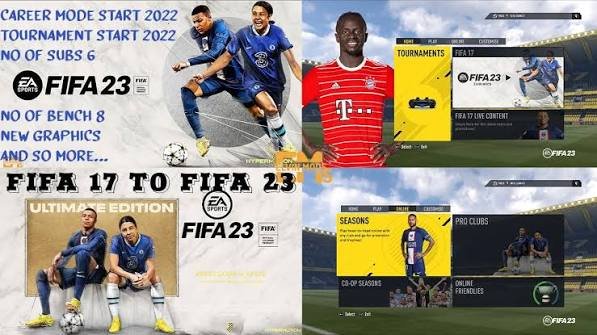
Looking for FIFA 17 Mod 23 APK OBB Offline because you want classic FIFA gameplay with newer teams, kits, and squads? You’re definitely not alone. Older FIFA games still have plenty of fans, especially players who prefer straightforward offline football instead of constant updates, accounts, and internet checks.
The interesting part comes with the word “Mod.” FIFA 17 originally came from EA, while “FIFA 17 Mod 23” usually describes a fan-made modification that updates parts of the older game to resemble a newer football season.
That distinction matters. If you see a website promising an official “FIFA 17 2023 Android release,” slow down for a second. The original game and a community modification are two very different things.
So, what can you expect from a FIFA 17 Mod 23 APK OBB package? Let’s talk about the features, offline play, requirements, installation basics, performance tips, and safety without the usual download-page nonsense.
What Is FIFA 17 Mod 23 APK OBB Offline?
FIFA 17 Mod 23 generally refers to a modified version of FIFA 17 that attempts to bring newer football content into the older game.
A mod can change things such as:
– Player squads
– Team kits
– Club badges
– Menus
– Competitions
– Stadium graphics
– Player faces
– Commentary
– Textures
– Boots and accessories
The exact changes depend on the individual modification. One “Mod 23” package can look completely different from another because different creators can build their own updates.
The APK normally handles the Android application, while OBB or data files can hold larger resources such as textures, audio, stadiums, and other game assets.
Think of it like this: the APK gives Android the game application, while the additional data gives the game its larger content.
Why Do Players Still Like FIFA 17?
You might wonder why anyone would bother with an older FIFA game when newer football titles exist.
Simple: gameplay matters.
FIFA 17 introduced several notable features during its original release, including the Frostbite engine on its main console and PC versions, the cinematic Journey mode, improved physical play, and various gameplay changes.
For many players, older FIFA games also feel less complicated.
You launch the game, choose a mode, pick your team, and start playing. No need to spend half an hour navigating menus before kicking the ball. Well, that’s the dream anyway. 🙂
Classic FIFA Feel
A FIFA 17-based mod keeps the basic identity of the older game while adding newer-looking content.
That combination appeals to players who enjoy classic football gameplay but want more current squads and kits.
The result depends heavily on the quality of the modification.
A good mod can make an old game feel surprisingly fresh. A bad one can give you mismatched kits, strange player faces, broken menus, and enough glitches to make you question every life decision that led to that installation.
FIFA 17 Mod 23 Features
Features vary between releases, but most FIFA 17 Mod 23 projects focus on updating the visual and football content.
Updated Squads
Updated squads represent one of the biggest reasons players search for this type of mod.
A typical modification may update:
– Player transfers
– Team lineups
– Player ratings
– Club names
– League structures
– New players
– Retired or transferred players
However, never assume every mod contains the same squad update.
Always check the specific version details before downloading anything.
New Kits and Logos
Kits can completely change the look of an older football game.
A well-made mod may introduce modern home and away kits while updating club badges and competition graphics.
Some modifications also refresh:
– Goalkeeper kits
– National-team kits
– Training kits
– Tournament branding
– Menu graphics
For me, these visual changes often make an older football game feel much newer without changing its core gameplay.
Updated Player Faces
Some mods also update player faces.
[10/8/2026 4:52 AM] Content store 3: This feature sounds small, but it can make a surprisingly big difference during matches.
Seeing recognizable players with updated faces makes the game feel more connected to the newer football season.
Of course, quality varies. Some faces look excellent, while others look like someone created them at 3 a.m. with one eye open.
Offline Gameplay: What Should You Expect?
The phrase FIFA 17 Mod 23 offline attracts plenty of attention because many mobile players want football they can enjoy without a constant internet connection.
Offline gameplay can work well for modes that don’t depend on online servers.
You may enjoy features such as:
– Exhibition matches
– Career-style gameplay
– Tournament modes
– Local football challenges
– Other offline modes included by the specific build
However, a modification cannot magically guarantee that every feature works offline.
Some packages may contain online-dependent elements, while others may remove or alter certain features.
Always check the specific mod description instead of assuming “offline” means every feature works without internet.
FIFA 17 Mod 23 APK OBB Requirements
Before searching for the FIFA 17 Mod 23 APK OBB download, check whether your phone can handle the game.
A practical Android setup should include:
– Android: A reasonably modern compatible version
– RAM: Around 3–4 GB or more for comfortable performance
– Storage: Several GB of available space
– CPU: A capable multi-core mobile processor
– GPU: A reasonably strong mobile graphics processor
– Battery: Enough charge for longer sessions
The exact requirements can vary because unofficial modifications can use different textures, audio files, and graphical resources.
Storage Matters More Than You Think
Don’t look only at the size of the ZIP or RAR archive.
Suppose you download a compressed package that takes 1.5 GB. The extracted files might require considerably more space.
You also need room for temporary files during extraction and installation.
I recommend keeping several GB of free storage before starting the process.
Nothing feels worse than reaching 99% and watching Android announce that you have run out of space. :/
How the APK and OBB Setup Works
Different FIFA 17 modifications can use different folder structures, so you should always follow the instructions that come with your legitimate game/mod files.
The general structure looks like this:
1. Check the Package
Look at the files before opening them.
You might see:
– An APK
– An OBB file
– A data folder
– A compressed archive
– A readme or installation guide
Don’t install every APK you find inside a download folder.
2. Check Compatibility
Confirm that the APK matches your Android version and device architecture.
An incompatible package can crash immediately or fail during installation.
3. Install the Application
Install the APK only when you trust the source and understand what the file contains.
Android may warn you when an application comes from outside its normal app-distribution system.
Don’t disable security features casually.
4. Add Required Game Data
If the game legitimately uses separate OBB or data resources, follow the package’s documented folder instructions.
Modern Android versions can restrict access to certain directories, so old tutorials may not match your phone’s current file manager.
5. Start the Game
Launch the game and test the basic functions.
Check:
– Main menu
– Player graphics
– Kits
– Stadiums
– Audio
– Controls
– Match loading
– Offline functionality
If something fails, don’t immediately download another “fix APK.” Find the actual cause first.
Common FIFA 17 Mod 23 Problems
Even a good modification can encounter technical issues.
Game Crashes
A crash can result from incompatible hardware, missing files, incorrect data placement, or an incompatible Android version.
Start by checking the requirements and installation structure.
Black Screen
A black screen can indicate missing or incompatible game resources.
[10/8/2026 4:52 AM] Content store 3: Check whether the required data files exist and whether you followed the correct folder structure.
Missing Kits or Faces
If the game launches but displays missing textures, the modification may not have installed its resource files correctly.
Check the extracted folders carefully.
Lag and Frame Drops
Your phone may struggle with high-resolution textures or demanding graphics settings.
Try reducing graphical options before assuming the entire game doesn’t work.
How to Improve Performance
Want smoother FIFA 17 Mod 23 gameplay? Start with the basics.
Use Moderate Graphics
Don’t automatically select the highest graphical option.
Try:
– Lower resolution
– Reduced texture quality
– Lower crowd detail
– Reduced shadows
– Fewer background effects
A stable frame rate matters more than having every visual effect turned up.
Close Background Apps
Before launching the game, close unnecessary apps.
Social media, browsers, video apps, and other background processes can consume RAM and CPU resources.
Keep Your Phone Cool
Heat can hurt performance during long gaming sessions.
Avoid playing demanding matches while your phone sits under a pillow or in direct sunlight. Yes, people actually do this.
Give your device some airflow and take breaks during long sessions.
FIFA 17 Mod 23 vs Newer Mobile Football Games
How does a FIFA 17-based mod compare with newer football games?
Feature| FIFA 17 Mod 23| Newer Official Mobile Games
Classic gameplay| Strong| Varies
Updated squads| Depends on mod| Usually official
Offline potential| Often a major attraction| Depends on game
Graphics| Mod-dependent| Usually more modern
Online features| Limited/variable| Usually stronger
Updates| Community-dependent| Developer-supported
Security| Depends on source| Generally more predictable
Device requirements| Can vary| Often higher
IMO, the biggest advantage of a FIFA 17 modification comes from its classic gameplay combined with updated content.
Newer games usually win when it comes to official support, online features, and regular updates.
So which one should you choose?
If you want simplicity and offline-style football, the FIFA 17 approach can make sense. If you want live services and official competitive features, a current officially distributed game makes more sense.
Is FIFA 17 Mod 23 APK Safe?
This question deserves more attention than the download button.
Unofficial APK files can come from unknown sources. A modified game package could contain unwanted software, excessive advertising, tracking components, or malware.
That doesn’t mean every FIFA 17 mod contains something dangerous.
It means you should treat unknown APK files carefully.
Before installing an unfamiliar package:
– Download only from sources you trust.
– Scan suspicious files with reputable security software.
– Check requested permissions.
– Avoid suspicious “unlimited coins” or “hack” packages.
– Don’t provide sensitive passwords to unofficial apps.
– Keep Android security protections active.
– Avoid installing additional APKs that the game doesn’t clearly require.
Why should a football game need access to unrelated personal information? Exactly.
What About “FIFA 17 Mod 23 Latest Update”?
You’ll often see phrases such as FIFA 17 Mod 23 latest update, FIFA 17 2023 APK, or FIFA 17 Mod 23 new season.
Treat those phrases as search labels rather than guarantees.
A modification may update the squads but leave the underlying gameplay untouched. Another may add new graphics while retaining older player data.
Before downloading, look for a clear feature list that explains exactly what changed.
Check for:
– Squad update date
– Kit update
– Graphics changes
– New leagues
– Player-face updates
– Bug fixes
– Android compatibility
– Offline functionality
A specific changelog tells you much more than the words “LATEST VERSION!!!” repeated seventeen times.
Tips for Choosing a Good FIFA 17 Mod
If you decide to explore a FIFA 17 modification, use a simple checklist.
Look for Clear Information
A trustworthy project should explain what it changes.
[10/8/2026 4:52 AM] Content store 3: Avoid pages that only show a huge download button without describing the actual modification.
Check Screenshots Carefully
Screenshots can reveal whether the mod actually contains the features it claims.
Look at menus, kits, player faces, stadiums, and squad lists.
Read User Feedback
Comments can help identify common problems.
Look for reports about:
– Crashes
– Missing files
– Installation errors
– Lag
– Broken menus
– Compatibility
Don’t trust every comment blindly, though. Some download pages have comments that look suspiciously enthusiastic.
Final Thoughts on FIFA 17 Mod 23 APK OBB Offline
FIFA 17 Mod 23 APK OBB Offline remains an interesting option for Android football fans who enjoy classic FIFA gameplay and want newer football content.
The main attraction comes from the combination of updated squads, modern kits, refreshed graphics, and offline-friendly gameplay. However, each modification can differ, so you should always check the exact features and requirements of the version you choose.
Remember the basics:
– Check your phone’s compatibility.
– Keep plenty of storage available.
– Understand the difference between APK and OBB/data files.
– Follow legitimate installation instructions.
– Avoid suspicious APKs and “hack” packages.
– Adjust graphics if your phone struggles.
– Don’t trust a download title simply because it says “latest.”
A good football mod should make an old game feel fresh, not turn your phone into a troubleshooting project.
So, if you’re searching for FIFA 17 Mod 23 APK OBB Offline, focus less on the biggest download button and more on compatibility, stability, safety, and the actual features. Your next match deserves better than a crash at kickoff. 🙂


