wapday Download Latest Pro Soccer Games
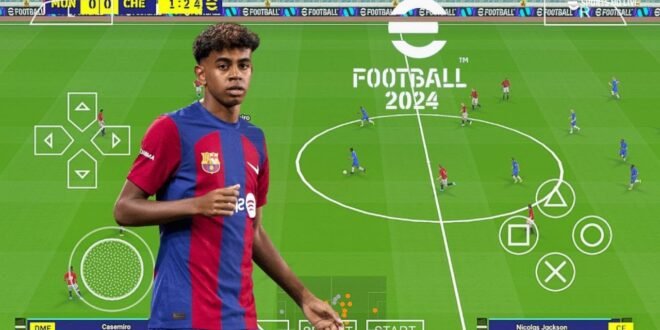
Searching for download eFootball PES 24 PPSSPP because you want updated football on Android without carrying a console around? I understand the attraction. A good PES modification can take an older PSP football game and give it newer squads, kits, player faces, competitions, and a much fresher look.
But let’s clear up one thing before we get excited about those shiny screenshots. Konami never released an official “eFootball PES 24” PSP game. The versions you see online under names like eFootball PES 2024 PPSSPP, PES 24 PPSSPP ISO, or PES 2024 PSP usually come from community modders who update an older PSP PES title.
That doesn’t make the experience useless. Quite the opposite. A well-made community mod can turn an old PES game into a surprisingly enjoyable modern football package.
So, what exactly does eFootball PES 24 PPSSPP offer, how does PPSSPP handle the game, and what should you know before searching for an ISO? Let’s talk about it.
What Is eFootball PES 24 PPSSPP?
eFootball PES 24 PPSSPP usually refers to a fan-made modification based on an existing PSP version of Pro Evolution Soccer.
Mod creators can update the game’s database and visual assets to represent the 2023/24 football season. They can change team squads, player transfers, kits, faces, logos, scoreboards, menus, and other elements.
PPSSPP then provides the emulator environment that can run compatible PSP game software on supported devices.
The “24” label normally refers to the season or update theme. It does not mean Konami created a new PSP version called PES 2024.
Why Does This Matter?
Knowing the difference helps you understand what you’re actually getting.
If a website claims that Konami officially launched “eFootball PES 2024 PSP,” don’t take that claim at face value. Konami moved its modern football series under the eFootball branding rather than releasing new PSP editions.
Community creators keep the older PES PSP experience alive through modifications.
Why Do Players Search for PES 24 PPSSPP?
The answer usually comes down to gameplay and accessibility.
Modern football games can demand powerful hardware and large amounts of storage. A PSP-based football game can offer a much lighter experience while still providing familiar football mechanics.
Have you ever wanted to play a quick football match without downloading another massive update first? That’s exactly where PPSSPP makes sense.
Classic PES Gameplay
Older PES games have a particular feel.
Passing, positioning, shooting, crossing, defending, and tactical decisions all contribute to the experience. The gameplay doesn’t try to overwhelm you with dozens of systems before you can start a match.
For many fans, that’s actually a strength.
I like the idea of keeping the classic gameplay intact while updating the football world around it. You get something familiar without feeling like you’re playing the exact same 2010s roster forever.
eFootball PES 24 PPSSPP Features
The feature list varies between modifications, but most PES 24 projects focus on modernising the content.
A typical version may include:
– Updated 2023/24 squads
– New player transfers
– Updated club kits
– New national-team kits
– Updated player faces
– New club logos
– Updated competitions
– Modern scoreboards
– Updated menus
– New boots
– Updated footballs
– Stadium texture improvements
– New backgrounds
– Updated player ratings
The quality depends on the individual mod creator.
One mod may deliver excellent kits but mediocre player faces. Another may focus heavily on graphics while leaving some squads outdated.
That’s why you should always check the specific modification’s update information before assuming it contains everything.
Updated Squads and Transfers
Squad updates represent one of the biggest reasons people search for PES 2024 PPSSPP ISO.
Imagine selecting your favourite club only to discover that several important players still belong to their old teams. Not exactly the “2024 experience” you expected.
Modders can update:
[10/4/2026 1:57 PM] Content store 3: – Player transfers
– Team lineups
– Player ratings
– Player positions
– Squad numbers
– Formations
– Club names
However, transfers constantly change during football seasons.
A modification created early in the 2023/24 season won’t necessarily include transfers that happened later. Check the mod’s update date if current squads matter to you.
Updated Kits and Club Logos
Kits can completely change the appearance of a classic PSP football game.
A community creator can replace old shirts with 2023/24 designs and update club logos, national-team graphics, goalkeeper kits, and competition branding.
Good texture work can make the game feel much newer without changing its fundamental gameplay.
This small detail matters more than people think. When you see current kits and familiar players on the pitch, your brain stops shouting, “I’m playing a PSP game!”
Well, mostly.
Player Faces and Graphics
Player faces represent another major part of PES modifications.
Modders can create updated textures for popular players and improve hairstyles, facial details, boots, and other visual elements.
The results vary.
Some modifications can look impressively accurate, while others can make you wonder whether your striker accidentally swapped faces with the substitute goalkeeper.
That’s normal with community projects.
Graphics You May See
Depending on the modification, creators may improve:
– Player faces
– Kits
– Stadium textures
– Pitch graphics
– Scoreboards
– Menus
– Football textures
– Boots
– Logos
– Competition graphics
However, remember that the underlying PSP engine still limits the experience. A mod can improve textures, but it cannot magically transform PSP hardware into a modern console.
How PPSSPP Runs PES 24
PPSSPP acts as the emulator that allows compatible PSP software to run on modern platforms.
Android users can benefit from touchscreen controls, external controllers, and configurable graphics settings.
You can also adjust performance options to match your device.
Why PPSSPP Works Well for Football
Football games fit handheld emulation particularly well because the control scheme doesn’t require dozens of complicated buttons.
You mainly need:
– Passing
– Shooting
– Through balls
– Crossing
– Sprinting
– Tackling
– Player switching
– Skill controls
Once you configure the controls, you can get into a match quickly.
And yes, touchscreen controls can work. But if you have a proper gamepad, I’d personally choose the controller every time. Your thumbs deserve better than wrestling with virtual buttons during a penalty.
Can You Play eFootball PES 24 PPSSPP Offline?
Yes, community PSP modifications can support offline gameplay.
That’s one of the biggest advantages of this type of football game.
Depending on the underlying PES version, you can enjoy offline modes such as:
– Exhibition matches
– League-style competitions
– Cups
– Tournaments
– Master League-style gameplay
– Single-player matches
You don’t need a constant internet connection to play a standard offline match.
This makes PES 24 PPSSPP attractive to players who have limited mobile data or unreliable network coverage.
However, don’t expect it to reproduce the online ecosystem of modern eFootball. Community PSP modifications cannot provide Konami’s current server-based features.
Android Requirements for PES 24 PPSSPP
PPSSPP can run on many Android phones, but your experience depends heavily on the hardware.
For a comfortable experience, consider a device with:
– At least 2GB RAM
– A reasonably capable processor
– Compatible graphics hardware
– Several GB of free storage
– A recent Android version
– Enough space for the game files
A stronger mid-range phone can provide better performance and allow higher rendering resolutions.
Storage also matters. A modification can require additional space for the original game, modified resources, and compressed archives.
Don’t fill your phone to 99% capacity and then blame the game for struggling. Your phone has feelings too. 🙂
Recommended PPSSPP Settings
[10/4/2026 1:57 PM] Content store 3: You don’t need to max every graphics option.
Start with moderate settings and increase quality gradually.
Useful PPSSPP options can include:
– Rendering resolution
– Texture filtering
– Frameskip
– Auto frameskip
– Hardware transform
– Buffered rendering
– Performance-related settings
If the game runs smoothly, keep your settings.
If you experience stuttering or overheating, reduce the rendering resolution or other demanding options.
Stable performance matters more than maximum graphics quality.
I’d rather play a smooth match with slightly lower graphics than watch a beautiful football match move at five frames per century.
PES 24 PPSSPP vs Modern eFootball
So how does a community PES 24 PPSSPP modification compare with the official modern eFootball experience?
Feature| PES 24 PPSSPP Mod| Official eFootball
Official Konami PSP release| No| N/A
Updated squads| Often| Yes
Updated kits| Often| Yes
Offline gameplay| Strong advantage| More limited
Online services| Limited| Extensive
Classic PES gameplay| Yes| Different
Community customization| High| Limited
Modern graphics| Limited by PSP| More advanced
Official support| No| Yes
Hardware demand| Generally lower| Depends on device
The choice depends on your priorities.
If you want official online features and current support, modern eFootball makes more sense.
If you want offline gameplay, classic PES controls, updated kits, and community customization, PES 24 PPSSPP offers something different.
ISO and PPSSPP Explained
When searching for download eFootball PES 24 PPSSPP, you’ll often see the term “ISO.”
An ISO represents a disc-image format associated with PSP software. PPSSPP can load compatible PSP game images.
You may also encounter compressed formats such as CSO.
Here’s the important part: use legally obtained PSP game software and create or use game images from games you own, rather than downloading unauthorized copyrighted copies.
Community modifications can also require a particular base game. Check the creator’s documentation so you understand which legitimate game version the modification expects.
Common PES 24 PPSSPP Problems
Even a good modification can cause technical problems.
Black Screen
A black screen can indicate incompatible settings or missing game resources.
Game Crashes
Crashes can occur when the modification doesn’t match the underlying game version or your device struggles with the configuration.
Lag
High rendering resolutions can put additional pressure on your phone.
Missing Kits
Incorrect or incomplete modification assets can cause kits to disappear.
Missing Player Faces
Face textures can fail when the required resources don’t match the game database.
Audio Problems
Some community modifications change commentary or sound resources, which can create compatibility problems.
When something goes wrong, check the mod creator’s instructions before randomly changing files or settings.
How to Avoid Fake PES 2024 PPSSPP Downloads
Search for eFootball PES 24 PPSSPP ISO Download and you’ll find plenty of websites competing for your attention.
Some provide useful information. Others mainly want clicks.
Watch out for:
– Fake download buttons
– Excessive redirects
– Suspicious APK files
– Password-protected archives from unknown sources
– Requests for unnecessary permissions
– “Official Konami PSP” claims
– Files that don’t match the advertised size or contents
A website can use a professional-looking thumbnail and still offer a questionable file.
Never provide sensitive personal information just to download a football game.
Also remember that copyrighted game files can raise legal issues. Stick to legally obtained game software and legitimate community modifications.
Is eFootball PES 24 PPSSPP Worth Playing?
If you enjoy classic PES gameplay, I think the concept remains attractive.
You get updated squads, newer kits, player faces, offline matches, and familiar PSP football mechanics in one package.
[10/4/2026 1:57 PM] Content store 3: The biggest advantage comes from portability. You can carry the experience on your Android phone instead of needing a console.
But you should keep your expectations realistic.
A PES 24 PPSSPP modification won’t suddenly become a modern PlayStation or Xbox football game. The PSP engine still determines the fundamental gameplay, animations, and graphical limits.
Who Should Try It?
This type of modification makes the most sense for players who want:
– Classic PES gameplay
– Offline football
– Updated 2023/24 squads
– Modern kits
– Updated player faces
– PPSSPP Android compatibility
– Community-created content
– Lower hardware requirements
Players who want modern online services should look toward official eFootball instead.
Final Thoughts
The search for download eFootball PES 24 PPSSPP usually comes from fans who want modern football content without giving up the classic PES experience.
Community modders can refresh older PSP PES games with updated squads, transfers, kits, player faces, scoreboards, menus, stadium graphics, and competition assets. PPSSPP then gives compatible devices a convenient way to play that PSP-based experience.
The most important thing to remember remains simple: Konami never released an official eFootball PES 2024 PSP game. The PES 24 PPSSPP versions you find online generally represent fan-made modifications.
If you explore one, check the version information, compatibility, features, and source carefully. Use legally obtained game software and avoid suspicious files.
And if the referee makes a ridiculous call during your first match, don’t blame the emulator. That’s just football doing football things. 🙂