 wapday Download Latest Pro Soccer Games
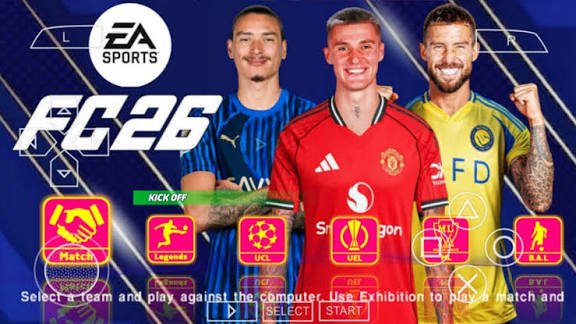
Searching for download EA SPORTS FC 2026 PPSSPP ISO latest version? Then you’ve probably already seen dozens of pages promising a “100% official FC 26 PSP ISO” with tiny file sizes, PS5 graphics, and every transfer already updated. Sounds perfect, right?
There’s just one problem: EA SPORTS FC 26 does not have an official PSP release. PPSSPP can run PSP games, but EA didn’t publish FC 26 for the PSP.
That doesn’t mean football fans have nothing to explore. The PPSSPP community creates fan-made football projects and patches that recreate modern FC-style squads, kits, menus, graphics, and gameplay on PSP. So, before you download anything, let’s separate the real information from the usual internet chaos.
Is EA SPORTS FC 2026 Available Officially for PSP?
No. EA SPORTS FC 26 never received an official PSP version.
EA developed FC 26 for modern gaming platforms rather than the old PlayStation Portable. PPSSPP works as a PSP emulator, so it cannot magically run a native modern FC 26 game.
Think of PPSSPP as the player and the PSP game as the ball. If nobody created an official PSP version, PPSSPP has nothing official to run.
So Why Do Websites Advertise FC 26 PSP?
You’ll often see titles such as:
– EA SPORTS FC 26 PSP ISO
– FC 26 PPSSPP Android
– FC 2026 PSP latest update
– FC 26 PPSSPP career mode
– FC 26 PSP offline
– FC 26 PPSSPP highly compressed
Most of these names describe fan-made modifications or projects based on existing PSP football games.
Some creators update an older football game with modern teams, kits, player faces, logos, menus, and other assets. They then give the project a modern name such as FC 26.
That approach can create a fun experience, but it doesn’t turn the project into an official EA release.
What Does an FC 26 PPSSPP Project Actually Contain?
A good fan-made project can make a classic PSP football game look dramatically different.
Instead of playing with outdated squads, you might get modern team names, updated uniforms, new player appearances, and redesigned menus.
Depending on the creator, the update may contain:
– Updated team squads
– Modern football kits
– Updated player transfers
– New player faces
– Updated boots
– Modern scoreboards
– New stadium graphics
– Updated competitions
– Redesigned menus
– Improved textures
– Updated commentary
– Gameplay modifications
The exact features depend on the individual project. Never assume that every download titled “FC 26 PPSSPP” contains the same content.
FC 26 PPSSPP ISO vs PSP Patch
This difference matters more than many download pages admit.
An ISO represents a PSP game image. A patch modifies or adds content to an existing game.
Some fan projects distribute modified game files, while others provide update files that work with a compatible PSP football game.
Why Does This Matter?
Imagine downloading a 1 GB “FC 26 PSP update” and discovering that it requires another football game as the base.
You could spend an hour moving files around before discovering that you missed one folder. Classic PSP problems. 🙂
Before installing anything, check the project instructions carefully.
Look for information about:
1. Required base game
2. Required patch files
3. Save data
4. Texture files
5. PPSSPP version
6. Android compatibility
7. Installation location
That information can save you plenty of frustration.
What Features Should You Look For?
If you want a convincing FC 26 PPSSPP latest version, focus on the actual features rather than the download title.
Updated Squads
Modern squads represent one of the biggest reasons players install these projects.
A good update should refresh team rosters and transfers rather than simply changing the title screen.
You should check whether the project includes:
– Current player transfers
– Updated starting lineups
– New squad numbers
– Updated player ratings
– Modern formations
– Updated national teams
Why play a supposedly modern football game when half the players still wear their old club colours?
Updated Kits
[10/4/2026 1:18 PM] Content store 1: Kits can completely change the visual experience.
A quality fan project may include modern home, away, goalkeeper, and national-team kits.
Look for clean textures and accurate colours. Poorly designed kits can make even a decent football game look like a school project.
Player Faces
Updated faces add another layer of realism.
Popular players often receive new face textures, hairstyles, beards, and other visual adjustments.
However, you should manage your expectations. PSP hardware has limitations, and no texture pack can transform a PSP football game into a current-generation console title.
FC 26 PPSSPP Graphics
Graphics remain one of the biggest selling points for fan-made PSP football projects.
Creators can improve several visual areas without changing the fundamental PSP engine.
You may see improvements to:
– Player textures
– Stadiums
– Grass
– Adboards
– Menus
– Team logos
– Scoreboards
– Football textures
– Boots
– Backgrounds
Can It Look Like PS5?
Not really.
You might see websites advertising “FC 26 PSP PS5 graphics.” Treat that phrase carefully.
A fan project can imitate certain presentation elements from modern football games, but PSP hardware cannot reproduce the full graphics quality of a PS5 version.
Still, a well-designed PSP patch can look surprisingly good on a modern smartphone.
That’s where PPSSPP gets interesting.
Best PPSSPP Settings for FC 26-Style Projects
Your phone can make a major difference to your experience.
A powerful Android phone can handle higher rendering resolutions and graphical enhancements. A budget device may need lighter settings.
Recommended Starting Settings
Try these settings first:
– Rendering resolution: 2x PSP
– Frameskipping: Off
– Texture filtering: Auto
– Anisotropic filtering: Moderate
– Rendering backend: Vulkan if your device supports it
– Texture scaling: Moderate
– VSync: Test according to performance
Don’t immediately set everything to maximum.
If the game runs smoothly at 2x resolution, try 3x. If you notice slowdowns, return to the lower setting.
FYI, your phone chipset matters more than the marketing label on the download page.
How Much Storage Do You Need?
Storage requirements vary considerably between fan-made projects.
A basic PSP game can occupy relatively little space, while a project with high-resolution textures and additional files can require considerably more.
Before downloading anything, check the actual requirements.
You may need space for:
– Base PSP game
– ISO or CSO file
– Save data
– Texture packs
– Additional update files
– PPSSPP itself
I recommend keeping several gigabytes of free storage if you plan to experiment with large texture packs.
Why? Because extracting archives temporarily requires additional space. Your phone needs room to unpack the files before you start playing.
ISO or CSO: Which Should You Use?
PPSSPP supports common PSP game formats, including ISO and CSO.
ISO
ISO files keep the game image in an uncompressed format.
Advantages:
– Simple structure
– Reliable compatibility
– No compression concerns
Disadvantage:
– Larger storage requirement
CSO
CSO compresses the game image.
Advantages:
– Smaller file size
– Saves storage
– Convenient for mobile devices
Possible disadvantage:
– Some devices may experience slightly different loading behaviour
For most players, ISO offers the simplest starting point, while CSO makes sense when storage space matters.
How to Install a Legitimate PSP Football Project
The exact installation process depends on the creator, but the general workflow looks like this.
Step 1: Install PPSSPP
Install PPSSPP from a legitimate source and open it once.
Step 2: Prepare Your Legally Obtained PSP Game
Use a PSP game copy that you legally own and can use with the emulator.
Step 3: Read the Project Instructions
Check whether the fan-made update requires a specific base game.
Step 4: Extract the Update
If the creator provides an archive, extract it using a suitable file manager.
Step 5: Place the Files Correctly
[10/4/2026 1:18 PM] Content store 1: Different projects use different folders for save data, textures, and game files.
Follow the creator’s instructions instead of randomly moving folders.
Step 6: Launch PPSSPP
Open PPSSPP and locate your PSP game.
If everything matches the project’s requirements, you should see the updated content.
Common FC 26 PPSSPP Problems
Even experienced PPSSPP users occasionally run into problems.
Black Screen
A black screen can indicate incompatible settings or incorrectly installed files.
Try restoring PPSSPP settings and checking the project’s installation instructions.
Missing Kits
Missing kits often indicate an incorrect texture location.
Check whether the project requires a separate texture pack.
Game Runs Slowly
Reduce the rendering resolution first.
You can also disable demanding graphical enhancements.
Missing Players
Some updates may rely on save data or database modifications.
Make sure you installed every required component.
Game Crashes
Large texture packs can put additional pressure on your device.
Try a lighter graphics configuration if your phone struggles.
FC 26 PPSSPP vs Modern EA SPORTS FC
How does a fan-made PSP project compare with the actual modern EA SPORTS FC experience?
Feature| FC 26 PPSSPP Fan Project| Modern EA SPORTS FC
PSP compatibility| Yes| No
Offline gameplay| Usually| Depends on mode
Modern graphics| Limited| Much better
Updated squads| Often| Yes
Modern animations| Limited| Yes
Storage requirement| Lower| Higher
Android PPSSPP support| Yes| No native PSP version
PS5-level visuals| No| Yes on supported hardware
IMO, the biggest advantage of the PSP project comes from offline accessibility and simplicity.
If you want modern graphics and advanced features, the official EA SPORTS FC experience wins easily.
If you want a lightweight football game that works through PPSSPP, the fan-made route offers something different.
Should You Download FC 26 PPSSPP?
If you enjoy PSP football games, you can definitely explore legitimate fan-made projects.
Just remember three things.
First, FC 26 does not have an official PSP release.
Second, most FC 26 PPSSPP downloads represent fan-made modifications rather than official EA products.
Third, you should avoid suspicious files that demand strange apps, passwords, surveys, or executable installers.
A file that claims to offer “PS5 graphics + 4K textures + 100% official FC 26 PSP” should probably make you raise an eyebrow.
Final Thoughts
The search for download EA SPORTS FC 2026 PPSSPP ISO latest version can lead you down a rabbit hole of confusing download pages and exaggerated claims.
The truth remains simple: EA SPORTS FC 26 has no official PSP version. PPSSPP players instead rely on fan-made football projects and patches that update older PSP football games with modern squads, kits, graphics, player faces, and other FC-inspired features.
If you decide to try one, check the project requirements first, use legitimate game files, keep your expectations realistic, and configure PPSSPP according to your phone’s performance.
The PSP may have grown old, but football fans clearly haven’t moved on. And honestly, there’s something satisfying about turning an old handheld football game into a modern-looking experience on your Android phone. 🙂


