 wapday Download Latest Pro Soccer Games
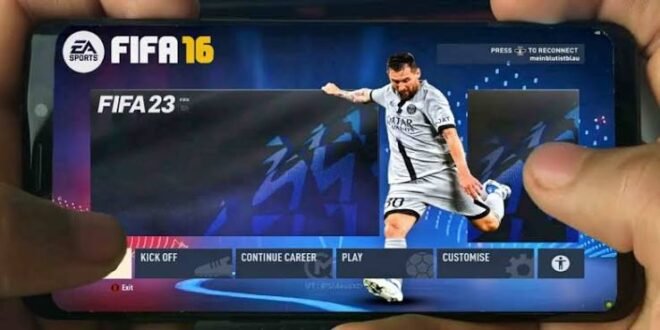
Still searching for FIFA 16 Mod 23 APK Mobile Android Offline because you want modern football content without needing a powerful phone or a constant internet connection? I understand the appeal. FIFA 16 already had solid gameplay, and community modders can give the old game a surprisingly fresh look with updated squads, kits and player faces.
But let’s clear up one thing before we talk about features. FIFA 16 Mod 23 is a community-made modification of FIFA 16, not an official EA Sports release. Mod creators update the original game with newer football content, which explains why you can see a classic FIFA engine with much more recent teams.
So, what makes FIFA 16 Mod 23 interesting on Android? How does the offline gameplay work, what should your phone handle, and how does it compare with modern football games? Let’s break it down.
What Is FIFA 16 Mod 23?
FIFA 16 Mod 23 takes the original FIFA 16 mobile experience and updates parts of its content to resemble the 2022–23 football season.
Community developers can modify resources such as squads, kits, player appearances, menus and other visual elements.
That combination gives players something interesting: older FIFA gameplay with newer football content.
If you enjoyed FIFA 16 but stopped playing because the original squads now feel outdated, a community modification can make the game feel more relevant again.
Is FIFA 16 Mod 23 Official?
No.
EA Sports released FIFA 16, but EA did not release an official “FIFA 16 Mod 23” edition.
That means features and compatibility can vary significantly between different versions created by different modders.
One mod might include updated transfers and kits, while another might focus more heavily on graphics. Always check exactly what a particular version includes before trusting its description.
FIFA 16 Mod 23 Android Features
The main attraction comes from the updated football content.
Updated Squads and Transfers
A good FIFA 16 Mod 23 update can refresh team squads with players and transfers from the 2022–23 football season.
You might see changes involving:
– Updated club squads
– New player transfers
– Updated starting lineups
– New team formations
– Updated player ratings
– New league information
This feature makes the older FIFA engine feel much newer.
Ever played an old football game and wondered why your favourite player still plays for a club they left years ago? That’s exactly the problem these community updates try to solve.
Updated Kits
Updated kits can dramatically change the visual experience.
Mod creators can replace older jerseys with designs inspired by newer football seasons.
Depending on the modification, you may find:
– Home kits
– Away kits
– Third kits
– Goalkeeper kits
– Updated kit sponsors
– Updated club colours
The quality depends entirely on the mod creator, so don’t expect every version to look identical.
Player Faces
Some FIFA 16 Mod 23 versions also include updated player faces.
Creators can modify player textures to make footballers look closer to their real-world appearance.
This can make matches feel more current, especially when you recognize your favourite players immediately.
FIFA 16 Mod 23 Gameplay
Here’s where I think the game remains interesting.
Modern football games often focus heavily on online modes, live events, huge downloads and complicated progression systems.
FIFA 16 offers something simpler.
You start a match and play football.
The controls remain familiar to anyone who has played older FIFA mobile games.
Passing
Passing forms the foundation of the gameplay.
You can build attacks through short passes, switch play and look for spaces behind the defensive line.
Good passing matters more than simply holding the sprint button and hoping for the best.
Shooting
Shooting also feels straightforward.
You can create chances around the box, take long-range attempts and finish one-on-one opportunities.
[10/4/2026 2:23 PM] Content store 4: Of course, your striker will occasionally miss an open goal that even your grandmother could score. That’s football, apparently. 🙂
Defending
Defending requires timing.
You need to position your players properly rather than constantly rushing toward the ball.
That makes FIFA 16 enjoyable for players who prefer a more traditional football-game feel.
FIFA 16 Mod 23 Offline Gameplay
One of the biggest reasons people search for FIFA 16 Mod 23 Android offline involves the ability to play without depending on a constant internet connection.
Many community modifications focus on offline gameplay.
That makes the game useful for players who:
– Have limited mobile data
– Experience unreliable internet
– Prefer single-player matches
– Want quick football sessions
– Travel frequently
– Use budget Android devices
You can enjoy the core match experience without treating your internet connection like a piece of football equipment.
Does Offline Mean Everything Works Without Internet?
Not necessarily.
Some community modifications may contain features that still depend on specific services or online functionality.
The safest approach involves checking the exact features of the version you use.
Offline gameplay should never mean “every feature works without internet.”
FIFA 16 Mod 23 APK, OBB and Data Explained
If you search for FIFA 16 Mod 23 APK OBB Data, you will probably encounter several separate files.
Understanding them helps you avoid confusion.
APK
The APK contains the Android application.
Android uses this package to install the application itself.
OBB
An OBB file can store additional large game resources.
Older Android games often used expansion files to hold textures, sounds and other resources outside the main APK.
Data
A Data folder can contain additional game resources, configurations and modified assets.
Different FIFA 16 modifications can use different structures, so don’t mix files from unrelated versions.
If a legitimate mod creator provides specific instructions, follow those instructions for that exact version.
FIFA 16 Mod 23 Android Requirements
One advantage of using an older football engine involves hardware requirements.
FIFA 16 generally doesn’t demand the same level of processing power as many newer football games.
A reasonable Android setup should have:
– Android 6.0 or newer, depending on the build
– At least 2GB RAM
– A capable quad-core or better processor
– Enough free storage
– A compatible GPU
– Sufficient battery and thermal capacity
More RAM can help with multitasking, but don’t assume RAM alone determines performance.
The processor, GPU, Android version and modification quality all matter.
Storage Requirements
Don’t judge the game only by the APK size.
The complete installation can require additional space for OBB, Data and other resources.
Keep extra storage available rather than filling your phone until Android starts complaining about everything.
The original FIFA 16 engine still has a decent visual foundation.
Mod creators can improve the experience by updating:
– Kits
– Player faces
– Logos
– Menus
– Scoreboards
– Stadium textures
– Footballs
– UI elements
However, you shouldn’t expect FIFA 16 Mod 23 to suddenly match modern console football games.
The mod updates the content, not the underlying generation of the graphics engine.
That’s actually part of its charm.
You get familiar gameplay with a newer football presentation.
FIFA 16 Mod 23 vs eFootball Mobile
How does it compare with eFootball?
The difference becomes obvious.
eFootball offers modern graphics, current gameplay systems and online features. FIFA 16 Mod 23 focuses more on lightweight offline football and community updates.
Feature| FIFA 16 Mod 23| eFootball Mobile
Official release| Community mod| Official
[10/4/2026 2:23 PM] Content store 4: Modern graphics| Moderate| Higher
Offline appeal| Strong| More limited
Updated squads| Community-based| Official updates
Online features| Limited| Extensive
Hardware demand| Lower| Higher
Gameplay style| Classic FIFA| Modern football
Modding| Extensive community mods| Limited
Which one should you choose?
If you want official modern football and online competition, eFootball makes more sense.
If you want offline gameplay and classic FIFA mechanics, FIFA 16 Mod 23 can offer a more attractive experience.
IMO, the choice depends less on graphics and more on how you actually play.
FIFA 16 Mod 23 vs FIFA Mobile
FIFA Mobile has evolved considerably compared with the older FIFA 16 engine.
Modern EA football games focus heavily on live content, online competition and ongoing updates.
FIFA 16 Mod 23 takes the opposite approach.
You get a relatively self-contained football experience with community-created updates.
That’s especially appealing if you don’t want to deal with constant updates or large downloads.
Common FIFA 16 Mod 23 Problems
Community modifications can introduce problems that official games usually handle through developer testing.
Game Crashes
The game may crash because of incompatible files, Android versions or missing resources.
Check compatibility before changing files.
Black Screen
A black screen can indicate missing or incompatible game resources.
Avoid combining OBB and Data files from different modifications.
Missing Players
If players remain outdated, your version may not contain the latest database.
Not every “Mod 23” package includes the same squad update.
Missing Kits
Some versions update squads without fully updating kits.
Again, always check the feature list before choosing a modification.
Lag
High-resolution textures can increase the workload on older devices.
If your phone struggles, choose a lighter version and close unnecessary background applications.
Is FIFA 16 Mod 23 Safe?
Safety should come before graphics.
Because FIFA 16 Mod 23 comes from community modding rather than EA, you should carefully consider where any APK or additional files originate.
Avoid files that demand suspicious permissions or ask you to disable Android security features.
Watch out for websites that advertise unrealistic promises such as:
– Unlimited coins
– Unlimited money
– “Official EA Mod”
– Guaranteed compatibility with every Android phone
– Impossible graphics upgrades
Also avoid suspicious installers that bundle unrelated applications.
A football game should not need access to your contacts, SMS messages or banking information.
How to Choose a Good FIFA 16 Mod 23 Version
Not every modification deserves your storage space.
Before choosing one, check:
1. Squad update date
2. Transfer update
3. Kit quality
4. Player faces
5. Graphics
6. Offline compatibility
7. Android compatibility
8. File structure
9. Storage requirements
10. Source credibility
A smaller, stable modification can offer a better experience than a huge package filled with unnecessary textures.
Final Thoughts
FIFA 16 Mod 23 APK Mobile Android Offline remains popular because it combines familiar FIFA 16 gameplay with newer football content.
The community-created modifications can update squads, transfers, kits, player faces, menus and other elements while keeping the classic FIFA experience intact.
However, remember that FIFA 16 Mod 23 is not an official EA Sports release. Different versions can contain different features, requirements and compatibility levels, so choose carefully and prioritize your device’s security.
Compared with eFootball or newer football games, FIFA 16 Mod 23 won’t win the graphics battle. But it can win the offline, lightweight and nostalgic football battle quite comfortably.
If you prefer simple matches over endless online events, this type of FIFA modification still has plenty to offer.
And honestly, sometimes you just want to pick your team, score a ridiculous 30-yard goal and celebrate like you’ve won the Champions League. That’s enough football drama for one afternoon. 🙂



2 comments
Pingback: Mortal Kombat Unchained PPSSPP: Classic PSP Fighting on Android - wapday
Pingback: Download First Touch Soccer 2024 FTS 24 for Android - wapday