 wapday Download Latest Pro Soccer Games
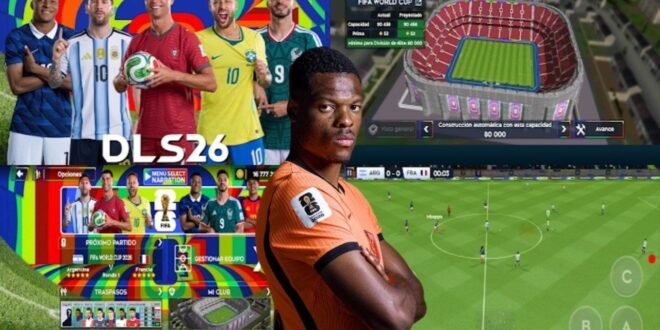
Dream League Soccer DLS 26 Android APK – Realistic Gameplay, Features and Full Game Guide
If you love football games on Android, Dream League Soccer 2026 (DLS 26) is a title worth checking out. From building your dream team to competing in exciting matches, the Dream League Soccer series offers a mix of football management and on-pitch action that keeps players coming back.
But what makes DLS 26 interesting for fans who want realistic gameplay? Is it the player animations, improved graphics, team-building options, or the feeling of controlling your favourite football stars? Let’s look at the gameplay, major features, installation options, and tips for getting the best experience on your Android phone.
Important: Make sure you distinguish the official Dream League Soccer release from unofficial modified APKs. Features advertised by third-party websites may not be part of the official game.
What Is Dream League Soccer DLS 26?
Dream League Soccer is a mobile football game developed by First Touch Games. It combines football matches with team management, allowing players to build a squad, improve their club, and progress through competitions.
DLS 26 is the name commonly used for the 2026 edition or season of the game. However, the exact features available depend on the official version installed. Unofficial versions labelled “DLS 26 Mod APK” may contain different kits, player ratings, graphics, or other changes.
One of the biggest attractions of Dream League Soccer is that it doesn’t focus on matches alone. You can develop your squad, sign players, customise your team, and work towards building a stronger club.
DLS 26 Realistic Gameplay
Realistic gameplay is one of the main things football fans look for in a mobile football game. Good graphics are nice, but they mean little if every player moves like a robot or defenders leave enormous gaps in the middle of the pitch.
1. Player Movement and Animations
Player movement plays a major role in making football games feel authentic. Running, turning, tackling, passing, and shooting all contribute to the overall experience.
In Dream League Soccer, the controls are designed for touchscreen devices. You can move players using the virtual joystick and use the action buttons to pass, shoot, or perform other football actions.
For a more realistic experience, avoid holding the sprint button constantly. Real football involves changes of pace, controlled movement, and good positioning—not every player running at full speed for 90 minutes.
2. Passing and Ball Control
Passing is essential when you want to create chances against organised opponents. Instead of trying to dribble past the entire defence, use short passes to move the ball into dangerous areas.
Try these techniques:
- Short passing: Use it to maintain possession and move through midfield.
- Through balls: Send attackers into open spaces behind defenders.
- Wing play: Use wide players to stretch the opposition’s defence.
- One-touch passing: Move the ball quickly when opponents press aggressively.
A patient passing game often creates better opportunities than repeatedly sending long balls towards your striker.
3. Shooting and Finishing
Scoring goals is the best part of any football game, but shooting without thinking about your position can waste promising attacks.
When approaching the penalty area, check where the goalkeeper is standing. A well-timed shot from a good angle is usually more effective than shooting from a difficult position.
Practise different attacking situations, including one-on-one chances, shots across goal, and attempts from outside the box. The more comfortable you become with the controls, the easier it is to turn chances into goals.
4. Defending and Tactical Positioning
Defending is about more than chasing the player with the ball. If you pull your centre-backs out of position too often, you may leave an easy route to goal.
Instead, try to keep your defensive shape, block passing lanes, and apply pressure at the right moment. Use your midfielders to challenge opponents before they reach the penalty area.
Pro tip: If your team keeps conceding goals from counterattacks, avoid sending too many players forward at the same time.
Main Features of Dream League Soccer 26
The exact features available depend on the version of the game. The following are key elements associated with the Dream League Soccer experience.
Build Your Dream Team
One of the most enjoyable parts of DLS is assembling a squad that suits your playing style. You can recruit players, improve your team, and experiment with different positions.
Want a fast counterattacking team? Focus on pacey attackers and midfielders who can release the ball quickly. Prefer possession football? Build around players who help you maintain control and create passing options.
A balanced team is generally more useful than a squad filled with attackers but lacking defensive cover.
Club Development
Dream League Soccer includes club-building elements that allow you to improve aspects of your team and its facilities as you progress.
Developing your club gives you additional goals beyond winning individual matches. It also creates a sense of progression as you work towards a more competitive squad.
Team Customisation
Customisation is another popular feature among DLS players. Depending on the official version, options may include changing kits, badges, formations, and other club details.
Some third-party versions advertise extra kits or updated team designs. Remember that unofficial customisation packs can come with security risks, so check their source carefully before installing anything.
Competitions and Progression
Dream League Soccer offers a progression-based football experience in which you aim to improve your squad and compete at increasingly challenging levels.
Competition availability and online features can vary by version. Check the game’s current menus and official store description for the modes included in your installation.
DLS 26 Graphics and Visual Quality
Graphics can make football matches more enjoyable, especially when player models, stadiums, pitch details, and animations look convincing on your screen.
However, avoid assuming that every APK advertised as “DLS 26 realistic graphics” has a genuine graphics upgrade. Some websites use attractive screenshots or edited videos to promote modified files that may not match the actual gameplay.
Your phone’s display, performance, and graphics settings can also affect how the game looks and runs.
For a smoother experience, close unnecessary apps before playing and keep enough free storage available. If the game offers adjustable settings, choose options that balance visual quality with stable performance.
DLS 26 Android APK: How to Download Safely
If you want to install Dream League Soccer on Android, the safest starting point is the official Google Play Store.
- Open the Google Play Store on your Android phone.
- Search for Dream League Soccer.
- Check that the developer is First Touch Games.
- Review the game’s current description, compatibility, and permissions.
- Tap Install if the official listing is available for your device.
- Open the game and follow its setup instructions.
You can also visit the developer’s official website to find information about its games.
Official sources:
- Google Play Store: https://play.google.com/store
- First Touch Games: https://www.ftgames.com/
Avoid APK sites that require you to complete suspicious surveys, install unrelated applications, disable important security protections, or provide your Google account password.
An APK labelled “DLS 26 Unlimited Coins” or “DLS 26 Mod Menu” is not automatically legitimate. Modified files may contain malware, steal data, or cause problems with your game account.
Does DLS 26 Work Offline?
Offline availability depends on the version and the feature you’re trying to use. Some parts of a mobile game may work without an internet connection, while updates, online matches, account services, or other features may require connectivity.
To check what works offline:
- Install the official game and complete its initial setup.
- Launch it while connected to the internet.
- Close the game completely.
- Temporarily disconnect from Wi-Fi and mobile data.
- Reopen the game and test the modes available to you.
Do not assume that every mode works offline just because a download page uses the phrase “offline game.” Always test the version installed on your device.
Recommended Android Requirements
The minimum requirements can change with updates, so consult the current Google Play listing for accurate compatibility information.
For a better gaming experience, consider the following general recommendations:
- Android version: Use a supported version of Android.
- RAM: More available memory can help reduce interruptions when switching between apps.
- Storage: Keep enough free space for installation, updates, and game data.
- Processor: A reasonably capable processor helps maintain smooth gameplay.
- Internet connection: Use a stable connection for downloads, updates, and online features.
These are general performance considerations, not verified minimum specifications for every DLS 26 release.
Best Tips for Realistic DLS 26 Gameplay
Want your matches to feel more like proper football? Try these simple improvements.
Choose a Balanced Formation
A formation such as 4-3-3 can provide width and attacking options, while 4-2-3-1 offers additional midfield protection. The best formation depends on your players and how you prefer to attack.
Stop Sprinting Everywhere
Constant sprinting can make it harder to control possession and respond to defenders. Use sprinting when you have space, especially on counterattacks or when chasing a loose ball.
Build Attacks Patiently
Move the ball through midfield and wait for gaps to appear. If the defence is compact, switch play towards the wings instead of forcing a pass through a crowded centre.
Improve Your Defensive Timing
Avoid charging at every opponent immediately. Position your defenders carefully and pressure attackers when you have support nearby.
Practise Set Pieces
Corners, free kicks, and penalties can decide close matches. Spend time learning the controls and experimenting with different delivery angles.
Common DLS 26 Problems and Possible Fixes
The game crashes on startup: Restart your phone, close background apps, and check whether an official update is available.
The game runs slowly: Free up storage, close unnecessary applications, and reduce graphics settings if the game provides that option.
The installation fails: Check device compatibility and available storage. If you downloaded an APK from an unknown source, remove it and use the official store instead.
The game requests an internet connection: Connect to the internet and complete any required setup or update. Some features may need a connection even if other parts work offline.
Your progress disappears: Check whether the game supports account linking or cloud saving, and make sure you use the correct account. Avoid deleting app data before confirming that your progress is backed up.
Is Dream League Soccer 26 Worth Playing?
If you enjoy building a football team, improving players, experimenting with formations, and playing matches on your phone, Dream League Soccer is worth considering.
Its appeal comes from combining football gameplay with long-term team development. The touchscreen controls also make it accessible to players who want a football game they can enjoy without needing a console.
However, if your priority is highly detailed simulation, extensive tactical control, or the exact presentation of a console football game, compare the available mobile football titles before deciding.
Final Verdict
Dream League Soccer DLS 26 Android is a search term for players looking for the 2026-era DLS experience with enjoyable matches, team building, customisation, and realistic football action.
For the safest experience, download the official version, check its current features, and avoid unverified modified APKs that promise unlimited resources or unrealistic upgrades. Focus on passing, positioning, and timing to make your matches more competitive.
Ready to build your dream team? Start with the official game listing, develop a balanced squad, and see how far your club can progress.



5 comments
Pingback: EA Sports FC 26 Android Game APK Offline - wapday
Pingback: Grand Theft Auto Sindacco Chronicles Android Game APK - wapday
Pingback: PES 2013 PRO Evolution Soccer Android Game APK - wapday
Pingback: DFL 26 MOD FIFA 16 Android Game OBB+DATA - wapday
Pingback: DFL 26 Android Game High Graphics Gameplay APK Full-transfer - wapday