 wapday Download Latest Pro Soccer Games
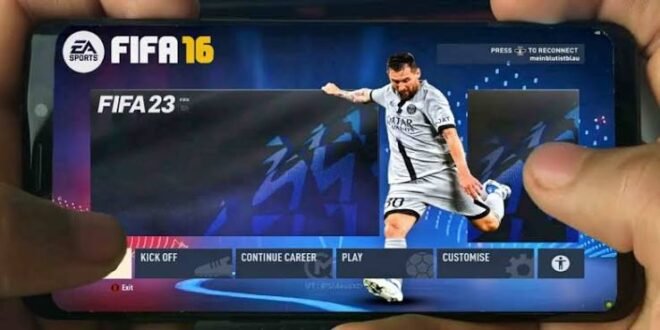
Still playing FIFA 16 on Android but wishing it looked more like EA Sports FC 24? That’s exactly where the FIFA 16 Mod EA Sports FC 24 concept gets interesting.
FIFA 16 remains popular among Android football gamers because the game offers solid gameplay, relatively manageable requirements, and plenty of room for community modifications. With the right mod project, players can give the classic game a modern football look through updated kits, squads, menus, faces, stadium graphics, and other visual changes.
I’ve always found FIFA 16 interesting for this reason. The original game has an older feel, but community creators can push it in completely different directions. So, what can an EA Sports FC 24 mod for FIFA 16 actually change, and what should you know before installing one?
Let’s break it down.
What Is FIFA 16 Mod EA Sports FC 24?
A FIFA 16 Mod EA Sports FC 24 usually refers to a community-made modification that transforms parts of FIFA 16 to resemble the newer EA Sports FC branding and football experience.
The base game remains FIFA 16, while mod creators replace or edit different game assets.
Depending on the project, you might find changes involving:
– EA Sports FC 24-style menus
– Updated club kits
– Modern player squads
– New player faces
– Updated football boots
– New balls
– Stadium improvements
– Updated competitions
– Modern scoreboards
– New graphics
– Updated team logos
– New commentary or audio elements
However, one important point matters here: a FIFA 16 mod cannot magically turn the entire game into the actual EA Sports FC 24 engine.
That distinction matters because some download pages use “EA Sports FC 24” as a catchy keyword even when the modification only changes graphics and database content.
Why Do Gamers Still Mod FIFA 16?
You might wonder why people still modify an older football game when newer mobile football titles exist.
Simple answer: FIFA 16 offers a great foundation for modification.
The game runs on many older and mid-range Android devices that struggle with heavier modern games. That makes it attractive to gamers who want updated football content without buying a powerful phone.
The community also enjoys experimenting.
One person might create a new kit pack. Another might update the squads. Someone else might completely redesign the menus.
Put those ideas together and suddenly your old FIFA 16 looks much newer.
FIFA 16 Mod EA Sports FC 24 Features
The exact features depend on the particular mod, but most EA Sports FC 24-themed projects focus on making FIFA 16 feel more modern.
Updated Kits
Kits immediately change the appearance of a football game.
A good mod can introduce more recent home, away, and goalkeeper kits for popular clubs. Some projects also update national-team shirts.
You can expect changes such as:
– Modern club jerseys
– Updated sponsors
– New goalkeeper kits
– Updated national-team kits
– Improved kit textures
If you care about realism, updated kits can make a surprisingly big difference.
Updated Squads and Transfers
This feature probably attracts the most attention.
Nobody wants to start a career mode and discover that half the players still belong to clubs they left years ago. Okay, maybe someone does, but most of us want current squads.
A FIFA 16 FC 24 mod may update:
– Player transfers
– Team rosters
– Player ratings
– Squad numbers
– Club formations
– Player positions
– Managers
The quality depends entirely on the mod creator.
Some databases receive careful attention, while others contain strange transfers or incorrect player information. Always check what a specific mod actually includes rather than trusting the title alone.
EA Sports FC 24-Style Graphics
Graphics provide another major reason gamers search for FIFA 16 EA Sports FC 24 mod Android.
Modders can change textures, menus, logos, scoreboards, fonts, backgrounds, and other visual elements.
A good graphics package can make the game feel much fresher.
You might see:
[10/6/2026 4:00 AM] Content store 1: – Modern menu backgrounds
– EA Sports FC-inspired branding
– New loading screens
– Updated scoreboards
– Modern fonts
– Improved pitch textures
– New competition graphics
Does it suddenly look identical to EA Sports FC 24? No.
But can it make FIFA 16 look considerably newer? Absolutely.
Updated Player Faces
Player faces can add another layer of realism.
Older FIFA 16 databases naturally contain players with appearances from years ago. Mod creators sometimes replace those faces with updated versions.
The best face packs can improve recognizable stars considerably.
However, face updates can also increase the size of a mod. If your phone has limited storage, you should consider that before installing massive graphics packages.
New Boots and Footballs
Small details matter.
Updated boots and footballs won’t change how you pass or shoot, but they can make matches look more authentic.
Some mods add modern boot designs, new official-style footballs, and improved textures.
IMO, these details work best when they complement other updates instead of acting as the only reason to install a mod.
Gameplay: Does the Mod Change FIFA 16?
Here’s something many people misunderstand.
A graphical modification doesn’t necessarily change the underlying gameplay engine.
If a mod mainly replaces:
– Kits
– Faces
– Logos
– Menus
– Balls
– Scoreboards
– Stadium textures
then the core FIFA 16 gameplay generally remains familiar.
That means you’ll still recognize the passing, shooting, defending, dribbling, and general movement.
And honestly, that’s one of the reasons people enjoy these mods. They get a refreshed presentation without completely abandoning the gameplay they already know.
FIFA 16 Mod vs EA Sports FC Mobile
How does a modified FIFA 16 compare with an official modern mobile football game?
The answer depends on what you value.
Feature| FIFA 16 FC 24 Mod| Modern EA Football Mobile
Base engine| FIFA 16| Modern mobile engine
Modern graphics| Depends on mod| More modern
Offline potential| Often stronger| Depends on mode
Mod customization| High| Limited
Squad updates| Community-dependent| Official updates
Online ecosystem| Limited| Stronger
Device requirements| Often lower| Can be higher
If you own an older Android phone, the FIFA 16 mod route may appeal more.
If you want official updates, current online features, and a modern ecosystem, an official EA mobile game makes more sense.
So which one wins?
There isn’t one universal answer.
Android Requirements
One advantage of FIFA 16 remains its relatively manageable hardware demands.
However, a large mod can require more storage and processing power than the original game.
Before installing an EA Sports FC 24 FIFA 16 mod, check whether your phone has:
– At least 3–4GB RAM for a smoother experience
– A capable Android processor
– Several gigabytes of free storage
– Enough battery capacity for long sessions
– A compatible Android version
These aren’t universal requirements because every mod package differs.
A lightweight kit update may run comfortably on an older phone, while a massive graphics package could push the same device much harder.
How Much Storage Does the Mod Need?
Don’t judge a mod by the size of one download file.
Some modifications use separate resources such as graphics, database files, textures, and other game assets.
You may need considerably more free storage than the advertised APK size suggests.
Before installing anything, check the complete package requirements.
Why? Running out of storage halfway through an installation ranks somewhere between conceding a 90th-minute goal and watching your Wi-Fi disconnect during an online match. Neither situation feels great. :/
Installation and Safety Tips
Searches for FIFA 16 Mod EA Sports FC 24 APK OBB Data can lead you to many unofficial websites.
You should treat those files carefully because community modifications come from third parties.
Before installing a package, consider these basic safety steps:
[10/6/2026 4:00 AM] Content store 1: 1. Use a trusted source whenever possible.
2. Check the file information and version.
3. Scan unfamiliar files with reputable security software.
4. Keep a backup of your original game data.
5. Avoid files that demand suspicious permissions.
6. Don’t enter your personal account information into random installers.
7. Avoid “unlimited money” packages that make unrealistic promises.
FYI, an APK filename doesn’t prove that the file comes from EA.
If a website promises “official EA Sports FC 24 FIFA 16 APK” with impossible features, take a step back and investigate before installing it.
Common Problems With FIFA 16 Mods
Community mods can look fantastic, but they can also create technical problems.
Game Crashes
A crash can happen because of incompatible files, insufficient RAM, corrupted resources, or conflicting modifications.
If the game worked before installing a new mod, the mod itself may have caused the problem.
Black Screen
A black screen can indicate incompatible graphics resources or incorrect game files.
Don’t immediately install another random APK. That approach often creates more problems than it solves.
Missing Kits or Faces
Sometimes the game loads correctly but certain assets don’t appear.
This can happen when a mod package expects specific files that you haven’t installed.
Always check the creator’s documentation for the specific project.
Lag
Heavy graphics can push your phone harder.
If you experience frame drops, try reducing graphics settings where possible and close unnecessary background applications.
Tips for Getting the Best Experience
Want your FIFA 16 mod to run smoothly?
Try these simple habits.
Keep Enough Free Storage
Leave several gigabytes of free space rather than filling your phone completely.
Don’t Mix Random Mods
Combining files from different mod projects can create conflicts.
If one mod already includes kits, faces, menus, and database updates, adding another package that replaces the same files may cause problems.
Back Up Your Original Files
This simple step can save you a lot of frustration.
Before modifying your installation, keep a backup of important original files. If something goes wrong, you can restore them instead of starting from scratch.
Match the Mod With Your Version
Not every FIFA 16 modification works with every release.
Check the specific version requirements before installing anything.
Is FIFA 16 Mod EA Sports FC 24 Worth It?
For gamers who enjoy older football games, yes, a good FIFA 16 FC 24 mod can still offer plenty of fun.
The biggest attraction comes from the combination of familiar FIFA 16 gameplay and modern community-created content.
You can get updated kits, squads, faces, menus, stadium textures, and other improvements without completely abandoning the original game.
But expectations matter.
Don’t expect the modification to reproduce every feature of the actual EA Sports FC 24 game. A mod can change the presentation and database, but it cannot simply replace the underlying engine with EA’s newer technology.
Final Verdict
The FIFA 16 Mod EA Sports FC 24 concept gives Android football gamers an interesting way to refresh an older classic.
Updated squads, modern kits, new faces, improved graphics, fresh menus, and EA Sports FC-inspired presentation can make FIFA 16 feel much newer.
The key comes down to choosing a reliable modification and understanding what it actually changes. Don’t trust every “FC 24 Full Version” headline you see online, especially when the file promises every possible feature in one tiny package.
If you enjoy FIFA 16’s gameplay but want a more modern look, this type of mod can provide a nice middle ground.
And let’s be honest: sometimes an old game with fresh kits feels better than a shiny new game that makes your phone sound like it’s preparing for takeoff. 🙂


