 wapday Download Latest Pro Soccer Games
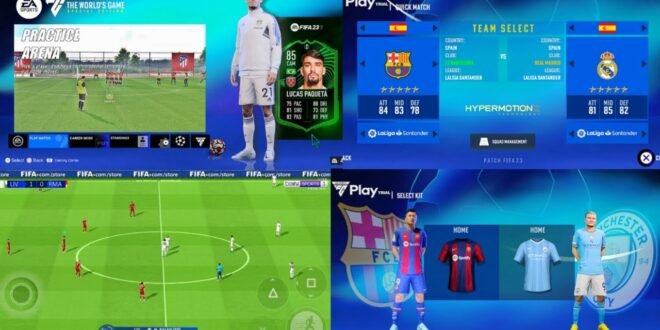
What if you could take the classic FIFA 16 gameplay and give it an EA Sports FC 24-style makeover? That idea explains why searches for FIFA 16 Mod EA Sports FC 24 continue to attract Android football fans.
This type of modification combines the older FIFA 16 foundation with newer football content. Depending on the version, mod creators can add updated squads, transfers, kits, player faces, menus, competitions, and other visual changes.
But let’s clear up one important detail first. EA never released an official FIFA 16 Mod EA Sports FC 24 edition. Community developers create these modifications, and each version can offer different features and quality.
So, what can you expect from a FIFA 16 FC 24 mod, and why do players still enjoy the old FIFA 16 engine? Let’s talk about it.
What Is FIFA 16 Mod EA Sports FC 24?
FIFA 16 Mod EA Sports FC 24 refers to a fan-made modification built around FIFA 16. Mod creators change different parts of the original game to make it resemble the newer EA Sports FC 24 era.
The original FIFA 16 provides the gameplay foundation. Creators then modify databases, kits, graphics, player appearances, menus, competitions, and other assets.
The result can feel like a completely different football game even though FIFA 16 remains underneath the changes.
Is It an Official EA Game?
No.
EA Sports never released FIFA 16 as an official FC 24 edition. EA launched FIFA 16 years before it introduced the EA Sports FC branding.
EA Sports FC 24 followed FIFA 23 as the first major EA football title under the FC name. Therefore, websites that advertise an “official FIFA 16 FC 24 APK” should immediately make you cautious.
Why does this matter? Because unofficial mods don’t receive the same support, updates, testing, or guarantees that official EA releases receive.
Why Do People Mod FIFA 16?
FIFA 16 already has a solid gameplay foundation. Instead of abandoning that engine, mod creators can refresh the game with newer football content.
Think about it like giving an old car a serious makeover. The engine stays familiar, but the interior, paint, wheels, and electronics get a modern treatment.
That’s basically the appeal of these football mods.
The Nostalgia Factor
If you’ve played FIFA 16 before, you’ll probably recognize the gameplay quickly.
The controls feel familiar, matches don’t demand massive hardware, and the overall experience remains straightforward.
Add updated teams and kits, and you get a combination of classic FIFA gameplay and modern football content.
Who wouldn’t enjoy taking an older game and giving it a fresh football season?
FIFA 16 Mod FC 24 Features
The exact features depend on the modification, but popular versions often focus on several areas.
Updated Squads and Transfers
One of the biggest reasons players search for FIFA 16 Mod FC 24 involves updated squads.
Mod creators can update player databases with transfers and lineups from the FC 24 era.
Depending on the specific version, you may find:
– Updated club squads
– New player transfers
– Updated formations
– Revised player ratings
– Updated national teams
– New leagues or competitions
– Updated team names
However, don’t expect every mod to contain the same database.
One creator might update major European clubs thoroughly, while another might focus on a smaller selection of teams. Always check the specific version details before assuming it contains every FC 24 transfer.
Updated Kits and Jerseys
Kits can make an enormous visual difference.
A strong FIFA 16 FC 24 mod can replace old jerseys with newer designs inspired by the 2023–24 football season.
You may see:
– Home kits
– Away kits
– Third kits
– Goalkeeper kits
– National-team jerseys
– Updated sponsor graphics
– New kit numbers and fonts
For football fans, these small details matter.
You can have perfect gameplay, but seeing your favourite club wearing an ancient kit can destroy the illusion pretty quickly.
Player Faces and Hairstyles
Mod creators can also update player appearances.
[10/4/2026 2:03 PM] Content store 3: They may replace older faces with newer versions, adjust hairstyles, add facial details, or modify player accessories.
A good face update can make the game feel considerably newer.
Of course, quality varies. Some creators produce impressive results, while others produce faces that make you wonder whether the player accidentally walked through a Photoshop experiment. That’s part of the unofficial-mod experience.
Graphics Improvements
The original FIFA 16 engine has limitations, but creators can still make noticeable visual changes.
Depending on the modification, you may find:
– Updated menus
– New scoreboards
– Improved player textures
– New ad boards
– Updated stadium visuals
– Enhanced pitch textures
– New boots
– Updated competition graphics
– Improved lighting effects
Don’t expect modern console-level graphics, though.
The game still comes from an older generation, and your phone can’t magically turn a 2015 football engine into a PS5 title.
Gameplay Changes
Some FIFA 16 FC 24 mods also adjust gameplay.
Creators may change player speed, shooting, passing, goalkeeper behaviour, ball physics, and other mechanics.
These changes can make matches feel more modern.
What I Look For in Gameplay
For me, gameplay matters more than fancy menus.
I’d rather play a mod with smooth passing, responsive controls, sensible defending, and good goalkeeping than one with beautiful menus but terrible match mechanics.
IMO, good gameplay makes a mod worth keeping. Graphics attract you initially, but gameplay decides whether you keep playing.
FIFA 16 Mod EA Sports FC 24 Android Experience
Android players often search for these modifications because FIFA 16-based projects can offer a familiar football experience on mobile devices.
The exact installation requirements depend on the specific build and how the creator packaged the game.
Some versions may use separate game resources, while others may package the necessary files differently.
Android Requirements
A reasonable Android phone can handle older FIFA-based games more comfortably than modern console-quality football titles.
Your device should ideally have:
– At least 3GB RAM
– A reasonably modern processor
– A capable GPU
– Enough free storage
– A compatible Android version
– Stable performance under sustained gaming
More demanding modifications can require better hardware.
If your phone starts heating up after five minutes, don’t immediately blame the mod. Close background apps, lower graphics settings where possible, and give the device some breathing room.
FIFA 16 Mod FC 24 vs EA Sports FC 24
So how does the community mod compare with the actual EA Sports FC 24?
The difference remains significant.
Feature| FIFA 16 Mod FC 24| EA Sports FC 24
Original engine| FIFA 16| Modern EA Sports FC engine
FC 24-style squads| Community updates| Official
Updated kits| Usually| Official
Player faces| Community edits| Official
Offline gameplay| Strong| Available depending on mode
Online services| Limited/unavailable| Official
Graphics| Older FIFA engine| Much more advanced
Modding| High community involvement| More restricted
EA support| No| Yes
If you want modern graphics, official online features, current support, and the full FC 24 experience, the actual EA Sports FC 24 release clearly wins.
But if you want lightweight gameplay and enjoy modifying older FIFA games, the FIFA 16 mod offers something different.
That’s the real comparison.
Common Problems With FIFA 16 FC 24 Mods
Community modifications don’t always work perfectly.
Game Crashes
Crashes can happen because of incompatible files, incorrect configurations, or hardware limitations.
Try using a version that matches your device rather than choosing the biggest graphical package available.
Black Screen
A black screen can indicate a compatibility or configuration problem.
Check your game resources and make sure your device supports the specific version.
Missing Kits or Faces
If players appear without faces or teams have missing kits, the modification may have incomplete resources.
[10/4/2026 2:03 PM] Content store 3: Check the version information and make sure all required game assets match the specific build.
Lag
Heavy graphics can push older phones harder.
If the game stutters, reduce graphical effects where possible and close background applications.
Sometimes a slightly lower visual quality gives you a much smoother match.
And honestly, smooth 60-ish gameplay beats a beautiful slideshow every single time. 🙂
Is FIFA 16 Mod FC 24 Safe?
This part deserves serious attention.
Because independent creators distribute these modifications, you should treat random APKs and game packages carefully.
A website can use attractive screenshots and the words “FIFA 16 Mod FC 24” while offering a completely unrelated or unsafe file.
Before opening unfamiliar software, consider these precautions:
– Use trusted sources whenever possible.
– Scan unfamiliar files with reputable security software.
– Avoid suspicious APKs that request unnecessary permissions.
– Don’t disable Android security protections just to install something.
– Avoid websites that demand personal information before accessing a file.
– Don’t enter banking information into download pages.
– Keep your Android system updated.
– Back up important files before experimenting with modifications.
Also remember that an unofficial modification can contain copyrighted game assets. Respect the original developers and use game copies and modifications according to applicable laws and the rights of the copyright holders.
Is FIFA 16 Mod EA Sports FC 24 Worth Playing?
That depends on what you’re looking for.
If you want FC 24’s official graphics, online ecosystem, licensing, and support, choose the official EA Sports FC 24 experience.
If you prefer older FIFA gameplay and want updated squads, kits, faces, and menus, a well-made FIFA 16 FC 24 modification can provide an enjoyable alternative.
The biggest advantage comes from combining familiarity with customization.
You already know how FIFA 16 plays. The mod simply gives the experience a newer coat of paint.
Who Should Try It?
A FIFA 16 FC 24 mod makes the most sense for players who:
– Enjoy classic FIFA gameplay
– Prefer lightweight football games
– Like offline matches
– Enjoy community modifications
– Want updated squads and kits
– Have a phone that struggles with newer football games
– Don’t mind unofficial content
It makes less sense if you specifically want official FC 24 online services and modern graphics.
Final Thoughts
FIFA 16 Mod EA Sports FC 24 gives classic FIFA gameplay a modern community makeover. Depending on the version, creators can add updated squads, transfers, kits, player faces, menus, stadium graphics, competitions, and gameplay changes.
However, remember the key point: EA never released an official FIFA 16 FC 24 edition. Community developers create these modifications, so every version can differ in quality, features, compatibility, and safety.
If you enjoy classic FIFA gameplay, a carefully made mod can breathe new life into an older title. Just don’t mistake a community project for an official EA release, and don’t trust every suspicious APK that promises “100% original FC 24” with a giant download button.
Sometimes the old FIFA engine just needs a fresh squad and a new kit. And apparently, that’s enough to keep us playing another match at 2 a.m. 🙂



2 comments
Pingback: Download eFootball PES 24 PPSSPP - wapday
Pingback: eFootball PES 2025 PPSSPP ISO Download - wapday