wapday Download Latest Pro Soccer Games
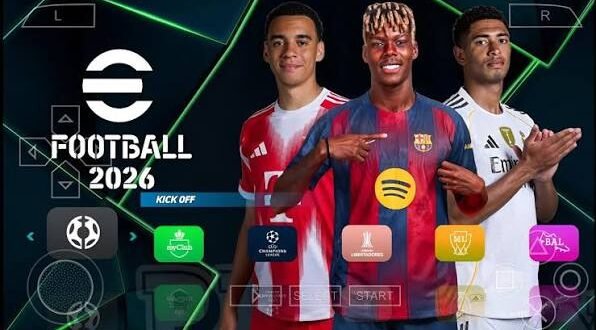
Looking for the eFootball PES 2026 PPSSPP ISO latest edition 2026 because you want updated teams, fresh kits, better graphics, and classic PSP gameplay on your Android phone? I get it. There’s something special about launching PPSSPP, picking your favourite club, and playing a quick match without needing a powerful console.
But before you start searching for some suspicious “100% original PES 2026 PSP” file, let’s clear up one important thing. Konami did not release an official eFootball PES 2026 game for PSP. Most PES 2026 PPSSPP versions online come from fan-made patches and modifications built around older PSP football games.
That does not automatically make them boring. In fact, some community patches add updated squads, kits, player faces, menus, stadium graphics, and other changes that make an older PES game feel surprisingly fresh.
So, what should you actually look for in the latest edition? Let’s talk about it.
What Is eFootball PES 2026 PPSSPP?
The term eFootball PES 2026 PPSSPP usually describes a fan-made modification of an existing PSP football game that runs through the PPSSPP emulator.
Creators take a PSP football base and modify elements such as teams, players, kits, logos, menus, competitions, and graphics. They then package those changes as a 2026-themed football experience.
Think of it like giving an old football game a serious makeover. The engine still carries that classic PSP feel, but the patch can make the presentation look much newer.
Is PES 2026 PPSSPP Official?
No. Konami did not release an official PES 2026 PSP ISO.
That distinction matters because websites sometimes use titles such as “official PES 2026 PSP” simply to attract clicks. FYI, the word “official” does not magically turn a fan patch into a Konami release.
When you see PES 2026 PPSSPP ISO, PES 2026 PSP, or eFootball PES 2026 PSP Android, think of those terms as search phrases for community-made modifications.
What Can You Expect From the Latest Edition?
The exact features depend on the individual patch creator. Different versions can use different base games, databases, graphics, and update files.
Still, many modern PES PSP patches focus on the same areas.
Updated Teams and Squads
One of the biggest reasons players search for a PES 2026 PPSSPP latest update involves squad updates.
A good patch can refresh:
– Player transfers
– Club squads
– Player names
– Team formations
– Starting lineups
– National teams
– Competition structures
– Club logos
Imagine opening a PSP football game and finding familiar modern squads instead of wondering why a player still represents a club he left years ago. That little detail makes a huge difference.
New Kits and Club Logos
Kit updates also help an old PSP game feel fresh.
Creators can replace older shirts with modern designs and update club badges, sponsor layouts, and national-team kits. The improvement might look simple, but football fans notice these details immediately.
Honestly, nothing kills the illusion faster than seeing your favourite club wearing a kit from an ancient season. 🙂
Updated Player Faces
Some patches also introduce updated player faces.
These changes can include:
– New hairstyles
– Updated facial textures
– Improved player likenesses
– Different skin textures
– Updated boots and accessories
However, don’t expect every player to look exactly like his real-world counterpart. PSP hardware has obvious technical limits, and patch creators work within those limits.
PES 2026 PPSSPP Graphics and Gameplay
Graphics matter, but gameplay matters even more.
A patch can give you beautiful menus and shiny kits, but if the gameplay feels terrible, you probably won’t play it for long. The best PES PSP modifications keep the classic responsive football mechanics while improving the presentation.
Classic PSP Gameplay
The PSP PES engine offers a different experience from modern console football games.
[10/4/2026 1:27 PM] Content store 1: You don’t get the huge animations and advanced physics from current PlayStation and Xbox titles. Instead, you get relatively straightforward controls that make quick matches easy to pick up.
That simplicity actually works well on Android.
You can launch PPSSPP, connect a controller if you want, or use the touchscreen controls and start playing without spending half an hour adjusting 400 settings.
Improved Match Presentation
Some fan patches modify:
– Scoreboards
– Menus
– Competition graphics
– Fonts
– Loading screens
– Team graphics
– Stadium visuals
– Commentary elements
These additions can make the game feel much closer to a modern football title.
Still, remember that a graphical patch cannot transform PSP hardware into a PlayStation 5. If somebody promises “PS5 graphics on PSP with 200 FPS,” you might want to keep one eyebrow raised.
eFootball PES 2026 PPSSPP ISO, CSO, and Save Files
If you plan to run a legitimate PSP copy with a fan-made modification, understanding the common file types helps.
ISO
An ISO represents a disc image. PPSSPP can load compatible PSP game images directly.
CSO
A CSO compresses an ISO to reduce storage requirements.
The smaller file can help if your phone has limited storage, although compression can sometimes affect loading performance depending on the game and device.
Save Data
Some patches use save data to carry updated teams, player information, kits, or other modifications.
Your exact setup depends on the patch creator’s instructions.
Texture Files
Some advanced PPSSPP modifications use texture replacements. These can improve menus, player graphics, stadium elements, and other visual assets.
Your PPSSPP version and the specific patch determine the correct folder structure.
How to Set Up PES 2026 on PPSSPP
If you already own a legitimate PSP game and want to experiment with a compatible community patch, keep the process simple.
Step 1: Install PPSSPP
Download PPSSPP from its legitimate distribution channels and install the Android version on your device.
Avoid random emulator APKs from unknown websites. You don’t need a mystery app with five suspicious permissions just to play football.
Step 2: Use a Legitimate PSP Game Copy
Use a PSP game copy that you legally own and follow the patch creator’s instructions for applying modifications.
I won’t point you toward pirated ISO downloads or copyrighted game files. You can still learn how the patch works without relying on questionable download pages.
Step 3: Apply the Community Patch
Follow the specific instructions that come with your chosen patch.
Some modifications rely on save data, while others use textures or other files. Don’t randomly throw every folder into PPSSPP and hope for a miracle.
Step 4: Configure PPSSPP
Open PPSSPP and adjust the graphics settings according to your phone.
Start with moderate settings, test the game, and increase graphical quality gradually.
Best PPSSPP Settings for PES 2026
Your ideal settings depend on your phone’s processor, GPU, RAM, and screen resolution.
For a smoother experience, you can experiment with:
– Rendering resolution: Start with 2x
– Frameskip: Keep it disabled unless you experience performance problems
– Texture filtering: Use a moderate setting
– VSync: Test it according to your device
– Rendering backend: Try Vulkan if your device supports it
– Texture scaling: Avoid aggressive settings on weaker phones
– Fast memory: Keep it enabled if your device handles it correctly
Don’t copy someone’s settings blindly.
A configuration that works beautifully on a Snapdragon gaming phone might struggle on an entry-level Android device. IMO, stable gameplay matters more than squeezing every possible graphical effect out of PPSSPP.
Android Requirements
You don’t necessarily need an expensive flagship phone to enjoy a PSP football game.
A reasonable Android phone with enough RAM and a capable processor can handle PPSSPP well.
Recommended Basics
Look for:
[10/4/2026 1:27 PM] Content store 1: – Android 8 or newer
– At least 2GB RAM
– Several gigabytes of free storage
– A reasonably capable GPU
– Updated PPSSPP software
– Enough battery capacity for longer sessions
More powerful phones can push higher rendering resolutions and additional graphical enhancements.
Storage also matters. Keep some free space because patches may include multiple files, textures, and save data.
Common PES 2026 PPSSPP Problems
Not every patch works perfectly.
You might encounter issues such as:
Game Crashes
A mismatch between the patch, save data, and base game can cause crashes.
Try checking the patch instructions before changing random settings.
Missing Textures
If kits or menus appear incorrectly, check the texture folder structure.
PPSSPP expects files in specific locations. One misplaced folder can make your beautiful new kit disappear faster than a striker’s confidence after missing an open goal.
Slow Gameplay
If the game runs slowly, lower your rendering resolution first.
You can also reduce texture scaling and other demanding graphics options.
Black Screen
A black screen can result from incompatible settings, incorrect files, or an unsuitable patch combination.
Return to the default PPSSPP settings and test the game before making additional changes.
PES 2026 PPSSPP vs Modern eFootball
How does this fan-made PSP experience compare with modern eFootball?
The answer depends on what you want.
Feature| PES 2026 PPSSPP Fan Patch| Modern eFootball
Offline play| Strong advantage| More limited depending on mode
Graphics| PSP-level| Modern graphics
File size| Generally smaller| Generally larger
Internet requirement| Often works offline| Online features matter heavily
Gameplay| Classic PES feel| Modern eFootball mechanics
Device requirements| Lower| Higher
Custom patches| Large community scene| More restricted
Portability| Excellent| Good
If you want modern graphics and online competition, modern eFootball wins easily.
If you want offline football on a modest Android phone, a good PES PSP patch still offers plenty of entertainment.
Is eFootball PES 2026 PPSSPP Worth Playing?
For fans of classic PES, absolutely.
The biggest attraction comes from the combination of old-school PSP gameplay and modern community updates.
You can enjoy updated squads, kits, player faces, menus, and other changes without needing a modern console.
However, manage your expectations.
This isn’t an official Konami PES 2026 PSP game. It won’t suddenly produce PS5-quality graphics, ultra-realistic animations, or modern online infrastructure.
Instead, think of it as a community project that keeps the classic PSP football experience alive.
Things to Check Before Downloading Any Patch
Search engines contain plenty of pages advertising “latest updates.” Some offer useful information, while others simply want clicks.
Before downloading anything, check:
– Who created the patch
– Whether the page provides clear installation instructions
– Whether the file matches your PPSSPP version
– Whether the patch requires a particular base game
– Whether the download contains suspicious executable files
– Whether antivirus software flags anything
– Whether the creator provides screenshots or update information
Never enter your Google password, banking details, or other sensitive information just because a download page demands it.
A football patch should not require your entire digital identity. Seriously.
Final Thoughts
The eFootball PES 2026 PPSSPP ISO latest edition 2026 search attracts players who want something simple: classic PSP football with a modern appearance.
While Konami never released an official PES 2026 PSP game, fan-made modifications can refresh older PES titles with updated squads, kits, player faces, menus, graphics, and football competitions.
The experience won’t match modern console football, and that’s perfectly fine. Sometimes you just want to grab your phone, launch PPSSPP, choose your club, and score a ridiculous 30-yard goal without worrying about online servers.
[10/4/2026 1:27 PM] Content store 1: Just remember to use legitimate game copies, download community patches carefully, and choose PPSSPP settings that match your phone.
And if your goalkeeper concedes five goals in ten minutes, don’t blame the patch. We both know you probably pulled him out of position. 🙂