 wapday Download Latest Pro Soccer Games
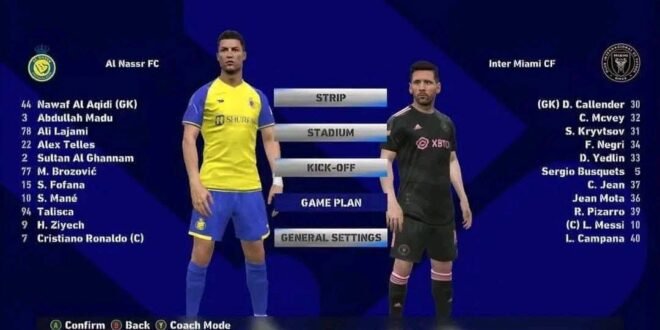
FIFA 14 MOD FC 26 Android Best Graphics Offline
Are you looking for FIFA 14 MOD FC 26 Android Best Graphics Offline to enjoy updated football teams, modern kits, realistic player faces, and exciting matches without an internet connection? If you still love the classic FIFA 14 mobile gameplay, this fan-made update might be exactly the kind of football game you’re searching for.
FIFA 14 remains popular among Android football gaming fans because of its familiar controls, quick matches, and traditional career-style gameplay. Although the original game is old, the modding community continues to create updates inspired by newer EA Sports FC releases.
The idea is simple: keep the classic FIFA 14 gameplay while giving it a fresh look with updated squads, modern menus, improved textures, and new-season kits.
But there’s one thing to remember before downloading anything. FIFA 14 MOD FC 26 is an unofficial fan-made modification, not the official EA Sports FC 26 game. The features depend on the particular mod, and some downloads may contain incomplete or outdated files.
In this article, we’ll explore the features players look for, graphics and gameplay, offline modes, installation requirements, common problems, and what you should check before installing the game on your Android phone.
What Is FIFA 14 MOD FC 26 Android?
FIFA 14 MOD FC 26 is a fan-made modification of the older FIFA 14 football game. It aims to bring the appearance and football content of the FC 26 season to a familiar gameplay experience.
Depending on the release, the modification may include updated team squads, player transfers, kits, club logos, player faces, menus, and scoreboards.
Some versions are distributed as Android APK packages with additional OBB or DATA files. Others are designed to run through PPSSPP and use PSP game files, save data, and textures.
These versions are not necessarily interchangeable. Always check whether the particular release is a native Android game or a PPSSPP modification before following installation instructions.
The biggest attraction is the combination of classic FIFA gameplay and a more modern football presentation.
FIFA 14 MOD FC 26 Features
1. Updated Transfers and Squads
One of the main reasons gamers search for FC 26 updates is to play with modern football squads.
Depending on the mod, team databases may include updated player clubs, shirt numbers, positions, ratings, and line-ups.
This can make familiar competitions feel more current. You might find updated squads for popular European clubs and national teams, although the exact teams and transfers depend on the release.
Remember that unofficial modifications are not always updated consistently. Check the version date and available screenshots to see whether the squads match the season you’re looking for.
2. New FC 26-Style Kits
Old kits can make a football game feel dated, even when the gameplay is still enjoyable.
Many FIFA 14 modifications focus on refreshing home, away, and goalkeeper kits with designs inspired by modern football seasons.
Some releases also update club badges, competition graphics, and mini-kits. The results vary depending on the creator’s artwork and the quality of the installed textures.
If updated uniforms are important to you, look for gameplay screenshots rather than relying entirely on promotional images.
3. Improved Graphics and Realistic Player Faces
Graphics are a major selling point for FIFA 14 MOD FC 26.
Fan-made updates may introduce higher-resolution textures, redesigned player faces, updated hairstyles, improved grass, new stadium advertisements, and modern menus.
These changes can make the older game look fresher on an Android screen.
However, the underlying FIFA 14 engine remains the foundation. Even with improved textures, it does not become the same game engine used by the official modern EA Sports FC release.
Terms such as “4K graphics,” “PS5 camera,” and “next-gen gameplay” should be treated as descriptions used by the creator, not guarantees of console-level quality.
4. Offline Gameplay
Offline football is one of the biggest advantages players look for when choosing an older mobile football game.
A compatible FIFA 14 modification may support local matches without requiring a continuous internet connection. Some versions also retain offline career-style or tournament modes.
This can be useful when travelling, conserving mobile data, or playing in an area with a weak network.
Nevertheless, offline support depends on the specific build. Verify the requirements before downloading, and test the game without an internet connection after any legitimate initial setup.
5. Career Mode
Career-style gameplay is another reason players continue searching for FIFA 14 modifications.
Depending on the version, you may be able to select a club, manage team selections, play matches across a season, and work towards winning competitions.
The precise options vary between releases. A mod’s title or cover image does not prove that every career feature works correctly.
If career mode is your priority, look for evidence showing the actual menus and match progression in the version you plan to install.
6. Tournament and Quick Match Modes
Quick matches are ideal when you only have a few minutes to play.
Tournament modes provide a longer challenge, letting you compete through multiple fixtures rather than playing a single match.
Some modifications preserve modes from the original game, while others change the available options or team database. Confirm the supported modes for the specific release.
7. Updated Menus and Scoreboards
Modern menus can make an older game feel more current.
An FC 26-inspired mod may feature updated backgrounds, team selection screens, player cards, scoreboards, and loading screens.
Some versions also modify stadium advertising and match presentation.
These changes are mainly visual. They do not necessarily add new gameplay systems or make the underlying engine identical to the official EA Sports FC game.
FIFA 14 MOD FC 26 Graphics and Gameplay
The appeal of this modification comes from combining familiar football mechanics with updated visual content.
Players who enjoy the older FIFA 14 style may appreciate the passing, shooting, defending, and player movement without having to learn a completely different game.
The graphics experience depends on the mod and the phone running it. A version with detailed textures may look attractive on a capable device, while a less powerful phone may experience slowdowns or overheating.
For smoother gameplay, try the following:
- Close unnecessary background applications before launching the game.
- Keep sufficient free storage available.
- Use moderate graphics settings if the game offers them.
- Avoid installing multiple texture packs that conflict with one another.
- Check whether the mod is compatible with your Android version.
A stable game with consistent performance is often more enjoyable than a heavily modified version that crashes during matches.
How to Install FIFA 14 MOD FC 26 on Android
Installation depends on whether you have a native Android APK version or a PPSSPP version.
For a Native Android APK + OBB + DATA Version
Step 1: Verify the source
Only consider files from a source you trust. Unofficial APKs can be modified to include unwanted software, so scan files and be cautious with unknown permissions.
Step 2: Check the required files
Read the release instructions to determine whether the version requires an APK, OBB, DATA folder, or another format.
Not every version uses all these files.
Step 3: Extract the archive
If the creator provides a compressed archive, use a reputable file manager to extract it. Make sure the extraction completes without errors.
Step 4: Follow the version-specific instructions
The folder structure varies by game build and Android version. Use the instructions supplied for that exact release rather than copying file paths from an unrelated tutorial.
Step 5: Install and test
Install the APK only if you trust the package and understand the risks. Launch the game and check that the menus, squads, and match modes work correctly.
If it crashes, do not immediately install another unknown APK. First check the file integrity and compatibility.
For a PPSSPP Version
A PPSSPP modification requires the PPSSPP emulator and a compatible PSP game image.
The necessary files may include an ISO or CSO, save data, and textures. The exact requirements depend on the particular mod.
You can download the emulator from the official PPSSPP website and consult its documentation for help using compatible game files.
A native Android FIFA 14 APK is not the same thing as a PSP ISO, so make sure you are following the correct instructions.
FIFA 14 MOD FC 26 System Requirements
There is no single verified minimum specification for every FIFA 14 MOD FC 26 release.
Performance depends on the original game, the size and quality of the textures, the Android version, and the phone’s hardware.
Before installing, check:
- Android compatibility: Confirm that the build supports your operating system.
- RAM: More available memory can help reduce crashes and slowdowns.
- Storage: Leave enough space for the archive, extracted files, and game data.
- Processor and graphics: Older phones may struggle with modifications that use heavier textures.
- File compatibility: APK, OBB, DATA, and texture files must match the same release.
Avoid trusting an advertised file size or RAM requirement without checking the actual package and its documentation.
Common Problems and Fixes
The Game Shows a Black Screen
This can happen when required files are missing, the folder structure is incorrect, or the build is incompatible with your device.
Check the installation instructions and confirm that the downloaded files are complete.
The Game Crashes After Opening
Possible causes include an incompatible APK, corrupted data, insufficient storage, or a problem with the modification itself.
Restart your phone, close background apps, and check the source’s compatibility information. If the problem continues, remove the package rather than installing random “fixer” applications.
The Kits or Transfers Are Not Updated
The mod may contain an older database, or the required DATA files may not have been installed correctly.
Check the release date and confirm that the files belong to the same version.
The Graphics Are Not as Good as Expected
Promotional screenshots may use different settings, edited images, or another version of the game.
Remember that updated textures cannot completely replace the original game engine. If the game runs poorly, reduce available graphics settings instead of adding more texture packs.
The Game Does Not Work Offline
Some packages may require an initial connection or may not support all the advertised offline features.
Check the specific release notes and test offline functionality. Do not assume every game described as “offline” will behave the same way.
Is FIFA 14 MOD FC 26 an Official EA Sports Game?
No. FIFA 14 MOD FC 26 is an unofficial fan-made modification based on an older game.
The name FC 26 refers to the season and visual content that the modification attempts to represent. It does not mean the package is the official EA Sports FC 26 release.
If you want an officially distributed football game, check EA’s official EA SPORTS FC website and the official mobile game listing on your app store.
Be cautious with websites that use official branding to suggest their modified files are authorised by EA.
Is FIFA 14 MOD FC 26 Worth Trying?
It may appeal to players who enjoy classic FIFA gameplay, want updated football-themed visuals, and prefer a game that can support offline matches.
Its main advantage is the familiar foundation: instead of learning an entirely new football game, you get an older experience with a fresh presentation.
However, the quality of unofficial modifications varies. Some may have incomplete squads, incorrect transfers, compatibility issues, or missing features.
Before installing one, check the actual gameplay footage, version details, required files, and security risks.
Final Verdict
FIFA 14 MOD FC 26 Android Best Graphics Offline is a search term for football fans who want modern kits, updated squads, improved player faces, and classic offline football gameplay on Android.
The important thing is to choose the correct version. These modifications are not official EA Sports releases, and their features, graphics, file requirements, and offline modes vary.
If you enjoy the FIFA 14 style, a well-maintained fan-made update may be worth investigating. Just remember that updated textures do not turn the old game into the official FC 26 release.
Verify the files, protect your device, and choose a version that works reliably on your phone. After all, the best football game is one that lets you finish the match instead of crashing before kick-off.


