wapday Download Latest Pro Soccer Games
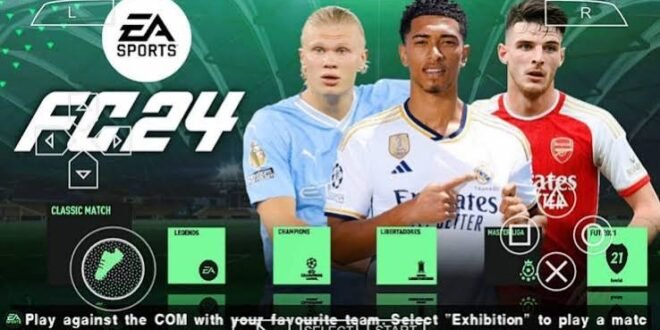
Want FIFA 24 PPSSPP with the best graphics and PES 5 camera? Then you’re probably looking for more than updated teams and fancy menus. You want a PSP-style football experience that looks sharp, feels smooth, and gives you that classic wide camera angle that makes passing and positioning much easier.
There’s one important detail to clear up first: EA never released an official FIFA 24 game for PSP. When players talk about FIFA 24 PPSSPP ISO, they usually mean an unofficial fan-made modification based on an existing PSP football game. Mod creators can update kits, squads, textures, menus, faces, and other assets to create a modern FIFA-style experience.
So, what actually makes the graphics look good? And does the PES 5 camera make the game look better or simply change how you see the pitch? Let’s break it down.
What Makes FIFA 24 PPSSPP Graphics Look Good?
Graphics involve much more than player faces.
A convincing football mod needs several visual elements to work together. A beautifully designed kit won’t save a game with blurry players, poor pitch textures, and ugly menus.
The strongest FIFA 24-style PPSSPP modifications usually focus on:
– High-quality player textures
– Updated kits
– Improved pitch textures
– Better stadium graphics
– Updated scoreboards
– Modern menus
– Improved player faces
– New boots and footballs
– Enhanced lighting
– Sharper textures
– Updated advertising boards
Why does this combination matter? Your eyes notice the entire match presentation, not just one player.
FIFA 24 PPSSPP Player Graphics
Player graphics usually grab attention first.
A good PSP football modification can refresh player faces, hairstyles, boots, body textures, and kits. When you recognise a famous player immediately, the match feels much more current.
The quality can vary considerably between mods, though. Some creators spend serious time improving star players, while others simply replace a few textures and call it a day.
Player Faces
Updated player faces can make a huge difference.
A modern-looking face combined with an updated hairstyle and kit helps older PSP graphics feel newer. You might notice the biggest improvements with popular players because modders tend to prioritise them.
Look for:
– Sharper facial textures
– Updated hairstyles
– Improved skin details
– Better player portraits
– Modern accessories
– Updated beards and facial hair
Of course, don’t expect every player to receive a perfect makeover. PSP hardware has limits, and modders work within those limits.
Updated FIFA 24 Kits
Kits provide another major visual upgrade.
An older PSP football game might still show outdated uniforms, while a FIFA 24-style modification can introduce newer designs and colours.
Depending on the mod, you might see:
– Home kits
– Away kits
– Third kits
– Goalkeeper kits
– National-team kits
– Updated sponsor graphics
– Improved kit textures
Kit quality matters more than many players realise.
Why? You see the kits throughout every match. Even if the player model stays relatively simple, a sharp kit texture can make the entire team look cleaner.
Better Pitch and Grass Textures
Ever played a football game where the players looked decent but the pitch looked like green cardboard?
Yeah, nobody wants that.
The pitch occupies a huge portion of the screen, especially when you use a wide camera such as the PES 5-style camera. That makes grass textures particularly important.
A good modification can improve:
– Grass texture
– Pitch lines
– Penalty areas
– Centre circle
– Goal areas
– Sidelines
– Pitch colour
– Stadium surroundings
The PES 5 camera can actually make these improvements more noticeable because you see more of the playing surface at once.
PES 5 Camera: Why Players Like It
Now we reach the interesting part.
The PES 5 camera gives the match a wider, more tactical view. Instead of focusing heavily on the player carrying the ball, the camera lets you see more teammates and opponents around you.
Why does that matter?
[10/7/2026 2:34 AM] Content store 4: Because football isn’t just about dribbling toward the goal like you’ve got a personal grudge against the goalkeeper.
You need to see passing lanes, defensive gaps, overlapping full-backs, and midfield movement.
Better Pitch Awareness
The wider camera can improve your awareness.
You can spot:
– Open teammates
– Defensive gaps
– Wide players
– Through-ball opportunities
– Overlapping runs
– Counterattacking spaces
IMO, this makes the camera particularly useful for players who enjoy passing and tactical football.
Better Passing
A wider viewpoint can make passing feel more natural because you see more of the pitch.
You can quickly identify a midfielder making a run or a winger sitting completely unmarked.
That extra visibility can reduce blind passes and encourage more deliberate build-up play.
FIFA 24 PPSSPP Graphics and Camera Combination
The graphics and camera work together.
Imagine installing a mod with excellent player faces, modern kits, and improved stadium textures. Then you switch to a wider PES 5-style camera and suddenly see the whole pitch.
That combination can create a surprisingly modern presentation despite the underlying PSP hardware.
The camera doesn’t technically increase graphical quality. Instead, it changes how you experience the graphics.
You see more of the stadium, pitch, players, and overall match environment.
Stadium Graphics and Atmosphere
Stadium presentation can make or break a football game.
Some FIFA 24-style PPSSPP mods update stadium textures, advertising boards, crowd colours, goal nets, and other environmental elements.
A good stadium package can include:
– Updated advertising boards
– Improved crowd textures
– Cleaner pitch surroundings
– Better goal nets
– Updated banners
– Modern stadium colours
– Enhanced lighting
You won’t get the same graphical complexity as modern console FIFA or EA Sports FC titles. The PSP simply doesn’t have that hardware power.
Still, smart texture work can make an older engine look surprisingly good.
Scoreboards and Broadcast Graphics
Scoreboards seem like a small detail, but they contribute heavily to presentation.
A modern scoreboard can make a PSP football match feel more like a current football broadcast.
Depending on the modification, you may see updated:
– Score display
– Match timer
– Competition logo
– Team abbreviations
– Replay graphics
– Tournament presentation
These changes don’t improve gameplay, but they improve the overall atmosphere.
And let’s be honest, a modern scoreboard looks much better than something that screams “2000s football game.”
Boots, Balls, and Player Accessories
Some of the best FIFA 24 PPSSPP graphics mods also update smaller visual details.
Creators can replace older boot and football textures with modern designs.
You may find:
– Modern football boots
– Updated match balls
– New goalkeeper gloves
– Improved accessories
– Updated player equipment
These details might not change your tactics, but they add polish.
The best modifications understand that small details contribute to the bigger visual picture.
Graphics Settings in PPSSPP
Your modification can contain excellent textures, but your PPSSPP settings still matter.
The emulator gives you several options that can influence image quality and performance.
Rendering Resolution
Increasing the rendering resolution can make the game look sharper.
However, higher resolution also demands more from your phone or PC.
If your device struggles, try lowering the resolution until the game maintains stable performance.
Texture Filtering
Texture filtering can improve the appearance of surfaces and objects.
It can help reduce the rough appearance of some textures, especially when you play on a larger screen.
Frameskipping
I generally recommend avoiding frameskipping unless your device genuinely needs it.
Frameskipping can help performance on weaker hardware, but it can also make gameplay feel less smooth.
Would you rather have slightly softer graphics with smooth gameplay or beautiful screenshots with stuttering movement?
[10/7/2026 2:34 AM] Content store 4: Easy choice for me.
Best Graphics Settings for Different Phones
Not every Android phone needs the same configuration.
Low-End Android
Try:
– Moderate rendering resolution
– Minimal enhancements
– Limited texture effects
– Frameskip only when necessary
– Closed background apps
The goal here involves stable gameplay rather than maximum visual quality.
Mid-Range Android
You can usually experiment with:
– Higher rendering resolution
– Texture filtering
– Additional visual enhancements
– Higher-quality textures
This category often offers the best balance between graphics and performance.
High-End Android
If your phone has a powerful modern processor and plenty of RAM, you can push PPSSPP harder.
You can experiment with:
– Higher resolution
– Texture scaling
– Filtering
– Anti-aliasing options
– Additional rendering improvements
Still, don’t enable every option simply because your phone lets you. Test each change and watch the frame rate.
FIFA 24 PPSSPP Graphics vs Modern EA Sports FC
How do these graphics compare with modern EA Sports FC games?
Honestly, they don’t compete directly.
Modern EA Sports FC titles use significantly more advanced rendering technology, detailed player models, sophisticated lighting, and much larger environments.
A FIFA 24-style PSP modification instead focuses on making an older football engine look newer through updated assets.
Feature| FIFA 24-Style PPSSPP Mod| Modern EA Sports FC
Platform| PSP emulation| Modern platforms/mobile
Graphics| Modded PSP textures| Modern 3D graphics
Player detail| Moderate| High
Stadium detail| Mod-dependent| Much higher
Camera options| PSP-style| Extensive
Hardware demand| Lower| Higher
Offline potential| Often strong| Depends on title
Gameplay feel| Classic football| Modern football
If you want cutting-edge visuals, modern EA Sports FC wins easily.
But if you want classic PSP gameplay with modern-looking football content, a good PPSSPP modification still has plenty of appeal.
Why the PES 5 Camera Works So Well
The biggest advantage of the PES 5 camera isn’t graphical quality.
It’s visibility.
You can see more players, more space, and more passing options.
That makes it particularly useful for:
– Possession football
– Counterattacks
– Through balls
– Wing play
– Tactical defending
– Midfield passing
– Build-up play
Ever tried a narrow camera and wondered why your winger suddenly disappeared from the universe?
A wider camera solves that problem.
Common Graphics Problems
Not every FIFA 24 PPSSPP modification delivers perfect graphics.
You might encounter:
– Blurry textures
– Missing player faces
– Incorrect kits
– Flickering graphics
– Black screens
– Slow performance
– Texture glitches
– Incorrect colours
These problems often come from incompatible files, demanding textures, or incorrect PPSSPP settings.
Try changing one setting at a time rather than changing everything simultaneously. Otherwise, you won’t know which setting caused the problem.
Safety and File Compatibility
Because FIFA 24 PPSSPP ISO versions generally involve unofficial fan modifications, you should pay attention to where files come from.
Avoid suspicious download pages, strange executables, and files that request unnecessary permissions.
Also remember that an ISO should only come from a game copy you have the legal right to use. I can’t provide unauthorized copyrighted game downloads or piracy links.
For a modification, always check that the game files and textures match the version you intend to use.
Compatibility matters more than file size.
A huge “ultra graphics” package means very little if it crashes during the first match.
Final Verdict: Are the Best FIFA 24 PPSSPP Graphics Worth It?
A good FIFA 24 PPSSPP ISO with PES 5 camera can give classic PSP football a surprisingly fresh appearance.
The biggest visual improvements usually come from:
– Updated player faces
– Modern kits
– Sharper textures
– Improved pitch graphics
– Updated stadium elements
– Modern scoreboards
– New boots and footballs
– Better menus
– A wide PES 5-style camera
The camera itself doesn’t make the graphics technically better. Instead, it gives you a wider view that lets you appreciate the pitch, players, stadium, and updated textures from a more tactical perspective.
And that’s the real charm.
You aren’t turning a PSP game into a modern console title. You’re taking a classic football foundation and giving it a modern visual makeover.
If you find a stable modification, match the PPSSPP settings to your device, and choose the PES 5 camera because you actually enjoy the wider tactical view, you can get a very enjoyable football experience.
Great graphics look nice. Great graphics with smooth gameplay and a camera you actually enjoy? That’s the real win.