wapday Download Latest Pro Soccer Games
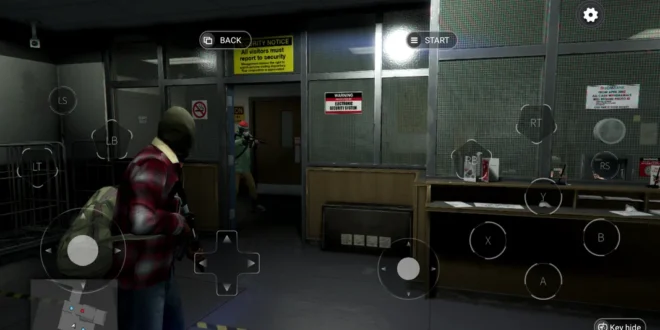
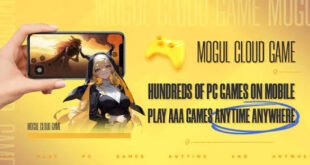
Want to play PC-style games on your Android phone without carrying a gaming laptop around? Mogul Cloud caught attention for exactly that reason. The app marketed itself as a cloud-gaming platform that could bring PC and console-style gaming to mobile devices, including games associated with Steam, Epic Games, PPSSPP, and other platforms.
But here’s the part you should understand before searching for Mogul Cloud APK: cloud gaming doesn’t mean your phone suddenly develops a gaming-PC processor overnight. The remote server does much of the heavy lifting while your phone handles the stream and your controls.
So, how did Mogul Cloud work, what made it interesting, and what should you know before installing an APK today? Let’s break it down.
What Is Mogul Cloud?
Mogul Cloud Game-Play PC Games was an Android application developed by Popular Cloud Game- Mogul Ltd. The app promoted cloud gaming and advertised access to PC and console game experiences through a mobile device.
The service positioned itself around the idea that even phones with modest hardware could access demanding games through cloud technology.
That approach sounds pretty clever, right?
Instead of asking your phone to render every frame of a demanding PC game locally, a cloud gaming service can process the game remotely and stream the resulting video to your phone.
How Mogul Cloud Was Supposed to Work
The basic idea behind cloud gaming remains fairly simple.
A remote computer or server handles the demanding game processing. Your Android phone receives the video stream, sends your controller inputs back to the service, and displays the result on your screen.
Think of it like controlling a gaming PC from your phone.
The Basic Process
The experience generally follows this pattern:
1. You launch the cloud gaming app.
2. You choose a supported game or gaming service.
3. The remote system handles the game processing.
4. The service streams the gameplay to your Android device.
5. Your phone sends touch or controller commands back to the remote system.
That means your phone doesn’t necessarily need the same hardware that a local PC would need.
However, your internet connection becomes extremely important.
Why Mogul Cloud Attracted Android Gamers
The biggest selling point involved accessibility.
Many Android users own phones that can’t run demanding PC games locally. A cloud gaming platform can potentially bypass some of those hardware limitations by moving the heavy processing elsewhere.
Mogul Cloud’s descriptions specifically promoted games and platforms associated with titles such as GTA V, Elden Ring, Fortnite, FIFA, NBA 2K, Cyberpunk 2077, Watch Dogs, The Witcher, and others.
Of course, seeing a game listed in an app description doesn’t automatically mean you could launch every title whenever you wanted. Cloud services depend on server availability, licensing, supported regions, account systems, and the service’s own game catalogue.
Mogul Cloud and PC Games on Android
So, can Mogul Cloud really let you play PC games on Android?
That was the core idea behind the platform.
The app marketed itself as a way to access PC and console gaming experiences through mobile devices. It also mentioned PC games, emulators, Steam, Epic Games, and PPSSPP in its descriptions.
This approach differs from traditional Android emulators.
A conventional emulator tries to reproduce another platform’s hardware or software environment locally on your phone. Cloud gaming takes a different route: the remote machine handles the demanding workload while your phone streams the result.
That difference matters when you compare performance.
Mogul Cloud vs Traditional Android Gaming
Let’s say you want to play a demanding game.
With a normal Android game, your phone handles the graphics, physics, audio, and other game processes.
With cloud gaming, the remote infrastructure handles much of that work.
[10/7/2026 2:04 AM] Content store 2: Feature| Mogul Cloud-style Gaming| Normal Android Game
Main processing| Remote/cloud system| Your phone
Internet requirement| High| Often lower
Phone GPU demand| Lower| Higher
Streaming required| Yes| No
Offline play| Generally unsuitable| Often possible
Input latency| Depends on connection| Usually lower
High-end PC games| Potentially accessible| Requires native Android version
Which approach works better?
If your phone has weak hardware but excellent internet, cloud gaming can make more sense. If you have a powerful gaming phone and limited internet, native gaming often provides a better experience.
Internet Speed Matters More Than You Think
Here’s where many people get disappointed with cloud gaming.
You can have a phone with 12 GB RAM and a powerful processor, but a poor internet connection can still ruin the experience.
Why?
Because cloud gaming constantly transfers gameplay video from the server to your device.
A weak connection can cause:
– Input delay
– Image compression
– Stuttering
– Disconnects
– Resolution drops
– Long loading times
– Frame inconsistencies
For fast games such as football, racing, or competitive shooters, even a small delay can become annoying.
Have you ever pressed a button and watched your character react half a second later? Yeah, that’s not exactly what anyone wants during a last-minute goal attempt.
Wi-Fi vs Mobile Data
For cloud gaming, I’d generally prefer stable Wi-Fi over inconsistent mobile data.
A strong Wi-Fi connection can provide more consistent latency and reduce sudden connection changes.
Mobile data can still work, especially with a strong 4G or 5G signal, but your experience can change depending on network congestion and signal quality.
If you live somewhere with unreliable connectivity, cloud gaming may frustrate you more than it impresses you.
Can a Low-End Android Phone Use Cloud Gaming?
This idea forms one of cloud gaming’s biggest advantages.
Because the remote system handles much of the demanding processing, the phone doesn’t need to match the hardware requirements of a gaming PC.
Older Mogul Cloud APK listings show Android compatibility starting as low as Android 4.4 for some versions. APKMirror records both ARMv7 and ARM64 variants, with later releases such as version 1.8.6 appearing in March 2024.
However, compatibility with the app doesn’t guarantee a good gaming experience.
Your phone still needs enough performance to decode the video stream, maintain the connection, and process your controls.
Mogul Cloud APK Size and Versions
If you’ve searched for Mogul Cloud APK download, you may notice multiple versions online.
That’s because the app received several releases over time.
Archived listings show versions including:
– 1.6.5
– 1.6.6
– 1.7.5
– 1.7.6
– 1.7.8
– 1.8.2
– 1.8.6
APKMirror lists version 1.8.6 at roughly 46–47 MB depending on the architecture variant.
The exact APK size can vary between ARMv7 and ARM64 versions.
Why Architecture Matters
Android apps can target different processor architectures.
Common examples include:
– armeabi-v7a
– arm64-v8a
A compatible APK can install and run more reliably than an incompatible build.
If you search for an older Mogul Cloud APK, check the architecture and Android requirements before installing anything.
What Games Did Mogul Cloud Promote?
Mogul Cloud’s archived descriptions promoted a surprisingly broad range of games.
The listed examples included:
– GTA V
– Elden Ring
– Fortnite
– FIFA
– NBA 2K
– Cyberpunk 2077
– Watch Dogs
– The Witcher
– Just Cause 3
– Hitman: Absolution
– Dead by Daylight
– Jump Force
– Stardew Valley
– Apex-related titles
– WWE
The descriptions also mentioned Steam, Epic Games, PPSSPP, and other emulator-based gaming.
However, treat these lists as historical descriptions rather than a guarantee that every title remains accessible today.
Cloud platforms can change their libraries, servers, availability, and business models.
Multiplayer Features
[10/7/2026 2:04 AM] Content store 2: Mogul Cloud later advertised an online multiplayer mode, according to its archived version history. APKMirror’s listing for version 1.8.2 references the addition of online multiplayer in version 1.7.9.
That feature made the concept more interesting because cloud gaming already focuses on remote infrastructure.
Imagine playing a multiplayer game from your phone while the remote server handles the demanding graphics.
Sounds great, right?
It does — until your internet connection decides to take the afternoon off.
That’s why latency remains one of the most important factors in cloud gaming.
Advantages of Mogul Cloud
The concept offered several interesting benefits.
1. Lower Hardware Requirements
Your phone didn’t need to render a demanding PC game locally.
2. Access to Larger Games
The service promoted access to PC and console-style titles that normally require stronger hardware.
3. Mobile Convenience
You could potentially play from a phone rather than sitting at a desktop computer.
4. Broad Game Focus
Mogul Cloud promoted PC games, emulators, Steam, Epic Games, and other gaming categories.
5. Multiplayer Potential
Later versions promoted online multiplayer functionality.
Disadvantages You Should Know
Cloud gaming doesn’t magically remove every problem.
It simply changes where the problems happen.
Internet Dependency
A stable connection matters enormously.
Without good connectivity, the experience can become frustrating.
Input Latency
Your commands travel to the remote system, and the resulting video travels back to you.
That process takes time.
Streaming Quality
Network conditions can affect image quality.
Server Availability
You depend on the service’s infrastructure.
Data Usage
Streaming high-quality gameplay can consume significant amounts of data.
For users with expensive or limited mobile data, that factor deserves serious attention.
Is Mogul Cloud Still Available?
This part requires extra caution.
AppBrain reports that Mogul Cloud Game-Play PC Games was removed from Google Play on August 22, 2024, after reaching more than 10 million downloads according to its archived listing. It lists version 1.8.6 as the last available version and Android 4.4+ as the technical requirement.
That means anyone searching for a Mogul Cloud APK today may encounter third-party archives rather than an official Google Play listing.
You should therefore avoid assuming that every APK carrying the Mogul Cloud name represents the original application.
Safety Tips for Mogul Cloud APK
If you decide to investigate an archived APK, take security seriously.
Before installing:
– Check the APK version and architecture.
– Scan the file with reputable security software.
– Avoid modified “premium unlocked” packages from unknown sources.
– Don’t grant unnecessary permissions.
– Compare the package name with archived information.
– Keep Android security protections enabled.
– Avoid websites that force suspicious downloads.
Archived APK listings identify the original package as com.mogul.flutte and provide version and signature information for certain releases.
That information can help you distinguish an archived original package from a random repackaged file.
Is Cloud Gaming Better Than Emulation?
Neither option wins every time.
Cloud gaming works well when you have strong internet and modest phone hardware.
Local emulation works better when you have enough phone power and want lower latency or offline access.
For example, a PPSSPP game running locally doesn’t need to stream every frame from a remote server. That can make local emulation feel more responsive.
Cloud gaming, meanwhile, can provide access to much more demanding PC-style experiences without requiring a flagship smartphone.
IMO, the better choice depends on your phone and your connection rather than hype.
Final Thoughts
Mogul Cloud APK represents an interesting chapter in Android cloud gaming. The app aimed to let mobile users access PC and console-style gaming experiences without requiring their phones to perform all the heavy graphical work themselves.
Its archived descriptions promoted games ranging from GTA V and Elden Ring to FIFA, NBA 2K, Cyberpunk 2077, and other titles, while later versions also advertised multiplayer functionality.
However, availability has changed. Archived app information indicates that Google Play removed Mogul Cloud in August 2024, so users searching for the APK today should treat third-party downloads with caution.
The bigger lesson remains useful: cloud gaming can turn a modest Android phone into a window for much more demanding games, but your internet connection becomes part of your gaming hardware.
So before you blame your phone for lag, check the Wi-Fi.
Sometimes the real gaming upgrade isn’t a new smartphone. It’s simply a better connection. 🙂