wapday Download Latest Pro Soccer Games
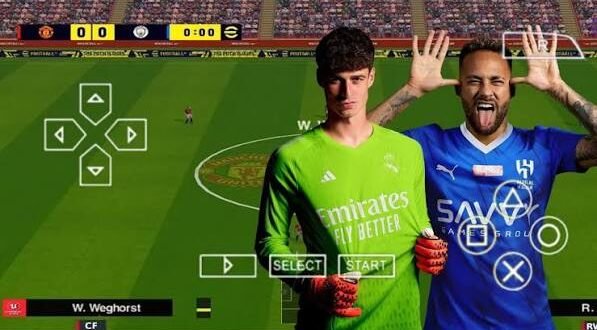
Searching for eFootball PES 24 PPSSPP ISO usually means you want one thing: modern football content with the classic PES experience on your phone. Updated teams, fresh kits, better-looking players, new menus, and offline gameplay can make an old PSP football engine feel surprisingly fresh.
But let’s clear up the confusing part first. Konami never released an official eFootball PES 2024 PSP game or official PES 24 PPSSPP ISO. The versions that use the PES 24 name generally come from fan-made modifications built around existing PSP football games.
That doesn’t make the projects uninteresting. Far from it. Modders can change a huge amount of content, and that’s exactly where the fun begins.
What Is an eFootball PES 24 PPSSPP ISO?
An eFootball PES 24 PPSSPP ISO typically refers to a modified PSP football game that players run through the PPSSPP emulator.
The original PSP game provides the foundation. Mod creators then update various assets to make the game resemble a newer football title.
Depending on the specific modification, creators may update:
– Teams
– Player squads
– Transfers
– Kits
– Player faces
– Stadium graphics
– Scoreboards
– Menus
– Boots
– Footballs
– Competition branding
The PPSSPP emulator handles the PSP emulation side of the experience. It also gives you control over graphics, controls, performance, and other settings.
Why Do Players Search for PES 24 PPSSPP?
Offline gaming remains a huge attraction.
You don’t need to wait for an online opponent when you simply want to play a quick match. You can open the emulator, select your teams, and start playing.
For players with limited mobile data or unreliable connections, that convenience matters. Why waste half your evening watching a loading circle when you could already be scoring goals?
Some Features in eFootball PES 24 PPSSPP ISO
The exact feature list varies from one fan-made project to another. However, several features appear frequently in PES 24-style modifications.
Let’s look at the ones that actually matter.
Updated Player Squads and Transfers
One of the biggest reasons people search for PES 24 PPSSPP ISO involves updated squads.
Mod creators can replace old player databases with newer information. They can move players between clubs and update squad numbers, team lineups, and other details.
A typical update may include:
– Recent transfers
– Updated club squads
– New player numbers
– Updated national teams
– Revised starting lineups
– New player appearances
This feature can completely change how the game feels.
Imagine launching a game with teams that still reflect an older football season. It works, but the experience quickly reminds you that the PSP era has passed.
Updated squads help close that gap.
Modern Football Kits
Updated kits rank among the easiest ways to make a classic football game look newer.
A good PES 24 modification may include current-style home, away, and goalkeeper kits.
Modders can also update:
– Club badges
– Sponsors
– National-team uniforms
– Third kits
– Training kits
– Competition-specific designs
Kit quality matters more than you might expect.
A sharp jersey texture can make a familiar team immediately feel more modern. A blurry one can make your favourite club look like someone designed the shirt inside Microsoft Paint. :/
Updated Player Faces
Player faces provide another major visual upgrade.
Modders can replace older PSP face textures with newer versions for popular footballers. They may also update hairstyles, facial details, and other visual elements.
The quality depends heavily on the creator.
Some projects focus heavily on famous players and produce impressive results. Others use simpler textures that don’t look quite as accurate.
Always judge the complete modification rather than one impressive screenshot.
Improved Graphics
PPSSPP can render PSP games at higher internal resolutions than the original hardware.
That capability can make a compatible football modification look cleaner on modern screens.
[10/7/2026 1:58 AM] Content store 1: Depending on your device, you can experiment with:
– Higher rendering resolution
– Texture filtering
– Texture scaling
– Anisotropic filtering
– Rendering backends
– Performance options
Why does this matter?
A PSP game designed for a small handheld screen can look noticeably different when you render it at a higher resolution on a modern Android display.
However, don’t expect a PSP engine to suddenly transform into a current-generation console engine. Technology has limits, even when the download page promises “Ultra 8K Realistic Graphics.”
Updated Stadiums and Pitch Textures
Stadium graphics can also receive a makeover.
A fan-made modification might update:
– Pitch textures
– Advertising boards
– Stadium banners
– Goal nets
– Crowd elements
– Tournament branding
These details contribute to the atmosphere during matches.
A modern-looking stadium combined with updated kits and player faces can create a much more convincing football presentation.
Does It Really Matter?
Absolutely.
Think about watching football on television. The players matter, but the stadium, pitch, scoreboard, advertisements, and broadcast graphics also create the overall atmosphere.
A good football mod tries to recreate that feeling within the limitations of the PSP engine.
Modern Scoreboards
Scoreboards don’t change gameplay, but they can dramatically change presentation.
PES 24-style modifications may replace older scoreboards with modern designs.
These updates can change:
– Team abbreviations
– Score layout
– Match timer
– Competition logos
– Colour schemes
– Icons
Since the scoreboard remains visible throughout a match, even a small improvement can make the game feel more current.
Updated Menus and Loading Screens
Menus provide another major visual upgrade.
Modders can replace the original interface with custom football-themed designs.
You may find:
– Modern main menus
– Updated team-selection screens
– New loading screens
– Tournament graphics
– Player backgrounds
– Custom icons
A good menu doesn’t just look nice. It establishes the visual identity of the entire modification.
Updated Boots and Footballs
Some projects also update player equipment.
Modern boots can replace older designs, while football textures can receive new patterns and branding.
These details won’t change your passing accuracy or shooting power, but they add visual variety.
And yes, football gamers notice these things. Give a player the wrong boots and someone will probably spot it before noticing the midfield tactics.
Improved Gameplay Experience
Graphics attract attention, but gameplay keeps players coming back.
A good PES 24 PPSSPP modification should retain the familiar PES-style football experience while updating the surrounding content.
Depending on the base game, you may still experience:
– Manual passing
– Dribbling
– Tactical defending
– Through balls
– Shooting mechanics
– Set pieces
– Player positioning
– Goalkeeper reactions
The modification may not completely redesign these systems.
That actually works in its favour for players who already enjoy classic PES gameplay.
Offline Gameplay
Offline gameplay remains one of the biggest advantages of PPSSPP football modifications.
You can play supported modes without depending on an online server.
Depending on the base game and modification, you may have access to:
– Exhibition matches
– League competitions
– Cups
– Tournaments
– Career-style modes
– Training
– Local multiplayer options
The exact modes vary, so check the modification’s feature list rather than assuming every PES 24 project includes everything.
PPSSPP Controller Support
Touchscreen controls can work, but many football fans prefer physical controls.
PPSSPP can support compatible controllers, giving you physical buttons for passing, shooting, sprinting, and defending.
A controller can make precise gameplay easier, especially during competitive matches.
Ever tried defending a one-on-one using tiny touchscreen buttons? Exactly. You understand the struggle.
eFootball PES 24 PPSSPP Graphics Settings
[10/7/2026 1:58 AM] Content store 1: Your modification only provides part of the visual experience.
PPSSPP settings also matter.
For stronger Android devices, you can experiment with higher rendering resolutions and texture enhancements.
For lower-end phones, prioritize stable performance.
A sensible starting point includes:
– Moderate rendering resolution
– Texture filtering
– Minimal frameskip
– Appropriate rendering backend
– Closed background applications
Don’t maximize every option immediately.
Increase settings gradually and test the game during a real match. Menus don’t stress your phone as much as actual gameplay.
PES 24 PPSSPP Requirements
You don’t necessarily need an expensive flagship phone.
A reasonable setup should include:
– Android device compatible with PPSSPP
– Adequate RAM
– Enough free storage
– Compatible emulator version
– Correct game files
– Optional controller
Your processor and GPU influence performance significantly.
Storage also matters because some modifications include additional graphics and texture packages.
PES 24 PPSSPP vs Original PSP PES
How much difference does a modern modification make?
Feature| Original PSP PES| PES 24-Style Modification
Original squads| Yes| Usually updated
Modern kits| No| Often included
Player faces| Older| Updated
Menus| Original| Custom
Scoreboard| Original| Often redesigned
Stadium graphics| Original| May receive updates
Offline gameplay| Yes| Usually retained
Official Konami release| Yes, for original PSP PES| No
The modified version wins if you care about modern presentation.
The original game wins if you want the untouched classic experience.
IMO, the best choice depends on what you value more: nostalgia or updated content.
Common Problems With PES 24 PPSSPP
Even good fan-made projects can experience problems.
Game Crashes
Incompatible files can cause crashes.
Use compatible files and avoid mixing assets from unrelated modifications.
Missing Kits or Faces
Missing textures can indicate an incomplete installation or incompatible asset package.
Check the creator’s instructions and confirm that your files match the same version.
Lag
Lower the rendering resolution first.
Then close background applications and experiment with PPSSPP performance settings.
Black Screen
A black screen can indicate a file or configuration problem.
Return to your previous working settings and check the compatibility of your game files.
Is eFootball PES 24 PPSSPP Worth Trying?
If you enjoy offline football gaming, a well-made PES 24-style modification can offer plenty of entertainment.
The biggest advantage comes from the combination of familiar gameplay and updated content.
You can get modern-looking squads, kits, faces, menus, scoreboards, stadium graphics, and other visual improvements without abandoning the classic PSP football formula.
But remember the important distinction: these projects aren’t official eFootball PES 2024 releases from Konami.
The quality can vary significantly between different modifications.
How to Stay Safe When Looking for PES 24 Files
Popular football mods attract plenty of questionable download pages.
Some websites use misleading buttons, excessive redirects, suspicious APK files, or fake claims about official releases.
Watch for:
– Unnecessary app installations
– Suspicious permissions
– Fake download buttons
– Password-protected archives without clear explanations
– Claims that Konami officially created the mod
– Extremely unrealistic file-size claims
– Files from unknown sources
Protect your phone before protecting your football career.
Use legitimate sources and game files you have the right to use. Don’t install a random APK simply because the page promises “100% working.”
Final Thoughts
The appeal of an eFootball PES 24 PPSSPP ISO comes from the ability to refresh classic PSP football with modern content.
The most interesting features include updated squads, transfers, kits, player faces, stadium graphics, scoreboards, menus, boots, footballs, and improved PPSSPP rendering options.
The emulator also gives you control over performance, resolution, textures, and controllers. That flexibility helps you build a setup that matches your Android phone.
Just remember that PES 24 PPSSPP represents an unofficial fan-made modification, not an official Konami PSP release. Use legally obtained game files, avoid suspicious downloads, and choose modifications that match your device.
At the end of the day, you don’t need the newest console to enjoy a good football match. Give an old PSP engine modern squads, fresh kits, better textures, and a decent controller, and suddenly that little handheld game has plenty of life left. That’s the beauty of modding.