wapday Download Latest Pro Soccer Games
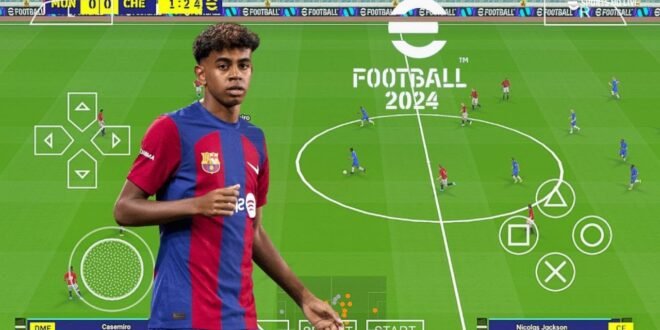
Want eFootball PES 24 PPSSPP with the best graphics on Android? I get why. Half the fun of a good football mod comes from making an old PSP game look surprisingly modern.
A well-made PES 24-style modification can bring updated kits, player faces, stadium textures, scoreboards, menus, boots, and other visual changes. Combine those assets with the right PPSSPP settings, and the difference can look impressive on a decent Android phone.
But let’s clear up one thing before we start. Konami never released an official eFootball PES 2024 PSP game. The “PES 24 PPSSPP” versions you find online generally represent unofficial fan modifications based on existing PSP football games.
So, what actually gives these mods their best graphics? Let’s break it down.
What Makes PES 24 PPSSPP Graphics Look Better?
The graphics don’t come from one magic setting.
Several elements work together to create the overall appearance. The modification itself supplies updated assets, while PPSSPP controls how your device renders those assets.
A good setup can improve:
– Rendering resolution
– Player faces
– Kit textures
– Pitch details
– Stadium graphics
– Lighting appearance
– Scoreboards
– Menus
– Boots and footballs
– Texture filtering
Ever wondered why the same football game can look completely different on two phones? The answer often comes down to hardware and emulator configuration.
eFootball PES 24 PPSSPP Best Graphics Features
Fan-made PES 24 modifications can focus heavily on visual upgrades.
Updated Player Faces
Player faces can make a huge difference.
A modern face pack can replace old textures with updated versions for popular footballers. When the face quality matches the rest of the game, the entire presentation feels newer.
However, quality varies from mod to mod. Some creators spend significant time improving individual faces, while others use simpler textures.
Don’t judge a modification only by screenshots. Screenshots can hide poor performance and texture problems.
HD Kits and Jerseys
Kits provide another major visual upgrade.
Modern kits can include:
– Home jerseys
– Away jerseys
– Third kits
– Goalkeeper uniforms
– Updated sponsors
– Club badges
– National-team kits
Sharp kit textures can make teams look much more authentic.
A low-resolution jersey can make even a famous club look like it plays Sunday league football behind the local supermarket.
Improved Pitch Textures
Pitch quality also affects the visual experience.
A modification can improve grass textures, pitch lines, advertising boards, and surrounding details.
A cleaner pitch can make player movement easier to follow and give matches a more polished appearance.
Modern Scoreboards
Scoreboards might occupy only a small part of the screen, but they remain visible throughout matches.
Modders can replace traditional PSP designs with modern football-inspired scoreboards.
They can change:
– Team abbreviations
– Score display
– Match timer
– Competition branding
– Icons
– Layout
These details help create a newer broadcast-style atmosphere.
PPSSPP Settings for Better PES 24 Graphics
Now we reach the part that can make a massive difference: PPSSPP graphics settings.
You don’t necessarily need an expensive phone to improve the visuals. You simply need to understand which settings actually matter.
Rendering Resolution
Rendering resolution often provides the biggest visual improvement.
Increasing the resolution can make:
– Player models look sharper
– Text appear clearer
– Stadium details look cleaner
– Menus look less blurry
However, higher resolution also demands more processing power.
If your phone struggles, reduce the resolution until gameplay becomes stable.
A smooth match always beats a beautiful slideshow.
Texture Filtering
Texture filtering can improve the appearance of surfaces and textures.
It can make certain graphics look cleaner, particularly when the game renders textures at different distances.
[10/7/2026 1:55 AM] Content store 1: Try different filtering options and compare them on your phone.
You don’t need to copy someone else’s settings blindly. Your device may respond differently.
Texture Scaling
Texture scaling can make some game textures appear sharper.
However, aggressive scaling can increase the workload on your device.
If you have a powerful phone, you can experiment with higher settings. If you use an entry-level device, start conservatively.
Frameskip
Frameskip can help some devices maintain playable performance when the hardware struggles.
However, frameskip can also make gameplay feel less smooth.
I would treat frameskip as a troubleshooting option rather than a default graphics enhancement.
If your phone already runs the game smoothly, leave it alone.
Best Graphics Settings for High-End Android Phones
Powerful Android phones give you more room to experiment.
You can start with:
– Higher rendering resolution
– Texture filtering enabled
– Higher texture scaling
– Appropriate rendering backend
– Minimal frameskip
– Higher-quality texture options
Then test the game during an actual match.
Why a real match? Menus don’t stress the device like gameplay does. Your phone might handle the main menu perfectly and then start struggling when 22 players, a stadium, crowd effects, and other assets appear simultaneously.
Best Graphics Settings for Low-End Phones
You don’t need to give up on PES 24 PPSSPP just because you use a budget phone.
Start with performance rather than maximum quality.
Try:
– Lower rendering resolution
– Moderate texture settings
– Minimal enhancement options
– No unnecessary texture scaling
– Closed background applications
– Stable frameskip configuration only when necessary
Your goal should remain consistent gameplay.
If you get smooth performance at a slightly lower resolution, keep it. You probably won’t notice the resolution difference during a fast match anyway.
PES 24 PPSSPP Graphics vs Original PES PSP
How much can a modern fan modification actually change?
Quite a lot visually, but the underlying hardware and game engine still impose limits.
Graphics Area| Original PSP PES| PES 24-Style Mod
Player faces| Older textures| Updated textures
Kits| Older designs| Modern kits
Scoreboard| Classic design| Modern design
Menus| Original interface| Custom interface
Pitch| Original textures| Modified textures
Stadium| Original assets| Updated assets
Resolution| PSP native limitations| Higher PPSSPP rendering
Overall appearance| Classic PSP| Modernised PSP
The modification can refresh the presentation significantly, but it cannot turn the PSP engine into a modern console engine.
That’s an important distinction.
What About 4K PES 24 PPSSPP Graphics?
You will probably encounter phrases such as “PES 24 PPSSPP 4K graphics” while searching online.
Treat those claims carefully.
PPSSPP can render compatible games at resolutions higher than the original PSP output, depending on your hardware. However, higher rendering resolution doesn’t magically create new high-resolution assets.
If the underlying texture looks blurry, increasing the resolution won’t suddenly make it look like a photograph.
Think of it like enlarging an old picture. You can make the picture bigger, but you can’t automatically create all the missing detail.
PES 24 PPSSPP HD Texture Packs
Texture packs can provide some of the biggest visual changes.
A good texture pack might update:
– Player faces
– Kits
– Boots
– Footballs
– Stadium advertising
– Menus
– Scoreboards
– Pitch graphics
However, texture packs can also consume additional storage and memory.
Don’t install every texture pack you find.
Choose a package designed specifically for your version of the modification.
Mixing incompatible textures can produce missing graphics, crashes, visual glitches, or strange colours.
How to Improve PES 24 Graphics Without Causing Lag
Want better graphics without destroying performance? Use a gradual approach.
Step 1: Start With Default Settings
Launch the game using reasonable PPSSPP settings.
[10/7/2026 1:55 AM] Content store 1: Play an actual match and check the frame rate.
Step 2: Increase Resolution
Raise the rendering resolution one level.
Play another match.
Did performance remain smooth? Keep the change.
Step 3: Adjust Texture Options
Experiment with texture filtering and scaling.
Again, change one setting at a time.
Step 4: Stop When Performance Drops
Don’t keep increasing settings just because your phone allows you to.
Once you notice stuttering, return to the previous setting.
This method gives you a better balance between graphics quality and gameplay performance.
Why FPS Matters More Than Graphics
Football games need responsive controls.
If your game looks incredible but players react slowly because your device struggles, the graphics won’t save the experience.
Think about passing.
You press the button and expect your midfielder to release the ball immediately. If the game stutters, your opponent can intercept the pass before you even understand what happened.
That’s why stable performance should always come before maximum graphics.
Common PES 24 Graphics Problems
Blurry Graphics
Increase rendering resolution gradually.
Also check texture filtering options.
If the modification itself uses low-quality textures, emulator settings can’t completely fix the problem.
Flickering Textures
Texture conflicts can cause flickering.
Check whether you recently installed a new texture pack or graphical modification.
Missing Faces
Missing player faces can indicate incomplete or incompatible texture files.
Use assets designed for your specific modification.
Black Screen
A black screen can indicate incompatible files or emulator settings.
Return to a known working configuration and test the game again.
Lag After Installing HD Textures
HD textures can increase memory usage.
If the game becomes slower after installing them, remove the heaviest texture additions and test again.
Sometimes “HD everything” sounds great until your phone starts negotiating its resignation.
Is PES 24 PPSSPP the Best Offline Football Graphics Experience?
That depends on your expectations.
If you want modern console-level graphics, no PSP modification can realistically compete with current-generation football games.
But if you want a lightweight football experience with modern-looking teams, kits, faces, menus, and offline gameplay, a well-made PES 24-style modification can still look impressive.
The biggest advantage comes from the combination of custom graphics and PPSSPP’s rendering controls.
Is eFootball PES 24 PPSSPP Official?
No.
This point deserves another mention because many websites use official-sounding language.
Konami did not release an official eFootball PES 2024 PSP version.
Fan-made projects use older football games as a foundation and add their own modifications.
That means features, graphics quality, compatibility, and update quality can vary significantly.
Final Thoughts
The best eFootball PES 24 PPSSPP graphics setup doesn’t necessarily mean turning every PPSSPP option to maximum.
The smartest setup balances resolution, texture quality, filtering, device performance, and stable frame rates.
A good fan-made modification can modernise player faces, kits, stadiums, scoreboards, menus, boots, and other visual elements. PPSSPP can then improve rendering quality further, especially on capable Android phones.
For low-end devices, focus on smooth gameplay first. For stronger phones, gradually increase resolution and texture settings until you find the sweet spot.
And remember: PES 24 PPSSPP represents an unofficial fan-made project, not an official Konami PSP release. Use legally obtained game files, avoid suspicious downloads, and don’t trust every “8K Ultra Realistic 120 FPS” headline you see.
After all, the best graphics setting is the one that lets you finish a full match without your phone sounding like it’s preparing for takeoff. IMO, that’s a pretty good benchmark. 🙂