wapday Download Latest Pro Soccer Games
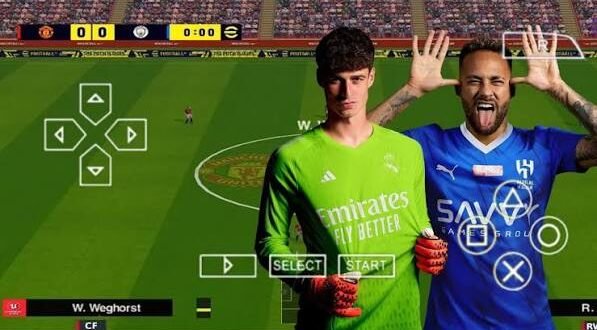
Looking for eFootball PES 24 PPSSPP because you want a modern football experience on your Android phone without needing a powerful console? You’re not alone. The combination of PES-style gameplay, updated squads, PPSSPP emulation, and offline football makes these fan-made projects especially popular.
But there’s one thing worth clearing up before you start searching for a PES 2024 PPSSPP ISO. Konami did not release an official PSP version of eFootball PES 2024. Most “PES 24 PPSSPP” projects online come from fans who modify older PSP football games and update their content.
That distinction matters. You can still enjoy the concept, but you should treat it as an unofficial fan modification, not an official Konami release.
What Is eFootball PES 24 PPSSPP?
The term eFootball PES 24 PPSSPP usually describes a modified PSP football game designed to look and feel like a newer eFootball or PES title.
Modders normally start with an existing PSP football game and update its assets. They can replace kits, teams, player information, menus, faces, stadium graphics, scoreboards, and other elements.
The PPSSPP emulator then runs the compatible PSP game on Android, Windows, iOS, or other supported platforms.
Why Do Players Search for PES 24 PPSSPP?
The answer comes down to convenience.
Many players want a football game that:
– Works offline
– Runs on relatively affordable phones
– Uses a controller or touchscreen
– Offers updated football content
– Doesn’t require constant internet access
– Provides familiar PES-style gameplay
And let’s be honest: sometimes you just want to play a quick match without waiting for servers to cooperate. Why should your 20-minute free time depend on someone’s server maintenance?
Is PES 24 PPSSPP an Official Game?
No.
Konami created the official eFootball series, but the PSP platform never received an official eFootball PES 2024 release.
When you see a title such as eFootball PES 2024 PPSSPP ISO, PES 24 PSP, or PES 2024 PPSSPP Android, you should understand that the creator usually refers to an unofficial modification.
These projects can still provide interesting gameplay, but they don’t represent an official Konami product.
What Does PPSSPP Actually Do?
PPSSPP acts as a PSP emulator.
Instead of creating a completely new Android football game, it allows compatible PSP games to run on modern devices.
The emulator provides options for:
– Rendering resolution
– Frameskip
– Texture filtering
– Performance
– Controls
– Audio
– Save states
– Controller configuration
That flexibility explains why PPSSPP remains popular among football-game fans.
eFootball PES 24 PPSSPP Features
The exact features depend on the modification you find, but many fan-made PES 2024-style projects focus on modernizing the older PSP experience.
Updated Teams and Squads
One of the biggest attractions involves updated teams and player squads.
A modder can replace older player information with newer lineups, transfers, and team structures. This can make an older PSP game feel considerably more modern.
However, don’t expect every project to include identical updates. Some mods focus heavily on transfers, while others concentrate on graphics.
Updated Kits
Modern kits can completely change the appearance of the game.
A good modification might include:
– Home kits
– Away kits
– Third kits
– Goalkeeper kits
– Updated sponsors
– Club badges
– National-team uniforms
Why does a simple shirt matter so much? Because visual accuracy helps create the feeling of playing a newer football title.
Updated Player Faces
Some PES 24 PPSSPP modifications also update player faces.
Creators can add new textures and improve the appearance of recognizable players. The quality can vary, though, so don’t expect every face to look perfect.
Some faces look fantastic. Others might make you wonder whether the player spent the night fighting a lawn mower. :/
PES 24 PPSSPP Graphics
Graphics represent another major part of these projects.
[10/7/2026 1:52 AM] Content store 1: The original PSP hardware had strict limitations, but PPSSPP can render games at higher internal resolutions on capable devices.
You can experiment with settings such as:
– Rendering resolution
– Texture filtering
– Texture scaling
– Anisotropic filtering
– Frameskip
– Rendering backend
– Performance settings
Higher Resolution vs Performance
Here’s where you need to find the right balance.
If you own a powerful Android phone, you can increase the rendering resolution and enjoy sharper visuals.
If your phone uses modest hardware, pushing every graphics option to maximum can create stuttering. What looks amazing in screenshots doesn’t always play smoothly.
Smooth gameplay matters more than screenshots.
I’d rather play a stable football match at sensible settings than watch a beautiful slideshow of Lionel Messi standing still.
eFootball PES 24 PPSSPP Android Requirements
PPSSPP itself doesn’t demand a flagship phone for every PSP game, but performance varies according to the device and settings.
A reasonable setup should include:
– Android phone with PPSSPP support
– Adequate RAM
– Sufficient free storage
– Compatible PPSSPP version
– Legitimately obtained PSP game files
– Optional physical or Bluetooth controller
You should also keep some additional storage available for game files and save data.
FYI, storage size alone doesn’t determine performance. Your processor and GPU play a much bigger role in determining how smoothly the game runs.
How to Set Up PES 24 on PPSSPP
If you already own a legally obtained compatible PSP game and a fan-made modification that you have permission to use, you can generally follow the emulator’s normal workflow.
Step 1: Install PPSSPP
Install PPSSPP from a legitimate source and open the application.
The emulator provides the environment required to run compatible PSP software.
Step 2: Prepare Your Game Files
Keep your legally obtained game files in an accessible folder.
PPSSPP supports compatible PSP game formats, depending on the emulator version and file type.
Avoid downloading random archives from unknown websites. A football game doesn’t need access to your contacts, SMS messages, or flashlight. If a file asks for all that, something has gone sideways.
Step 3: Open the Game Through PPSSPP
Use the emulator’s file browser to locate your game.
Once PPSSPP recognizes the compatible file, select it and launch the game.
Step 4: Configure Controls
You can use:
– Touchscreen controls
– Bluetooth controllers
– USB controllers
– Compatible gamepads
A controller can make a major difference during competitive matches.
Touch controls work, but precise defending and passing can feel much easier with physical buttons.
Best PPSSPP Settings for PES 24
Finding the best configuration depends on your phone.
For a weaker Android device, start with conservative settings:
– Use a lower rendering resolution
– Disable unnecessary enhancements
– Avoid aggressive texture scaling
– Keep frameskip disabled unless you need it
– Close background applications
For a stronger phone, gradually increase visual settings.
Don’t change ten options at once. Change one setting, play a match, and check the result. That approach makes troubleshooting much easier.
PES 24 PPSSPP vs Modern Mobile Football Games
How does a PES 24 PPSSPP-style modification compare with modern Android football games?
Feature| PES 24 PPSSPP Mod| Modern Online Football Game
Offline gameplay| Often available| Often limited
Internet requirement| Usually low| Often required
Updated squads| Depends on mod| Usually integrated
Graphics| PSP-based| Modern mobile graphics
Device requirements| Generally moderate| Can be demanding
Controller support| Strong| Depends on game
Modding| Extensive| Usually limited
Official support| No| Usually yes
IMO, PPSSPP wins when offline gaming matters most.
Modern football games usually offer better technology, live content, online competitions, and advanced graphics. PPSSPP modifications offer something different: simplicity and flexibility.
Common PES 24 PPSSPP Problems
[10/7/2026 1:52 AM] Content store 1: Even good modifications can produce annoying problems.
Game Runs Slowly
Reduce the rendering resolution first.
Then close other applications and experiment with PPSSPP’s performance settings.
Game Crashes
Crashes can happen when you combine incompatible files or use a modification that doesn’t match your base game.
Use the correct file structure and avoid mixing unrelated mods.
Missing Kits or Faces
Missing graphics usually indicate an incomplete or mismatched texture package.
Check the modification’s documentation and make sure you use compatible files.
Black Screen
A black screen can indicate compatibility or file problems.
Start by checking the game file, emulator configuration, and modification version. If you recently changed several settings, return to your previous configuration and test again.
Is PES 24 PPSSPP Worth Playing?
If you enjoy offline football games, the answer can easily become yes.
The biggest advantage comes from the combination of familiar PES gameplay and modern fan-made content. Updated squads, kits, faces, menus, and graphics can make an older PSP football game feel surprisingly fresh.
However, you should understand the limitations.
PES 24 PPSSPP isn’t an official eFootball PES 2024 PSP release. Its quality depends on the individual modification, and some projects may contain outdated information or compatibility problems.
That doesn’t make the concept useless. It simply means you should choose your files carefully and keep your expectations realistic.
How to Avoid Fake PES 24 PPSSPP Downloads
Search engines can produce plenty of questionable pages around popular football mods.
Some websites use attractive titles such as “PES 24 PPSSPP 100% Working” simply to attract clicks.
Watch for warning signs such as:
– Suspicious APK installers
– Excessive redirects
– Fake download buttons
– Password-protected archives with no explanation
– Unnecessary applications
– Requests for sensitive permissions
– Claims of official Konami involvement
– Extremely unrealistic file sizes
Never sacrifice your phone’s security just to install a football game.
If a website promises a tiny file that supposedly contains console-quality graphics, every current team, commentary, and several gigabytes of content, stop and think for a second.
Final Thoughts
The search for download eFootball PES 24 PPSSPP usually comes from one simple desire: players want modern football content with the flexibility of PPSSPP and offline gameplay.
A fan-made PES 2024-style modification can deliver updated teams, kits, player faces, menus, graphics, and a familiar football experience. PPSSPP also gives you plenty of control over graphics, performance, and input settings.
Just remember the important distinction: Konami did not release an official PES 2024 PSP game. Treat PES 24 PPSSPP projects as unofficial fan modifications, use legally obtained game files, and avoid suspicious downloads.
Once you get the settings right, though, an old PSP football engine can still provide plenty of fun. Sometimes you don’t need the newest console — you just need a good match, a decent controller, and a striker who actually remembers where the goal is. 🙂