 wapday Download Latest Pro Soccer Games
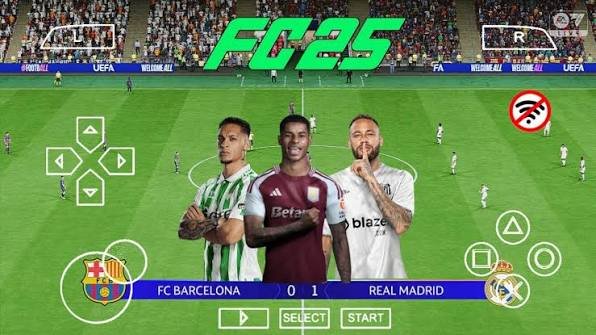
Searching for EA Sports FC 25 PPSSPP ISO because you want to play modern football on your Android phone without needing a console? You’re definitely not alone. PPSSPP football mods have become popular because they give classic PSP football games a modern look with updated teams, kits, players, and menus.
But there’s one important detail you should know before downloading anything: EA Sports FC 25 never received an official PSP release. Any “FC 25 PPSSPP ISO” you find online usually refers to a community-made modification or patch based on an older PSP football game, rather than an official EA Sports title.
That doesn’t make the experience useless, though. A well-made community patch can make an old football game feel surprisingly fresh. Let’s look at what you can realistically expect from an EA Sports FC 25 PPSSPP Android experience.
What Is EA Sports FC 25 PPSSPP?
EA Sports FC 25 launched as part of EA’s modern football series, but EA did not create a PSP version of the game.
So how do websites advertise EA Sports FC 25 PSP ISO?
Community creators modify older PSP football games and add modern football content. They can replace things such as:
– Player names
– Club squads
– Jerseys
– Team logos
– Menus
– Player faces
– Stadium graphics
– Competition branding
– Commentary or audio elements
– Football boots
– Balls
– Other visual assets
The underlying PSP game still handles the gameplay.
Think of it as giving an old car a serious body makeover. It can look completely different, but the engine still comes from the original car.
EA Sports FC 25 PPSSPP Features
A good FC 25 PPSSPP ISO mod can offer plenty of modern-looking content while keeping the lightweight nature of PSP football.
Updated Teams and Squads
One of the first things players notice involves the team updates.
Community patches often try to bring current clubs and player transfers into the older PSP football engine.
That can make the game feel much closer to a modern football title.
Depending on the particular patch, you may find:
– Updated club squads
– New transfers
– Modern player names
– Updated formations
– National teams
– Updated competitions
However, don’t assume every website’s “FC 25 latest transfer update” actually contains every current transfer. Mod quality varies considerably.
Updated Kits
Football fans care about kits more than some people care about actual tactics. And honestly, I understand it.
A modern EA Sports FC 25 PPSSPP mod can replace old shirts with newer designs.
You might find updated:
– Home kits
– Away kits
– Third kits
– Goalkeeper kits
– National-team kits
– Training kits
The quality depends on the creator.
Some patches look fantastic on a phone screen, while others make you wonder whether the designer created the kit during a power outage. 🙂
EA Sports FC 25 PPSSPP Graphics
Graphics represent another major selling point.
The original PSP hardware obviously cannot compete with a modern PlayStation or gaming PC. Still, community creators can improve the visual presentation through updated textures and interface designs.
A good patch may include:
– Improved player faces
– New boots
– Updated kits
– Modern menus
– Better grass textures
– New scoreboards
– Updated banners
– Improved team logos
– Custom backgrounds
PPSSPP also gives Android users options for increasing the rendering resolution.
That can make older PSP graphics look considerably cleaner.
Gameplay Experience
Here’s where things get interesting.
No matter how impressive the menus look, the underlying gameplay still comes from an older PSP football engine.
That means you shouldn’t expect the same mechanics as the official EA Sports FC 25 on PS5, Xbox Series X|S, or PC.
You still get the fundamentals:
– Passing
– Shooting
– Crossing
– Tackling
– Sprinting
– Dribbling
– Set pieces
– Goalkeeping
– Team management
The controls can feel surprisingly responsive once you get comfortable with them.
[10/6/2026 4:40 AM] Content store 4: If you’ve played older PSP football games before, you’ll probably adjust quickly.
EA Sports FC 25 PPSSPP ISO vs EA Sports FC 25
This comparison matters because many websites blur the difference.
Feature| FC 25 PPSSPP Mod| Official EA Sports FC 25
Official PSP release| No| No
Platform| PSP emulator| PC/Console
Modern graphics| Modified PSP graphics| Full modern graphics
Updated squads| Community dependent| Official updates
Offline gameplay| Usually possible| Depends on mode
Hardware requirements| Relatively low| Much higher
File format| PSP game format| Platform-specific
Developer| Community modders| EA Sports
IMO, the PPSSPP version wins on accessibility, especially for players with modest Android hardware.
The official FC 25 experience wins easily in graphics, animations, licensing, presentation, and overall technology.
You can’t expect a PSP emulator to suddenly turn your phone into a PS5. Nice try, though.
How PPSSPP Works With FC 25 Mods
PPSSPP acts as an emulator.
It recreates the PSP environment on another platform, allowing compatible PSP games to run on Android, Windows, macOS, Linux, and other supported systems.
The important point involves the game itself.
PPSSPP does not create an official FC 25 PSP version.
Instead, community developers modify compatible PSP football games and distribute patches or updated game builds.
That explains why you may see several different versions online with different graphics, squads, and features.
How to Play an FC 25-Style PSP Mod on Android
If you want to experiment with a community-made football patch, start with the emulator itself.
Step 1: Install PPSSPP
Get PPSSPP from its official distribution channels.
Avoid modified emulator APKs from suspicious websites.
Step 2: Use a Legitimate PSP Game
Community modifications generally rely on an existing PSP football game.
Use a game copy that you legally own or have permission to use.
Step 3: Apply the Community Patch
Follow the documentation supplied by the mod creator.
Different patches use different structures, so don’t blindly copy files from one mod into another.
Step 4: Launch the Game
Open PPSSPP and locate your compatible game.
Start with the default emulator settings before making graphics changes.
Step 5: Adjust Performance
If your phone handles the game comfortably, gradually increase rendering resolution.
If you notice slowdowns, lower the graphics settings.
Best PPSSPP Settings for EA Sports FC 25 Mods
Your phone determines the ideal settings, but you can start with a simple configuration.
Recommended Starting Settings
– Rendering resolution: 2x
– Frameskip: Off
– Texture filtering: Auto
– Texture scaling: Off initially
– Post-processing: Optional
– Backend: Test Vulkan or OpenGL
– VSync: Enable only if you notice screen tearing
Don’t copy someone’s “ultimate 4K PPSSPP settings” blindly.
A setting that works beautifully on a Snapdragon flagship might turn an entry-level phone into a pocket heater.
Android Requirements
You don’t need an expensive gaming phone to experiment with PSP football.
A reasonable Android device should have:
– A modern multi-core processor
– Adequate RAM
– Sufficient storage
– Updated Android software
– Updated PPSSPP
– Reliable graphics drivers
Performance also depends on the specific mod.
Heavy textures and visual enhancements can increase the workload.
If your phone struggles, reduce the rendering resolution first.
Why Players Like FC 25 PPSSPP Mods
The appeal goes beyond graphics.
Small and Accessible
PSP games generally require far less hardware power than modern football titles.
That makes them attractive to players who use affordable Android phones.
Offline-Friendly
Many community PSP football mods focus on offline gameplay.
You can enjoy matches without relying on a constant internet connection, depending on the original game and modification.
Customization
Community creators can update older football games with modern football content.
That flexibility keeps the PSP football scene alive.
Nostalgia
[10/6/2026 4:40 AM] Content store 4: Let’s be honest: nostalgia does some heavy lifting here.
If you grew up playing football games on PSP, seeing modern clubs inside that familiar interface can feel strangely satisfying.
Common Problems With FC 25 PPSSPP Mods
Not every mod works perfectly.
Game Crashes
A modified game may contain incompatible files.
Try returning to the creator’s recommended configuration instead of mixing files from several different patches.
Missing Textures
If kits or faces don’t appear correctly, the modification may require additional texture files or a specific configuration.
Always follow the creator’s instructions.
Slow Gameplay
Reduce rendering resolution and disable unnecessary graphical enhancements.
Incorrect Squads
Community patches don’t receive the same official update system as EA’s games.
A mod advertised as “latest” may still contain outdated transfers.
That’s one of the biggest differences between unofficial patches and official football games.
Is FC 25 PPSSPP Offline?
Many FC 25 PSP-style mods focus on offline gameplay because the original PSP football engine supports offline modes.
That makes them attractive to players who simply want quick matches without connecting to a server.
However, don’t assume that every feature from official EA Sports FC 25 works offline through PPSSPP.
Online services, licenses, live events, and modern Ultimate Team features require completely different infrastructure.
Safe Download Advice
Search for download EA Sports FC 25 PPSSPP ISO and you’ll probably find dozens of websites.
Treat those results carefully.
The biggest risk doesn’t come from PPSSPP itself. The risk comes from downloading unknown files from unreliable sources.
Keep these points in mind:
1. Download PPSSPP from a trusted official source.
2. Use PSP game files that you legally own or have permission to use.
3. Avoid APK files that promise “FC 25 for Android” without explaining their origin.
4. Don’t install unknown apps simply to access a download.
5. Scan unfamiliar files before opening them.
6. Avoid pages that demand unnecessary personal information.
7. Don’t trust exaggerated claims such as “official FC 25 PSP release.”
FYI, a huge download button doesn’t make a website legitimate. Sometimes it just makes the button huge.
FC 25 PPSSPP vs eFootball PES PPSSPP Mods
Football fans often compare EA Sports FC 25 PPSSPP mods with PES-based PSP patches.
Both approaches have advantages.
PES-based mods often benefit from a large community of patch creators. They can offer updated kits, transfers, faces, tournaments, and other custom content.
FC-style PSP mods appeal to players who prefer the EA football branding and presentation.
Ultimately, gameplay matters more than the name printed on the menu.
If the patch runs smoothly and the controls feel good, you’ll probably enjoy it regardless of which logo appears on the loading screen.
Is EA Sports FC 25 PPSSPP Worth Trying?
Yes, but you should understand what you’re getting.
You’re not getting an official EA Sports FC 25 PSP game. You’re getting a community-created modification that uses an older PSP football game as its foundation.
That distinction matters.
Still, a polished mod can provide updated squads, modern kits, refreshed graphics, and familiar football gameplay without demanding powerful hardware.
For Android users who love PSP games, that’s a pretty attractive combination.
Final Verdict
The EA Sports FC 25 PPSSPP ISO scene offers an interesting way to experience modern football themes through classic PSP technology.
You can find community patches with updated teams, kits, faces, menus, transfers, and other visual improvements. PPSSPP can also improve the experience through higher rendering resolutions and customizable controls.
Just remember the key point: EA Sports FC 25 never received an official PSP release. Any FC 25 PPSSPP version you encounter comes from the community rather than EA’s official PSP catalogue.
If you want modern console-level graphics, play the official FC 25 on supported platforms. If you want a lightweight, nostalgic football experience on Android, a well-made PSP community patch can still deliver plenty of fun.
Sometimes you don’t need a monster gaming rig to enjoy a good football match. You just need a decent phone, PPSSPP, and a striker who remembers how to score. 🙂


13 comments
Pingback: Call of Duty Road to Victory PSP/PPSSPP Download – Features, Gameplay and Android Guide - wapday
Pingback: DLS 23 Mobile Android Download – Features, Gameplay and Installation Guide - wapday
Pingback: MadOut 2 Grand Auto Racing APK – Features, Gameplay and Android Guide - wapday
Pingback: FIFA 16 Mod EA Sports FC 26 Android Offline – Features and Installation Guide - wapday
Pingback: DFL 25 Mod FIFA 16 APK OBB Data – Features, Gameplay and Installation Guide - wapday
Pingback: Download EA Sports FC 25 PPSSPP ISO – Features, Gameplay and Android Guide - wapday
Pingback: eFootball PES 2026 PPSSPP ISO PSP Latest Update – Features, Gameplay and Android Guide - wapday
Pingback: Download Total Football APK for Android Latest Version – Gameplay, Features and Guide - wapday
Pingback: EA Sports FC 24 for Android – Gameplay, Features, Requirements and Download Guide - wapday
Pingback: FIFA 16 Mod 23 APK – Features, Gameplay, Updates and Android Guide - wapday
Pingback: GTA San Andreas APK OBB – Android Gameplay, Features, Requirements and Download Guide - wapday
Pingback: Official FIFA 22 Mobile KR by Nexon 300 MB for Android – Features, Gameplay and Download Guide - wapday
Pingback: Dream League Soccer 2023 Android Offline – Gameplay, Features, Requirements and Download Guide - wapday