wapday Download Latest Pro Soccer Games
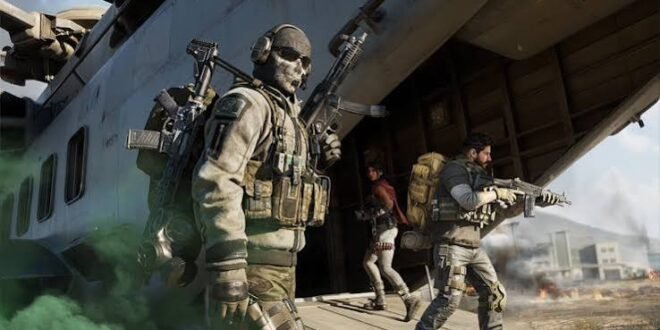
Looking for Call of Duty: Roads to Victory PSP PPSSPP download? You’ve probably heard about this classic World War II shooter and wondered whether it still feels good on Android today. The short answer: yes, especially if you enjoy old-school military shooters that focus on action instead of throwing 200 notifications at you every five minutes.
Call of Duty: Roads to Victory launched for the PlayStation Portable (PSP) in 2007. The game brings the Call of Duty experience to Sony’s handheld system with missions inspired by World War II, different playable campaigns, weapons, vehicles, and plenty of shooting.
You can also play the original PSP game through PPSSPP, a popular PSP emulator for Android, Windows, Linux, macOS, and other platforms. If you want the smoothest experience, though, your device and settings matter almost as much as the game itself.
So, what makes Roads to Victory worth playing in 2026? Let’s take a closer look.
What Is Call of Duty: Roads to Victory?
Call of Duty: Roads to Victory is a first-person shooter developed specifically for the PSP. Activision published the game, while Amaze Entertainment handled development.
Unlike modern Call of Duty titles, Roads to Victory keeps things relatively straightforward. You select a campaign, complete missions, shoot enemies, follow objectives, and move through different World War II scenarios.
The game gives you three perspectives:
– American forces
– British forces
– Canadian forces
That variety gives the campaign more personality than you might expect from a handheld game released in the PSP era.
And honestly, that simplicity feels refreshing sometimes. You don’t need to unlock a battle pass before you can enjoy the shooting. 🙂
Call of Duty Roads to Victory PSP Features
The PSP hardware had obvious limitations compared with modern phones and consoles, but the developers still packed plenty into the game.
Multiple World War II Campaigns
One of the biggest strengths of Call of Duty Roads to Victory PSP comes from its three military campaigns.
You experience different missions and objectives depending on the campaign you choose. That structure helps the game avoid feeling like one long repetitive shooting gallery.
Classic Call of Duty Gunplay
The game includes several weapons associated with World War II, including rifles, submachine guns, machine guns, and other battlefield weapons.
The controls obviously cannot match a modern console shooter, but the developers designed the gameplay around the PSP’s buttons.
If you grew up playing PSP games, the control scheme will probably feel familiar pretty quickly.
Vehicles and Battlefield Action
Roads to Victory doesn’t restrict you to walking around with a rifle.
Some missions include vehicle-based action, giving the campaign some variety. These moments help break up the standard run-and-gun gameplay.
Ever played a shooter where every mission feels exactly the same? Yeah, nobody wants that.
Multiplayer Support
The original PSP version also included multiplayer functionality, although the experience depends heavily on the hardware, game setup, and connection method you use today.
Modern PPSSPP players may explore multiplayer features through supported emulator functionality, but compatibility can vary.
Call of Duty Roads to Victory PPSSPP Gameplay
Playing the game through PPSSPP can give the old PSP title a second life.
PPSSPP emulates PSP hardware and allows compatible games to run on modern devices. On Android, you can adjust graphics, controls, performance settings, and other options.
The result can look considerably cleaner than the original PSP display.
Graphics on Android
Don’t expect PS5 graphics here. That would be like expecting a 2007 Nokia phone to run Cyberpunk.
Still, PPSSPP can improve the presentation through features such as:
– Higher rendering resolution
– Texture filtering
– Frame-rate adjustments
– Post-processing options
– Controller support
– Screen scaling
[10/6/2026 4:39 AM] Content store 4: Your results will depend on your phone.
A newer mid-range or flagship Android phone can generally provide plenty of performance for PSP emulation. Older budget phones may need lower graphics settings.
Call of Duty Roads to Victory PPSSPP Controls
Touchscreen controls can take some time to master.
The PSP originally used physical buttons, so PPSSPP places virtual controls on your Android screen. You can customize their position and size.
For a better experience, I recommend using a Bluetooth controller if your phone supports one.
Why? Because aiming with virtual buttons can feel awkward during hectic firefights. A physical controller gives you more precise movement and makes the game feel closer to the original PSP experience.
Call of Duty Roads to Victory PSP ISO Explained
If you search for Call of Duty Roads to Victory PSP ISO, you’ll see plenty of websites offering game files.
Here’s the important part: an ISO represents a disc image or game image. PPSSPP can use compatible PSP game images, but you should only use game files that you legally own or have permission to use.
You don’t need some mysterious “super compressed ultra mega ISO” from a random website just because the title sounds impressive.
Those files can create unnecessary security risks.
ISO vs CSO
You may also encounter CSO files.
Both formats can work with PPSSPP depending on the game and setup, but CSO uses compression to reduce file size.
In simple terms:
– ISO: Uncompressed game image
– CSO: Compressed game image
– PPSSPP: Emulator that runs compatible PSP games
Always check your game’s compatibility and use legitimate game files.
How to Play Call of Duty Roads to Victory on PPSSPP
The basic process remains straightforward when you use a legitimate PSP game dump.
Step 1: Install PPSSPP
Download PPSSPP from its official website or trusted app store. Avoid modified emulator APKs from unknown sources.
Step 2: Obtain Your Legitimate Game File
Use a game image created from a PSP game that you legally own or otherwise have permission to use.
Step 3: Open PPSSPP
Launch PPSSPP and allow it to scan the location where you keep your legally obtained PSP games.
Step 4: Select the Game
Once PPSSPP detects the game, select Call of Duty: Roads to Victory from your library.
Step 5: Adjust Graphics
Start with the default settings.
If the game runs smoothly, you can experiment with higher rendering resolution and other enhancements.
If you notice stuttering, reduce the rendering resolution or disable demanding effects.
Best PPSSPP Settings for Roads to Victory
You don’t need to change every PPSSPP setting you find online. That’s a fast way to turn a simple gaming session into a software engineering internship.
Start with these general recommendations:
– Rendering resolution: 2x or 3x for capable phones
– Texture filtering: Try automatic or a moderate setting
– Frameskip: Keep disabled unless performance problems appear
– VSync: Test it if you experience visual tearing
– Post-processing: Optional
– Texture scaling: Use carefully on weaker devices
– Backend: Test the available Vulkan or OpenGL option
– Controls: Customize the touchscreen layout
Your ideal configuration depends on your phone’s processor and GPU.
If you own a powerful Android phone, you can experiment with higher resolutions. If your phone struggles, lower the graphics settings instead of forcing maximum quality.
Call of Duty Roads to Victory Android Requirements
The original game targets PSP hardware, so PPSSPP doesn’t require anything close to a modern gaming PC.
However, Android performance varies between devices.
A reasonable setup includes:
– Android phone with a modern processor
– Sufficient free storage
– Updated PPSSPP version
– Stable graphics drivers
– Enough RAM for smooth multitasking
– A controller, if you prefer physical controls
Your phone doesn’t need to carry a gaming-phone badge to run PSP games.
Still, very old Android devices may struggle with enhanced rendering.
Roads to Victory vs Modern Call of Duty Games
[10/6/2026 4:39 AM] Content store 4: How does Call of Duty: Roads to Victory compare with modern Call of Duty titles?
Pretty differently.
Modern Call of Duty games offer much more advanced graphics, larger environments, sophisticated multiplayer systems, and more complicated progression systems.
Roads to Victory focuses on a smaller-scale handheld experience.
Feature| Roads to Victory| Modern Call of Duty
Platform| PSP| PC, Console, Mobile
Era| World War II| Mostly modern/futuristic eras
Graphics| PSP-era| Modern HD/4K
Campaign| Yes| Usually yes
Multiplayer| PSP-focused| Extensive modern systems
Storage| Relatively small| Often huge
Controls| PSP buttons| Modern controllers/touch
IMO, the biggest advantage of Roads to Victory comes from its simplicity.
You can start the game and get straight into the action without learning an enormous progression system.
Is Call of Duty Roads to Victory Still Worth Playing?
Absolutely, especially if you enjoy retro gaming.
The game doesn’t compete with modern Call of Duty titles on graphics or technical complexity. Instead, it offers something different: a compact World War II FPS experience designed around the PSP.
The campaigns give you different perspectives, the missions provide plenty of shooting action, and PPSSPP can make the game look noticeably cleaner on a modern screen.
If you’re a longtime PSP fan, nostalgia adds another layer.
Remember when games didn’t need a 90 GB update before letting you play the first mission? Exactly.
Common Problems When Running Roads to Victory on PPSSPP
Some players may encounter issues when running older PSP games through an emulator.
Game Runs Slowly
Lower the rendering resolution and disable demanding enhancements.
You can also close background applications before launching the game.
Controls Feel Awkward
Customize the virtual buttons.
Better still, connect a compatible Bluetooth controller if you have one.
Graphics Look Strange
Try changing the graphics backend or returning PPSSPP to its default settings.
Avoid copying random configuration files from unknown sources.
Game Doesn’t Appear
Check that PPSSPP scans the correct folder containing your legally obtained PSP game files.
Also make sure the file format matches what PPSSPP supports.
Is a “Roads to Victory Mod” the Same Game?
Not necessarily.
You may encounter modified versions online that claim to offer updated graphics, new textures, improved controls, or other changes.
These community projects can look interesting, but always check their source carefully.
Third-party downloads can contain unwanted software or altered files.
FYI: A modded version doesn’t automatically represent an official Activision release.
If a website claims that Activision secretly released “Call of Duty Roads to Victory 2026 Ultimate Edition PSP,” maybe pause before clicking the enormous green DOWNLOAD button.
Safe Download Tips
Search engines can return hundreds of pages for terms like Call of Duty Roads to Victory PPSSPP download.
Not every result deserves your trust.
Before downloading anything, remember these tips:
1. Use official PPSSPP sources for the emulator.
2. Use game files you legally own or have permission to use.
3. Avoid suspicious APK files pretending to contain the game.
4. Don’t install unknown “download managers.”
5. Scan unfamiliar files with reputable security software.
6. Avoid websites that demand strange permissions or personal information.
7. Never enter banking information on questionable download pages.
A game isn’t worth risking your phone or personal information.
Final Verdict
Call of Duty: Roads to Victory remains one of the more interesting World War II shooters in the PSP library. It brings recognizable Call of Duty action to a handheld platform while offering three campaigns, classic weapons, vehicle sections, and a surprisingly enjoyable amount of combat.
With PPSSPP, you can experience the PSP game on modern Android hardware with customizable graphics, controls, and display settings.
Just remember that emulation doesn’t magically make unauthorized game downloads legal. Use the emulator from a trusted source and stick with game files you have the right to use.
So, should you give Call of Duty Roads to Victory PSP/PPSSPP a try? If you enjoy classic military shooters and PSP nostalgia, absolutely.
Sometimes you don’t need 4K explosions, 200-player lobbies, and a battle pass named after a vegetable. Sometimes you just need a PSP, a good mission, and enough ammunition. 🙂