 wapday Download Latest Pro Soccer Games
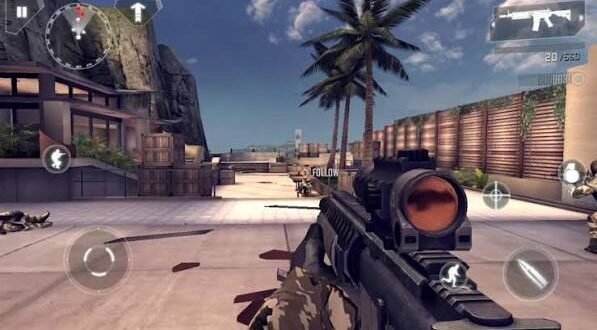
Remember when mobile shooters actually tried to feel like console games? Modern Combat 4: Zero Hour came from that era, and it still gets attention from Android gamers who want a proper first-person shooter without needing a PlayStation in their backpack.
If you’re searching for Modern Combat 4 Zero Hour APK, you probably want to know more than where to get the game. Does it still run well on Android? What does the campaign offer? Does it work offline? What about graphics, controls, and storage? Let’s talk about all of that without turning this into a boring instruction manual.
What Is Modern Combat 4: Zero Hour?
Modern Combat 4: Zero Hour is a first-person shooter from Gameloft. The game launched during the period when Android phones started pushing mobile graphics much harder.
The game puts you into a military action story with firefights, explosions, vehicles, and cinematic missions. You move through different environments while switching between weapons and completing objectives.
What makes the game interesting today? Modern Combat 4 focuses heavily on a traditional single-player FPS experience. You don’t need to learn a complicated card system before you can enjoy a firefight. You simply start playing and start shooting.
Modern Combat 4 Zero Hour Gameplay
The campaign forms the heart of Modern Combat 4. You follow a military storyline while completing missions across different locations.
The game mixes standard shooting sections with scripted action sequences. You’ll move through buildings, fight enemies from different positions, and deal with situations that keep the campaign moving.
Ever played an older mobile shooter and wondered how developers squeezed so much action onto a tiny screen? Modern Combat 4 gives you exactly that feeling.
First-Person Shooting
The game uses traditional FPS controls.
You can:
– Move around the environment
– Aim at enemies
– Fire different weapons
– Reload
– Crouch or take cover
– Switch weapons
– Interact with objectives
– Follow mission instructions
The controls may feel slightly old compared with modern touchscreen shooters, but that also gives the game some charm.
Cinematic Missions
Modern Combat 4 doesn’t simply throw enemies into an empty map and tell you to shoot everything that moves.
The campaign uses scripted sequences, explosions, vehicle sections, dialogue, and dramatic moments to create a more cinematic experience.
IMO, that approach makes the game feel closer to the console shooters that inspired it.
Modern Combat 4 Graphics
Graphics remain one of the biggest reasons gamers search for Modern Combat 4 APK for Android.
For its generation, the game pushed mobile hardware aggressively. You’ll find detailed environments, character models, weapons, explosions, lighting effects, and different locations.
The game may look dated beside modern Android titles, but that doesn’t make it ugly. In fact, its visual style still holds up surprisingly well on smaller phone screens.
Why the Graphics Still Matter
The graphics help create the atmosphere of the campaign.
You’ll see:
– Detailed military environments
– Weapon animations
– Explosions
– Character animations
– Lighting effects
– Cinematic sequences
– Different combat locations
Of course, don’t expect your mid-range phone to suddenly become a gaming PC because you installed an old Gameloft classic. Phones have limits. 🙂
Modern Combat 4 Weapons
A good shooter needs good weapons, and Modern Combat 4 gives you a selection of firearms for different situations.
You’ll encounter weapons designed for close-range combat, medium-range engagements, and longer-distance shooting.
Weapon Variety
Depending on the mission, you can use different types of weapons, including:
– Assault rifles
– Submachine guns
– Shotguns
– Sniper rifles
– Pistols
– Explosive weapons
[10/6/2026 3:47 AM] Content store 1: Each weapon encourages a slightly different approach. A shotgun works well when enemies get close, while a sniper rifle rewards patience and careful aiming.
Do you enjoy rushing into a room or sitting back and picking enemies off? Modern Combat 4 gives you room for both styles.
Modern Combat 4 Multiplayer
Modern Combat 4 also gained attention for its multiplayer experience. During its active period, multiplayer helped the game stand out from many other mobile shooters.
Players could compete against others using different weapons and loadouts.
However, online multiplayer availability can depend on current server support, device compatibility, and the specific version you install. You shouldn’t assume that an old APK automatically restores every online feature.
For players mainly interested in offline gaming, the campaign remains the safer focus.
Is Modern Combat 4 Zero Hour Offline?
This question appears frequently alongside searches for Modern Combat 4 Zero Hour offline APK.
The campaign provides the main single-player experience, but certain features may require connectivity depending on the version and platform.
You should check the requirements for the particular legitimate release you use. An APK description that says “100% offline” doesn’t automatically make every feature work without an internet connection.
Treat offline claims carefully, especially when a download page promises additional features that the original game never offered.
Modern Combat 4 Android Requirements
Before installing Modern Combat 4 on Android, check your device.
Older games can sometimes create surprisingly strange compatibility problems on newer operating systems. A powerful modern phone doesn’t automatically guarantee that every older game will run perfectly.
Consider these factors:
– Android version compatibility
– Available RAM
– Free storage
– Processor architecture
– GPU compatibility
– Screen resolution
– Permission requirements
You should also keep additional storage available because the complete game can require more space than the initial APK file suggests.
How to Install Modern Combat 4 on Android
If you obtain Modern Combat 4 from a legitimate source, follow the installation instructions supplied by that platform.
A typical Android installation process looks like this:
1. Download the compatible game package from a trustworthy source.
2. Check the Android requirements.
3. Install the APK through Android.
4. Launch the game.
5. Allow only legitimate permissions requested by the game.
6. Download any additional official resources when prompted.
7. Configure the controls and graphics.
8. Start the campaign.
Some older Android releases used separate game-data packages. If your legitimate version provides additional files, follow the developer or platform’s instructions rather than copying unknown files into protected folders.
Why OBB Guides Can Become Complicated
Older Android games often relied on additional data files. Newer Android versions introduced stricter storage controls, so installation methods from years ago may no longer work exactly as described.
If you see an old tutorial telling you to copy files into a specific folder and your phone refuses access, your Android version may enforce newer storage restrictions.
That doesn’t necessarily mean your phone has a problem. Android simply changed the rules.
Common Modern Combat 4 Android Problems
Older games can experience compatibility problems on newer devices. Fortunately, you can troubleshoot several common issues.
Game Crashes at Startup
First, restart your phone and close unnecessary apps. Then check whether your Android version supports the particular game release.
If the game still crashes, reinstall it from a legitimate source. Avoid mixing files from different releases because mismatched game data can cause crashes.
Black Screen
A black screen can indicate compatibility issues, corrupted files, or graphics problems.
[10/6/2026 3:47 AM] Content store 1: Try restarting the game and checking the installation. If the problem continues, look for an officially supported version that matches your Android device.
Missing Game Data
If the game starts but cannot find its resources, the installation may have failed to place the required files correctly.
Don’t download random replacement files from unknown websites. You could introduce malware while trying to fix a simple installation problem.
Modern Combat 4 vs Modern Combat 5
Gameloft later released Modern Combat 5: Blackout, which naturally invites comparison.
Modern Combat 5 offers newer graphics, updated mechanics, and a more modern multiplayer structure. Modern Combat 4, however, has a campaign-focused identity that many players still appreciate.
Which Game Feels Better?
Choose Modern Combat 4 if you want:
– A classic mobile FPS
– A cinematic campaign
– Older-school shooter mechanics
– A nostalgic gaming experience
– A relatively straightforward structure
Choose Modern Combat 5 if you prefer:
– Newer presentation
– Updated gameplay
– More modern multiplayer features
– A more contemporary mobile shooter experience
Personally, I think Modern Combat 4 has a certain charm that newer games sometimes lose. It doesn’t bombard you with endless menus before letting you shoot something.
Modern Combat 4 vs Other Mobile FPS Games
Modern Android shooters such as Call of Duty: Mobile offer much more modern graphics, online systems, seasonal content, and competitive features.
But those games also demand more from your phone and often focus heavily on online ecosystems.
Modern Combat 4 takes a simpler route. Its biggest advantage today comes from its campaign and nostalgia.
If you want competitive online gaming, newer shooters make more sense. If you want an older cinematic FPS campaign, Modern Combat 4 remains worth checking out.
Is Modern Combat 4 Still Worth Playing?
Absolutely—if you approach it with realistic expectations.
You shouldn’t expect 2026-level graphics from a game designed for much older hardware. Instead, appreciate what the developers achieved with the technology available at the time.
The campaign remains the main attraction. The shooting mechanics feel familiar, the missions move quickly, and the cinematic presentation keeps the experience entertaining.
FYI, nostalgia can make an older game feel better than you remember, but Modern Combat 4 actually has enough gameplay substance to stand on its own.
Safety Tips When Searching for the APK
Searches for Modern Combat 4 Zero Hour APK download can lead to hundreds of third-party pages. You should treat those pages carefully.
Avoid files that promise:
– Unlimited money
– Unlimited weapons
– “God mode”
– Premium features unlocked
– Suspicious mod menus
– Modified system permissions
Those files can contain unwanted software.
Use legitimate sources whenever possible, and never provide banking details, passwords, OTP codes, or other sensitive information to a game installer.
A football game or FPS should never need your banking OTP. If something asks for it, close the page immediately.
Tips for Better Modern Combat 4 Gameplay
Once you get the game running, a few habits can make your experience better.
Adjust Your Controls
Spend a few minutes arranging your touchscreen controls. A comfortable layout can improve aiming and movement dramatically.
Use Cover
Don’t stand in the middle of an open area and expect enemies to politely miss you.
Use walls, vehicles, buildings, and other objects for protection whenever the mission allows it.
Watch Your Ammunition
Avoid wasting bullets. Reload during safe moments and switch weapons when appropriate.
Learn Enemy Positions
Many campaign encounters reward awareness. Watch enemy movement and avoid rushing blindly into every room.
Adjust Graphics
If your phone struggles with performance, lower graphical settings when the game provides them.
Smooth gameplay matters more than maximum visual quality. A stable frame rate will help you aim better than fancy effects ever will.
Final Verdict
Modern Combat 4: Zero Hour remains one of the memorable classic FPS games from the mobile gaming era. Its cinematic campaign, weapon variety, touchscreen controls, and impressive-for-its-time graphics helped it stand out.
If you’re searching for Modern Combat 4 Zero Hour APK for Android, focus on compatibility and safety before worrying about file size or fancy “mod” features. Older games can behave differently on modern Android versions, so always check whether your device supports the release you choose.
For pure nostalgia, the game still delivers. For modern multiplayer competition, newer shooters offer a better experience.
Either way, Modern Combat 4 reminds us of something simple: sometimes you don’t need a massive 20GB download and seventeen battle passes to enjoy a good shooting game. Sometimes you just need a decent phone, a good campaign, and enough ammunition to survive the next mission. 🙂


