 wapday Download Latest Pro Soccer Games
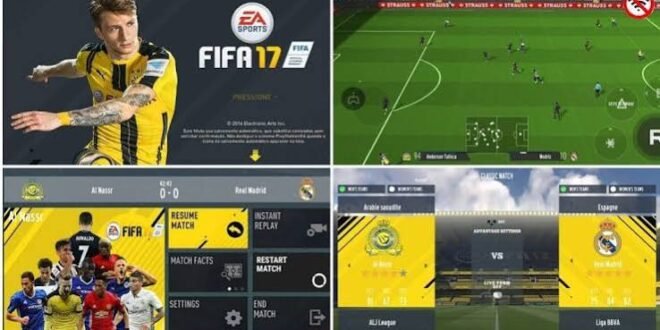
Still searching for download FIFA 17 Mod 23 APK OBB offline because you want classic FIFA gameplay with newer teams, kits, players, and football content? I get the appeal. FIFA 17 already had a solid gameplay foundation, and community modders can give that older experience a fresh look with updated football content.
The important part comes first: FIFA 17 Mod 23 does not represent an official EA release. Community creators modify the original FIFA 17 experience and add newer squads, kits, player faces, menus, and other updates.
So, what exactly does a FIFA 17 Mod 23 APK OBB offline version offer? Does it work without internet? What does “APK OBB” mean? And can your Android phone actually handle it? Let’s break everything down without the usual download-page nonsense.
What Is FIFA 17 Mod 23?
FIFA 17 Mod 23 refers to a fan-made modification based on FIFA 17. Mod creators take the existing football game and change different assets to make the experience resemble a newer football season.
The “23” in the name usually points toward the 2022/23-era updates that mod creators wanted to introduce. Different creators can produce different versions, so the exact content can vary significantly.
You may find versions featuring:
– Updated squads
– New football kits
– Updated player faces
– New club logos
– Updated competitions
– Modern scoreboards
– New menus
– Updated boots and balls
– Improved textures
– Updated team formations
FYI: don’t confuse a community FIFA 17 Mod 23 with an official EA Sports FIFA 23 Android release. The two products don’t share the same development history.
Why Do Players Still Like FIFA 17 Mods?
FIFA 17 has a certain charm that newer games sometimes struggle to reproduce.
The gameplay feels familiar, the controls remain accessible, and the game doesn’t demand the same kind of hardware that some newer football titles require. For players who enjoy offline football, that combination can make FIFA 17 modifications particularly attractive.
Ever played an older football game and realized you actually enjoyed it more than the newest version? You’re not alone.
Classic FIFA Gameplay
The biggest attraction comes from the underlying FIFA 17 gameplay.
You can pass, shoot, cross, tackle, dribble, sprint, and build attacks without learning an entirely new control system.
A community modification can update the football world around that gameplay while preserving much of the original feel.
FIFA 17 Mod 23 Features
The exact feature list depends on the specific modification, but most FIFA 17 Mod 23 projects focus on visual and database updates.
Updated Squads
Updated squads usually sit at the top of the feature list.
Creators can change player transfers, team lineups, ratings, formations, and other database information. That means your favourite club can look much closer to the period represented by the modification.
However, don’t assume every player transfer appears in every version. Community modders work independently, so different builds can contain different databases.
New Kits
Kits can completely change the appearance of an older football game.
A good mod may introduce newer home, away, and goalkeeper kits. Some creators also update national-team shirts and competition-specific graphics.
You might load into a match and suddenly forget that you’re playing an older FIFA game. Well, at least until the graphics remind you.
Updated Player Faces
Player faces can also receive attention.
Popular players often receive updated textures, hairstyles, facial details, and other visual changes. The quality depends heavily on the creator.
Some faces can look excellent, while others can make you ask, “Who exactly is that supposed to be?”
That’s one of the trade-offs with community mods.
FIFA 17 Mod 23 APK OBB Explained
If you’ve searched for FIFA 17 Mod 23 APK OBB offline, you’ve probably encountered the terms APK and OBB.
Don’t worry; the terminology sounds more complicated than it really is.
What Does APK Mean?
[10/4/2026 1:51 PM] Content store 2: An APK represents an Android application package. Android uses APK files to install applications outside the standard Play Store distribution system.
You should always treat APK files from unknown websites carefully because malicious apps can disguise themselves as popular games.
What Does OBB Mean?
An OBB file can contain large additional resources that an Android game needs.
These resources can include:
– Graphics
– Audio
– Stadium assets
– Player textures
– Menus
– Other game resources
A modification can use additional data alongside its application package.
Why Do Mods Use Additional Files?
Large football games contain plenty of assets. A modification that adds updated kits, faces, graphics, and other resources may require additional storage.
That’s why you’ll often see searches involving FIFA 17 Mod 23 APK + OBB, FIFA 17 Mod 23 Android, and FIFA 17 updated squads offline.
Can You Play FIFA 17 Mod 23 Offline?
Offline gameplay represents one of the biggest reasons people search for this modification.
A properly configured community version can support offline matches without requiring a constant internet connection. That makes the game useful when you’re travelling, dealing with poor network coverage, or simply trying to save mobile data.
You can enjoy the basic single-player experience without worrying about online matchmaking.
However, don’t expect offline gameplay to reproduce every online feature from modern EA football games. FIFA 17 comes from a completely different generation of football gaming.
Graphics and Visual Improvements
FIFA 17 already offered decent visuals for its era, and modders can push the presentation further through updated assets.
A well-made modification may improve several areas:
– Player faces
– Team kits
– Football boots
– Ball textures
– Pitch graphics
– Scoreboards
– Menus
– Competition branding
– Team logos
– Background screens
IMO, updated kits and player faces usually make the biggest difference. A fancy menu looks nice, but you’ll spend far more time watching players run around the pitch.
Gameplay: What Should You Expect?
The modification can refresh the content, but it doesn’t completely replace the FIFA 17 gameplay engine.
That means you should expect familiar FIFA 17 mechanics rather than the exact gameplay from newer EA Sports FC titles.
You can still enjoy:
– Passing
– Through balls
– Dribbling
– Shooting
– Crossing
– Tackling
– Sprinting
– Set pieces
– Goalkeeping
– Tactical adjustments
If you enjoy classic FIFA mechanics, that consistency can feel refreshing.
If you expect modern animations and physics from the latest console football games, however, you should lower your expectations.
Android Requirements
Before installing any FIFA 17 modification, check the requirements listed by the specific creator.
Community mods can vary considerably in size and performance.
A reasonable Android setup may include:
– Android smartphone or tablet
– At least 2GB RAM
– Several GB of free storage
– Compatible graphics hardware
– A reasonably capable processor
– Enough space for the game and additional files
A phone with 4GB or 6GB RAM can provide more breathing room than a basic 2GB device.
Storage also matters. Don’t start an installation with 500MB free and expect your phone to perform magic.
FIFA 17 Mod 23 Performance
Performance depends on your phone and the modification itself.
A lightweight version may run comfortably on mid-range hardware, while a modification packed with high-resolution textures can demand more resources.
If You Experience Lag
Try checking:
1. Available storage.
2. Background applications.
3. Graphics settings.
4. Android system updates.
5. Whether the modification matches your device architecture.
6. Whether the game files match the required version.
Closing unnecessary apps can also help free memory.
If your phone starts heating up like a small cooking stove, give it a break. Your match can wait.
FIFA 17 Mod 23 vs Modern Football Games
How does an older FIFA modification compare with a modern football game?
[10/4/2026 1:51 PM] Content store 2: Feature| FIFA 17 Mod 23| Modern EA Sports FC
Official EA product| No| Yes
Updated squads| Often| Yes
Updated kits| Often| Yes
Offline gameplay| Strong advantage| Depends on mode
Graphics| Older engine + mods| Modern
Animations| Older generation| More advanced
Hardware demand| Usually lower| Usually higher
Community modifications| Extensive| More restricted
Modern online ecosystem| Limited| Extensive
Classic FIFA feel| Yes| No
The choice depends on your priorities.
Choose a FIFA 17 modification if you want classic gameplay, updated content, and offline football. Choose a current official EA Sports FC game if you want modern graphics, current online services, newer mechanics, and official support.
Common FIFA 17 Mod 23 Problems
Community modifications don’t always work perfectly.
You may encounter several issues.
Game Crashes
The game can crash when your phone doesn’t meet the requirements or when incompatible files interact with each other.
Black Screen
A black screen can indicate missing game resources or compatibility problems.
Missing Kits
A missing kit can indicate incomplete or mismatched modification files.
Missing Players
Updated databases can sometimes conflict with other game resources.
Lag
High-resolution graphics can put additional pressure on older phones.
Installation Errors
Android security restrictions, incompatible packages, or damaged archives can cause installation problems.
When something goes wrong, don’t immediately download another five versions from random websites. First identify the actual problem.
How to Stay Safe With APK Mods
This part deserves serious attention.
Search results can contain websites offering modified APKs, compressed archives, fake download buttons, aggressive redirects, and suspicious applications.
Before installing anything, check:
– The reputation of the source
– The developer or mod creator
– File size
– User reports
– Security warnings
– Requested permissions
– Whether the file matches the advertised modification
Avoid applications that request unnecessary access to your contacts, SMS messages, banking information, or other unrelated data.
A football game doesn’t need your entire digital life.
Also remember that unofficial modifications can violate the original game’s terms or copyright. Stick to legitimate copies and community modifications where you have the right to use the underlying game.
Is FIFA 17 Mod 23 Worth It?
If you love older FIFA gameplay, I’d say the concept remains interesting.
The combination of updated squads, modern kits, player faces, offline gameplay, and classic FIFA mechanics gives FIFA 17 another lease on life.
The biggest advantage comes from simplicity. You don’t need to chase every new feature when you simply want to play a football match.
But you should understand the limitations.
The game doesn’t magically become FIFA 23 or EA Sports FC. The underlying FIFA 17 engine still controls much of the experience.
Final Thoughts
FIFA 17 Mod 23 APK OBB Offline appeals to players who want updated football content while keeping the classic FIFA 17 experience.
Community creators can add newer squads, kits, player faces, menus, logos, scoreboards, and other visual improvements. Offline gameplay also makes the modification attractive to players who prefer football without a constant internet connection.
Just remember one important point: FIFA 17 Mod 23 represents an unofficial community modification, not an official EA release.
If you decide to explore it, check the requirements carefully, protect your Android device, and avoid suspicious files or websites promising unrealistic features.
At the end of the day, good football doesn’t always need the newest engine. Sometimes you just need your favourite club, a decent phone, and a goalkeeper who doesn’t suddenly forget how hands work. 🙂


