 wapday Download Latest Pro Soccer Games
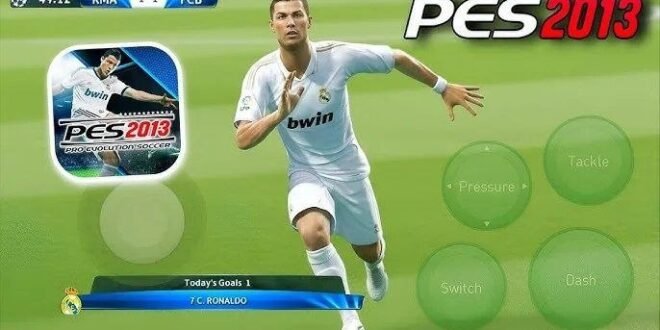
PES 2013 Pro Evolution Soccer Android Game APK – Classic Football Gameplay
Remember when Pro Evolution Soccer 2013 was one of the football games everyone wanted to play? The classic player animations, satisfying long-range shots, clever through balls, and competitive matches made PES 2013 a favourite among football fans. Even today, many gamers still look for ways to enjoy this legendary football title on Android.
If you’re searching for PES 2013 Pro Evolution Soccer Android Game APK, you’re probably interested in playing the classic game on your phone, enjoying offline matches, and bringing back those old-school football memories.
In this guide, we’ll explore PES 2013’s gameplay, classic features, Android installation options, offline availability, performance tips, and what you should know before downloading an APK.
Important: PES 2013 was originally released for platforms including PC, PlayStation 2, PlayStation 3, and Xbox 360. An APK advertised as PES 2013 for Android may be a fan-made port, a modified game, or an unofficial package rather than an official Android release from Konami.
What Is PES 2013 Pro Evolution Soccer?
Pro Evolution Soccer 2013, commonly known as PES 2013, is a football simulation game developed and published by Konami. It became popular for its focus on player control, passing, shooting, and tactical football.
The game features club and international football, familiar players from its era, and several modes that allow you to compete in individual matches or longer competitions.
One reason PES 2013 remains popular is its straightforward gameplay. You can focus on passing, creating opportunities, defending properly, and scoring goals without needing to learn an overly complicated control system.
For many fans, it represents a classic period of football gaming before the series evolved into eFootball.
PES 2013 Android Gameplay
The original PES 2013 was not released as a native official Android game. However, third-party projects and modified versions may attempt to bring its gameplay, teams, kits, or graphics to Android devices.
The actual experience depends on the version you’re using. A fan-made Android adaptation may not reproduce every feature of the original console or PC game.
1. Realistic Passing and Ball Control
Passing is a major part of PES 2013’s gameplay identity. Rather than relying entirely on sprinting, players can build attacks through midfield and look for openings in the opposition’s defence.
Try these techniques:
- Short passes: Keep possession and move the ball between teammates.
- Through balls: Send attackers into space behind defenders.
- Wing play: Use wide players to stretch the opposition.
- Quick combinations: Create openings around the penalty area.
- Switching play: Move the ball to the opposite flank when one side becomes crowded.
The key is patience. Sometimes three simple passes create a better chance than one risky long ball.
2. Shooting and Finishing
Scoring goals is one of the most satisfying parts of classic PES gameplay. A well-timed shot from outside the box or a carefully placed finish can change the outcome of a close match.
For better finishing, pay attention to your player’s position, the angle towards goal, and the goalkeeper’s location.
Don’t shoot every time you receive the ball near the penalty area. Sometimes a short pass to an unmarked teammate creates a much easier opportunity.
3. Dribbling and Skill Moves
Dribbling allows you to move past defenders, protect possession, and create space for a shot or pass.
The most effective approach is to combine controlled movement with changes of direction. Trying to dribble through several defenders at once usually results in losing possession.
If your Android version uses customised touchscreen controls, spend time practising the available actions before playing difficult matches.
4. Defensive Gameplay
Good defending requires positioning and timing. Charging towards every opponent can leave open spaces behind your defenders.
Instead, try to block passing lanes, pressure the ball carrier when you have support, and keep your defensive line organised.
When defending against fast attackers, avoid pulling your centre-backs too far out of position. Protecting the space in front of your goal is often more effective than chasing the ball everywhere.
Main Features of PES 2013
The features below describe the original PES 2013 experience. Unofficial Android adaptations may include only some of them.
Player ID
One of the game’s defining features was Player ID, designed to make certain footballers more recognisable through their movements, animations, and playing styles.
This helped distinguish individual players instead of making every footballer feel identical on the pitch.
ProActive AI
PES 2013 emphasised intelligent movement and player positioning through its ProActive AI systems. Teammates and opponents could react to the flow of a match, helping create different attacking and defensive situations.
The result was a football experience that rewarded awareness and decision-making.
FullControl
The game’s FullControl approach focused on giving players more control over passing, shooting, and movement.
This emphasis on input and timing helped make matches feel more dependent on how you played rather than simply on the players’ ratings.
Master League
The original game included Master League, a mode focused on developing a team over time. Players could manage their squad, work through competitions, and build towards long-term success.
Whether Master League is available in a particular Android adaptation depends on how much of the original game it supports.
Become a Legend
Become a Legend lets players focus on an individual footballer’s career rather than controlling an entire team throughout every match.
It is one of the classic PES modes fans may look for when choosing a version of the game, but you should verify that an unofficial Android build actually includes it.
Club and International Teams
PES 2013 featured club and international teams from its era. Team names, kits, player faces, and rosters in modified versions can vary significantly.
Some fan patches advertise updated teams and transfers. These additions are community modifications, not evidence of an official current roster update.
PES 2013 Android APK: What Should You Know?
When searching for PES 2013 Android APK, you may come across files described as:
- PES 2013 Android APK and data
- PES 2013 offline Android game
- PES 2013 updated kits and transfers
- PES 2013 high-graphics mobile version
- PES 2013 PPSSPP or emulator edition
These labels can describe different things. An APK is an Android application package, while a data archive may contain additional resources. An emulator edition, on the other hand, requires an emulator and a compatible game image.
Do not assume that every download labelled “PES 2013 APK” is the original game. Some files may be unrelated games with modified menus, while others may be fan projects or repackaged software.
Check the publisher, source, compatibility, and actual gameplay demonstrations before installing anything.
How to Play PES 2013 on Android
The right approach depends on which version you want to play.
Option 1: Look for an Official Current Football Game
PES 2013 does not have an official native Android release from Konami. If your main goal is to play football on your phone, check the official listing for Konami’s current mobile football title, eFootball.
Official sources:
- Konami: https://www.konami.com/
- Google Play Store: https://play.google.com/store
The current mobile game is different from PES 2013, so don’t expect identical menus, teams, modes, or gameplay.
Option 2: Use a Compatible Emulator With a Legitimate Game Copy
Some players prefer using emulation to play older console games on Android. Compatibility depends on the original platform, emulator, device hardware, and game version.
If you choose this route, use a legitimate copy of the game and follow the emulator developer’s documentation. Do not download copyrighted game images from unauthorised sources.
Also check whether your phone can run the selected emulator smoothly before spending time setting everything up.
Option 3: Consider a Fan-Made Android Adaptation
Fan projects may reproduce the appearance of PES 2013 through modified assets, menus, or gameplay systems.
Before installing one, check the project’s source, supported Android versions, and whether it requires additional game files. Avoid packages that ask you to disable security protections or install unrelated applications.
Can PES 2013 Android Be Played Offline?
Offline play depends on the specific adaptation or emulator setup.
The original PES 2013 supported local single-player football gameplay, but that does not mean every APK advertised as PES 2013 Android works offline.
Some unofficial packages may require an internet connection for initial setup, display excessive advertising, or fail to load without files that are not included in the download.
If offline football is your main priority, check the developer’s documentation and test the game after installation. Launch it with an internet connection first if required, then disconnect and see which modes remain available.
Avoid trusting download pages that promise “100% offline” without showing the actual version or explaining its requirements.
Recommended Android Requirements
There is no single set of Android requirements for every PES 2013 adaptation. Requirements depend on whether you’re using a native fan project, an emulator, or another implementation.
For a smoother experience, consider these general recommendations:
- Processor: A capable chipset can help with demanding emulation.
- RAM: Sufficient available memory helps reduce interruptions.
- Storage: Keep room for the application, game resources, and updates.
- Android compatibility: Check the minimum supported operating-system version.
- Graphics support: Emulator compatibility may depend on the device’s graphics hardware.
- Controls: Touchscreen mapping or a compatible game controller can improve comfort.
These are general guidelines, not verified minimum specifications for every unofficial build.
How to Improve PES 2013 Gameplay on Android
Once you have a compatible version running, use these tips to get more out of your matches.
Choose a Balanced Formation
A formation such as 4-3-3 provides width and attacking options, while 4-2-3-1 offers additional protection in midfield.
Your best formation depends on your available players and preferred style. If you enjoy quick counterattacks, prioritise pace and accurate forward passing. If you prefer possession, focus on midfield control.
Use Short Passes
Constantly trying long passes can lead to turnovers. Build your attacks with short passes and look for opportunities to move the ball forward when a gap appears.
Time Your Tackles
Poorly timed challenges can allow attackers to move past your defenders. Stay in position and choose the right moment to challenge for the ball.
Practise Set Pieces
Corners, free kicks, and penalties can decide close matches. Learn the available controls and practise your aim.
Adjust the Camera and Controls
If your adaptation or emulator provides camera or control settings, choose a setup that gives you a clear view of the pitch and comfortable access to the buttons.
Common PES 2013 Android Problems
The APK Does Not Install
The file may be incompatible with your Android version, corrupted, or intended for a different device configuration. Check the source and compatibility details before trying anything else.
The Game Shows a Black Screen
This can happen with incompatible game resources, unsupported emulator settings, or a faulty adaptation. Check the developer’s documentation and avoid downloading replacement files from unknown sites.
The Game Runs Slowly
Close unnecessary apps, check available storage, and review any supported performance settings. If you’re using an emulator, confirm that your device and emulator support the original game.
The Game Crashes During Matches
Crashes may result from incompatible files, insufficient resources, or an unstable build. Back up your saves before changing the installation.
The Download Has No OBB or Data Folder
Not every version uses the same installation structure. Follow the instructions for the exact project you downloaded rather than copying generic instructions from another game’s installation guide.
PES 2013 vs Modern Mobile Football Games
PES 2013 appeals to players who prefer the classic football experience, while newer mobile games offer more modern interfaces and ongoing updates.
| Feature | PES 2013 | Modern mobile football games |
|---|---|---|
| Gameplay style | Classic football simulation | Varies by title |
| Official native Android release | No | Available for selected titles |
| Current player rosters | Original-era rosters unless modified | Depends on the current game |
| Offline play | Depends on adaptation or emulator | Depends on game and mode |
| Installation | May require emulation or a fan project | Usually through an official app store |
If nostalgia is your main reason for searching, PES 2013 may be worth exploring through a compatible, legitimate setup. If you want current players and ongoing updates, a supported modern mobile game may be more suitable.
Final Verdict
PES 2013 Pro Evolution Soccer Android Game APK remains a popular search among fans who want classic football gameplay on their phones. Its passing, shooting, Player ID, and career-focused modes helped make the original game memorable.
However, the original PES 2013 was not released as an official native Android game. APKs advertised under that name may be fan-made adaptations or modified packages, so check the source and compatibility carefully.
For the safest experience, consider Konami’s official mobile football game or use a compatible emulator with a legitimate copy of PES 2013. Verify offline support before installation, avoid suspicious downloads, and enjoy the classic football style responsibly.



2 comments
Pingback: FTS 27 First Touch Soccer Android Game APK - wapday
Pingback: Brothers 3 In Arms Android Game OBB+DATA - wapday