 wapday Download Latest Pro Soccer Games
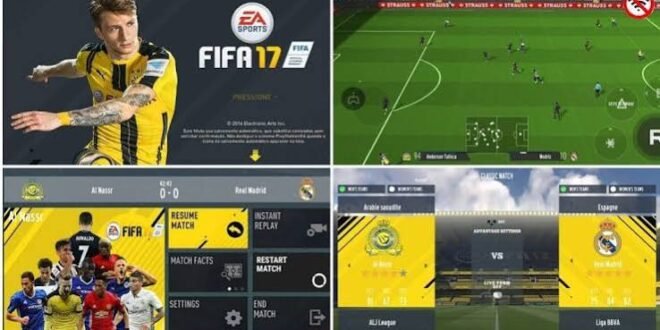
If you enjoy classic FIFA gameplay but want updated teams, modern kits, and a more current football experience on Android, FIFA 17 Mod 23 can sound like a pretty tempting combination.
The important detail? FIFA 17 Mod 23 usually refers to an unofficial fan-made modification of FIFA 17, not an official EA Sports release. Mod creators can change squads, kits, player faces, menus, graphics, and other content while keeping much of the original gameplay foundation.
But forget the fancy screenshots for a moment. How does the gameplay actually feel? Does the older FIFA 17 engine still hold up on Android? And can a 2023-style update make an older football game feel fresh?
Let’s talk about the part that matters when the referee blows the whistle.
What Is FIFA 17 Mod 23?
FIFA 17 Mod 23 combines the gameplay foundation of FIFA 17 with unofficial updates inspired by the 2022/23 football season.
Different versions can include different modifications, so you shouldn’t expect every “FIFA 17 Mod 23 APK OBB” package to contain exactly the same features.
Typical modifications can include:
– Updated squads
– New transfers
– Modern kits
– Updated player faces
– New boots
– Improved graphics
– Updated menus
– New scoreboards
– Updated competitions
– Modified commentary or audio
– Gameplay adjustments
The APK and OBB/data structure can also vary depending on the version.
So, if someone tells you that every FIFA 17 Mod 23 release contains exactly the same content, take that claim with a pinch of salt.
FIFA 17 Mod 23 Gameplay Experience
The biggest attraction comes from the classic FIFA 17 gameplay style.
FIFA 17 already offered a relatively polished football experience compared with many older mobile football games. The modification doesn’t necessarily transform the underlying engine into an entirely new game.
Instead, it can refresh the surrounding content while retaining familiar mechanics.
That means you can expect gameplay built around:
– Passing
– Shooting
– Dribbling
– Crossing
– Tackling
– Sprinting
– Through balls
– Set pieces
– Defensive positioning
– Goalkeeping
Why does that matter?
Because updated kits mean very little if the football itself feels terrible. Gameplay has to carry the experience.
Passing Feels More Important Than Sprinting
One thing I like about classic FIFA-style gameplay involves the emphasis on passing.
You can’t always sprint through the entire defence and expect the game to reward you. Good passing creates space and forces defenders to move.
You can build attacks with:
– Short passes
– Through balls
– One-two combinations
– Wide passes
– Crosses
– Back passes
– Long diagonal balls
Ever wondered why some matches feel easy while others turn into a complete midfield war?
Your passing decisions often make the difference.
If you move the ball quickly, you can pull defenders out of position. If you hold the ball too long, opponents can close the space.
Dribbling and Ball Control
Dribbling adds another layer to the FIFA 17 Mod 23 gameplay.
You can use close control to escape pressure, change direction, and create shooting opportunities.
However, I wouldn’t recommend turning every attack into a solo dribbling competition.
Sometimes the smartest move involves passing the ball.
Good dribbling works best when you combine it with:
– Quick changes of direction
– Controlled sprinting
– Passing
– Body positioning
– Space awareness
The game rewards players who recognise when to attack a defender and when to release the ball.
Shooting in FIFA 17 Mod 23
Shooting provides the obvious reward for all that build-up.
You can attempt:
– Finesse shots
– Power shots
– Low finishes
– Headers
– First-time shots
– Long-range attempts
– One-on-one finishes
Shot selection matters.
If you blast every attempt from 30 yards, don’t blame the goalkeeper when your striker starts collecting missed chances like trophies.
Instead, look for clear angles and use the appropriate amount of power.
Finishing Inside the Box
Inside the penalty area, composure matters.
[10/7/2026 2:38 AM] Content store 4: A quick shot can beat the goalkeeper before defenders recover. A controlled finish can work better when you have enough space.
Try to avoid unnecessary touches near goal.
One extra touch can give a defender enough time to ruin the entire attack.
Defending Requires Patience
Defending might frustrate new players because aggressive tackling doesn’t always solve the problem.
Instead of constantly charging toward the ball carrier, focus on positioning.
Good defending involves:
– Tracking runners
– Blocking passing lanes
– Controlling midfield space
– Timing tackles
– Switching players quickly
– Protecting dangerous areas
Why chase the striker across the entire pitch when you can simply close the passing lane?
That small change in thinking can make a huge difference.
Tactical Gameplay
FIFA 17 Mod 23 can feel more enjoyable when you actually use tactics instead of relying on one formation every match.
Your formation should match your playing style.
4-3-3
A 4-3-3 works well for players who enjoy:
– Wide attacks
– Possession
– Wing play
– High pressing
4-2-3-1
The 4-2-3-1 provides a stronger midfield structure.
It can help players who prefer:
– Controlled possession
– Counterattacks
– Defensive stability
– Central play
4-4-2
The classic 4-4-2 keeps things simple.
You get two forwards, two wide midfielders, and a straightforward defensive structure.
For casual players, that simplicity can make the formation easy to understand.
Updated Teams and Their Effect on Gameplay
One of the biggest reasons players search for FIFA 17 Mod 23 updated squads involves the modernised team database.
A fan-made update can change player transfers, squad numbers, lineups, and sometimes player ratings.
That changes the way teams play.
For example, a squad with fast wingers encourages counterattacking football. A team with strong midfielders can control possession more effectively.
So updated squads don’t only change appearances. They can also change your tactical approach.
Modern Kits and Player Faces
The visual side also contributes to the gameplay experience.
Updated kits help you recognise teams immediately, while refreshed player faces make important players easier to identify.
A good modification might include:
– Modern club kits
– National-team kits
– Updated player faces
– New hairstyles
– Modern boots
– Updated squad numbers
– New player portraits
These changes don’t alter passing or shooting, but they make the match feel more current.
And let’s be honest, seeing your favourite player wearing a kit from several seasons ago can kill the illusion pretty quickly.
FIFA 17 Mod 23 Graphics
Graphics can vary heavily between different modifications.
Some versions focus on higher-quality textures, while others prioritise performance on lower-end Android phones.
Potential visual improvements include:
– Better player textures
– Updated stadium graphics
– Improved pitch textures
– Modern menus
– New scoreboards
– Updated advertising boards
– Better lighting
– New kits
However, better graphics can increase hardware demands.
If your phone has limited RAM or an older processor, a lightweight version may provide a better experience than an ultra-HD modification.
IMO, smooth gameplay beats flashy textures every time.
Offline Gameplay
The word offline attracts many Android football players because nobody wants an internet connection requirement for every single kick-off.
Depending on the particular modification, FIFA 17 Mod 23 can offer offline-focused gameplay after successful installation.
Offline play can make the game useful when:
– Mobile data runs out
– Your network connection becomes unstable
– You travel
– You want to play without interruptions
– You simply prefer single-player football
However, don’t assume that every unofficial version works identically offline.
Some modifications may include online-dependent features or additional requirements.
Always check the specific release information before installation.
FIFA 17 Mod 23 APK OBB Explained
[10/7/2026 2:38 AM] Content store 4: You may see “APK + OBB” in the title of a particular version.
Here’s what those terms generally mean.
APK
The APK contains the Android application package.
Android uses it to install the application.
OBB/Data
Older Android games often used additional files for large resources such as:
– Stadium assets
– Audio
– Textures
– Player models
– Menus
– Other game resources
The exact folder structure depends on the game version and Android release.
Never mix files from different modifications unless the creator specifically says they work together.
A mismatched APK and OBB combination can cause crashes, missing graphics, black screens, or loading problems.
FIFA 17 Mod 23 Performance on Android
Your phone plays a major role in the experience.
A device with enough RAM, a capable processor, and sufficient storage can handle graphical modifications more comfortably than an entry-level phone.
Before playing, consider:
– RAM
– Processor
– GPU
– Android version
– Free storage
– Screen resolution
– Device temperature
Close unnecessary applications before launching the game.
If your phone becomes extremely hot, take a break. Thermal throttling can reduce performance and turn smooth gameplay into a slideshow.
Nobody enjoys defending while the game suddenly decides to show you 12 frames per second.
FIFA 17 Mod 23 vs Newer Mobile Football Games
How does this type of modification compare with newer football games?
The biggest difference involves complexity.
Modern football titles can offer advanced graphics, larger online systems, more detailed animations, and sophisticated gameplay mechanics.
FIFA 17 Mod 23 instead offers a classic football experience with updated content.
Feature| FIFA 17 Mod 23| Newer Mobile Football Games
Core gameplay| Classic FIFA style| Modern mechanics
Graphics| Mod-dependent| Generally more advanced
Updated squads| Often available| Usually available
Offline focus| Often stronger| Varies
Hardware demand| Usually moderate| Can be high
Controls| Familiar| Often more complex
Customisation| Mod-dependent| Official features vary
If you want modern online features, a newer official title may suit you better.
If you want familiar FIFA gameplay with updated content and offline-friendly play, FIFA 17 Mod 23 can remain appealing.
Common FIFA 17 Mod 23 Gameplay Problems
Not every modification runs perfectly.
You might encounter:
Lag
Lower demanding graphics options when available and close background applications.
Crashes
Check whether the APK and additional data match the same release.
Missing Players
The database may not include every update you expect.
Incorrect Kits
Some versions update only selected teams.
Black Screen
Check compatibility and verify that the required game resources exist in the correct location.
Controller Problems
If you use a Bluetooth controller, confirm that your device and the particular game version support it correctly.
Safety When Looking for FIFA 17 Mod 23
Because FIFA 17 Mod 23 represents an unofficial fan modification, you should take extra care with third-party APK files.
Avoid suspicious websites and files that request unnecessary permissions.
Also, don’t confuse an unofficial mod with an official EA product.
I can’t provide unauthorised copies or piracy links for FIFA 17 or copyrighted game files. If you own the original game, use legitimate game files and follow the applicable licensing terms when using modifications.
FYI, “modded” doesn’t automatically mean “safe.”
Final Thoughts on FIFA 17 Mod 23 Gameplay
FIFA 17 Mod 23 APK OBB Offline can offer a fun combination of classic FIFA gameplay and modernised football content.
The core experience focuses on passing, shooting, dribbling, defending, tactical movement, and squad management. Fan-made updates can then add newer squads, kits, faces, graphics, menus, and other visual changes.
The biggest strength comes from that balance.
You get the familiar feel of an older FIFA game without necessarily having to accept completely outdated football content.
Just remember that different modifications can vary significantly. Check compatibility, keep your game files organised, and choose performance over unnecessary graphical extras when your phone struggles.
At the end of the day, the best football mod isn’t the one with the biggest feature list. It’s the one that lets you play a smooth match without your phone turning into a pocket-sized heater. 🙂


